Voice-to-Notes Tools are really helpful from turning large study lectures into simple notes in just few minutes. Writing everything down is an old fashion technique that takes a lot of time for a few pages notes but everything is going easy with fast pacing technologies. Whether it’s hours of session or long research sheets, enabling speech to text is the smarter way to take notes.
You’re forty minutes into a lecture, the professor has moved through three concepts, and your notes still say “photosynthesis — light reaction —” because your hand gave up before your brain did. Speaking runs at roughly 150-160 words a minute while typing tops out around 40 for most people.
That gap is the entire case for voice-to-notes tools, and for Indian students juggling coursework in English, Hindi, or a regional language, the tool you pick matters more than the concept itself — because most of the tools were built for American office meetings, not for Indian classrooms.
Best Voice-to-Notes Tools For Indian Students
There are plenty of tools that can turn your voice into text but then you find an error — spelling, whole different word (except, accept), not able to turn your regional language — that’s because it doesn’t understand. Some AI integrated voice tools that turn your every word into text without major errors is here:
Gboard Voice Typing — free, and it’s already on your phone
Before downloading anything, check what you have. Google’s Gboard keyboard has an in-built voice typing feature which you can use by clicking on the mic icon. If the icon is invisible then enable it from the setting so voice-to-notes can be easy and quick without downloading any new app.

It works in Hindi plus eight regional languages — Bangla, Gujarati, Kannada, Malayalam, Marathi, Tamil, Telugu, and Urdu — Indian students can use this keyboard in any app that takes input in the same language, not just Google’s own apps.
For a student jotting quick revision notes in Hindi between classes, this is the lowest-friction option because there is no signup, no subscription, no separate app to remember to open.
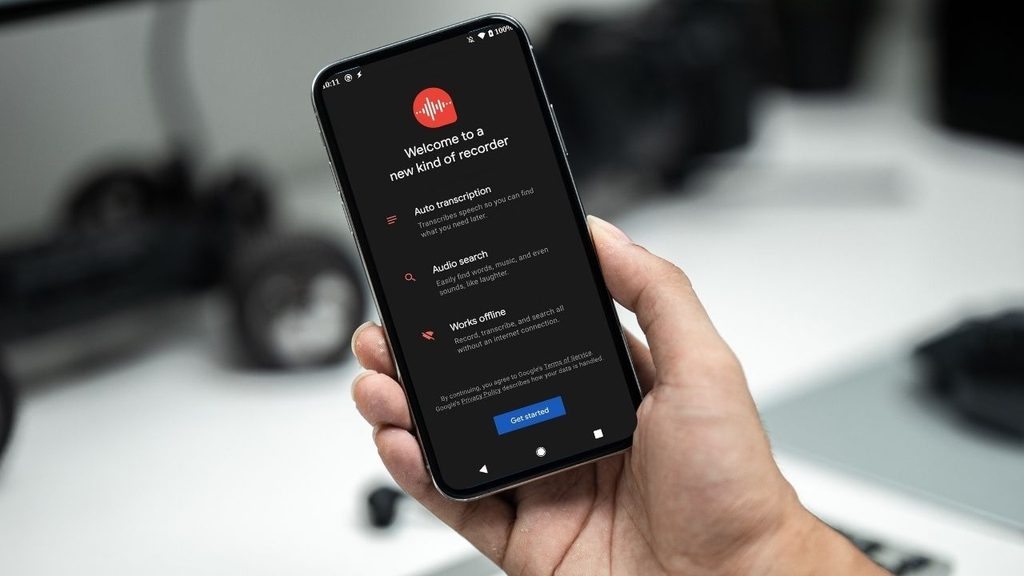
Google Recorder — real-time transcription, best if you have a Pixel
Google Recorder transcribes live as you speak and runs the processing on-device, which matters if your hostel Wi-Fi is unreliable. The catch: it’s tied to Pixel phones for its full real-time transcription experience, so if you’re on a different Android device or iPhone, this one’s off the table.
Otter.ai — good for English lectures, but it skips Hindi entirely
Otter is the name that comes up first in most “best voice-to-notes tools” lists, and for English-medium lecture capture it’s genuinely capable — live transcription, speaker labels, searchable transcripts.
The free tier gives you 300 minutes of transcription a month, capped at 30 minutes per recording, which covers maybe eight or nine standard lecture sessions before you hit the wall. The Pro plan runs $16.99/month billed monthly, or roughly $8.33/month if you pay annually (about $99.99/year).
But for Indian students: Otter’s transcription supports English and a small set of other languages — Spanish, French, German, Japanese, Chinese depending on the source you check — but not Hindi or Indian regional languages. If your coursework happens in Hindi medium, Otter simply won’t understand you, no matter which plan you’re on.
Wispr Flow
Wispr Flow is the strongest option because it works inside almost any application. Students who want long-form writing and fast drafting can use this tool but unlimited dictation requires a subscription, which costs around $15 per month or $12 per month when billed annually. Since it supports more than 100 languages and gives accuracy for names and jargon along with AI editing, the cost is worth it.
VoiceToNotes.ai
Its features include real-time transcription, grammar correction, AI summaries so it can become a useful tool for students which turn spoken thoughts into structured notes. Some professionals consider this tool as more affordable than many full-featured AI assistants but free usage is limited. The catch: accuracy still depends on microphone quality and background noise.
Mindgrasp
Mindgrasp is primarily an AI learning and content-understanding platform. Students can use it for lectures and study material — it helps in creating flashcards and quizzes automatically. Best for exam preparation and research but some features are tied to specific subscription tiers.
Lisup
Lisup focuses on accessibility and hands-free writing. It can be used across desktop applications so access will be easy and it is specifically designed for in-place speech-to-text features. It’s not built for broader use but enough for students to take notes easily.
Soniox — the app actually built for Hindi dictation
Soniox is less well-known in student circles but solves exactly the gap Otter leaves open. It handles Hindi across regional varieties like Khariboli and Braj Bhasha, works system-wide across any app or text field on your phone rather than locking you into one note-taking interface, and covers 60-plus languages total with the ability to switch languages mid-sentence.
It’s useful if you naturally code-switch between Hindi and English while explaining a concept to yourself. It’s free to start, with weekly free credits rather than a hard monthly cap, and the company states it doesn’t store your recordings or use them for model training, which is worth knowing if you’re dictating exam-prep notes you’d rather keep private.
Sarvam AI — worth watching, not quite a student app yet
Sarvam is India’s most-funded sovereign AI company, and its speech models (Saaras v3) handle 22 Indian languages with genuinely strong accuracy claims. But as of now, Sarvam’s product lineup is built mainly for enterprises — voice agents for banks and government call centers, APIs for developers — rather than a polished consumer app you’d install and use for lecture notes.
A consumer-facing voice app was announced in February 2026, aimed at exactly this kind of mass-market, multilingual use case, but a public launch isn’t happening right now.
Read More 👉 Why ChatGPT Ads Deserve a Place In Your 2027 Media Plan
Why Do Students Need These Tools?
Most of the time students missed points while trying to understand the same topic simultaneously. Writing it down on paper or in a mobile is the same thing — it consumes a lot of time and misses points. So, these voice-to-notes tools help students take notes without tiring their hands.
There are some free and some paid tools, if you just need to take notes of what your processor is explaining then a free tool is enough for you. But if you are a Ph.D student or you need to do heavy research, organize every note, and make summaries from online content, you need a tool which can handle all of that, even if it costs you a little.
Which Speech-to-Text Tools are Best For Studies?
Google’s Gboard keyboard is the best free tool which I have used personally and crafting many documents in English, Hindi and Urdu. I recommended to students who wanted to take notes before exams and stop writing everything manually and waste their time.
Gboard offers unlimited access to use on any other applications like docs, word, and on any device (mobile or laptop). Most of the students take their mobile to the college, so it runs smoothly. But sometimes it makes minor errors in spelling which you can edit later.
Second is Wispr Flow but you have to pay after a limited use and many students can’t afford it but those who can afford can consider Wispr Flow as the best tool for making notes.
Read More 👉 Upgrade Laptop Like New Model In Low Budget
Conclusion
The world is changing and for solving traditional problems by adapting new technology. One of the old problems is taking notes in a mid-session in your classrooms. Students have to understand the topic and write down their important concepts — two jobs at once.
If they forgot, they have to ask other students and it appears a problem if you don’t have a lot of friends. So the problem is solved now, you can spend your time to understand the topic without worrying about the notes as these voice-to-notes tools do that job for you.