Upgrade Laptop Like New Model In Low Budget

Laptop

Upgrade Laptop in low budget is more beneficial than buying a new one. It doesn’t mean that new laptops aren’t worth buying but upgrading from i3 to i7 can be quick and affordable for students. Working on a laptop which takes minutes to open and making noises while turning on kills the vibes for coding, gaming, or video editing.

However, it is worth knowing before making a decision to buy a brand new laptop this festive season, the machine slowing you down probably isn’t dying — it’s just outdated in one or two specific ways, and fixing those is often a fraction of the cost of a new one.

Laptop upgrades on a budget aren’t about replacing everything. Find the vulnerability of the system caused by one or two old elements and change it. Most 3–5 year old laptops are held back by Hard Drive and RAM most of the time. Fixing both can allow users to experience faster and smooth performance.

But how you can upgrade laptop like a brand new is something to understand first before buying anything you find on flipkart or amazon.

Diagnose Your Laptop Internally

This step is crucial because without knowing the cause of your system, how can you fix it? If you skip the diagnosis, and buy $60 RAM but end up waiting for your computer to respond faster and do the work, you wasted your money. 

So Open Task Manager on Windows — shortcut keys are Ctrl+Shift+Esc or in MAC — go to Activity Monitor and watch it for a minute while working usually.

Check These Three Things in Your System:

The task manager shows you how much usage has been used to run your apps, if it’s near 100% then your storage drive is the bottleneck — almost certainly a traditional hard disk drive (HDD). Most of the older laptops suffer from this issue that’s why they’re too slow and fixing it (with SSD) is the cheapest and highest impact upgrade for your laptop.
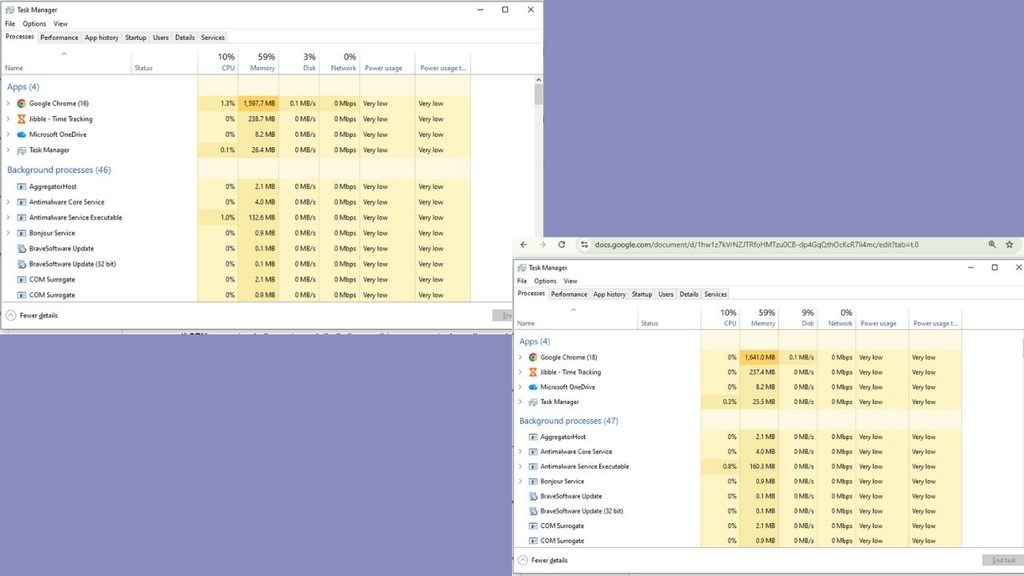

Memory usage above 85% continuously means more RAM is needed. Heavier apps like Zoom, Team and Word running altogether with 15 browser tabs should be run smoothly at 8 GB. But if building applications and gaming is your main course then you need more than 8 GB. Since this amount is default on a lot of budget and mid-range laptops sold in the last five years.

If CPU usage is the thing hitting its limit, that’s one part you generally can’t upgrade on a laptop. CPU bottleneck won’t be solved by swapping components because it is soldered to the motherboard usually so knowing it before you start spending your money on an upgrade that won’t help is important.

Most people diagnosing a “slow laptop” for the first time are surprised to learn its disk, not processor. That distinction is the whole game.

SSD Swap: The Single Best Upgrade You Can Make

By replacing a mechanical hard drive with a Solid State Drive is the single most efficient upgrade that makes a laptop feel like new hardware. It improves the speed and multi-tasking process, boot times can drop from 90+ seconds to under 15 and regular tasks like switching between apps or opening them won’t lag.

A basic 480GB–500GB SATA SSD, such as the Crucial MX500, Kingston A400, or WD Blue, usually costs around ₹2,500–₹3,500 in India, depending on ongoing pricing and sales. The price is far less than buying a whole new laptop, this upgrade can make your older laptop fresh.

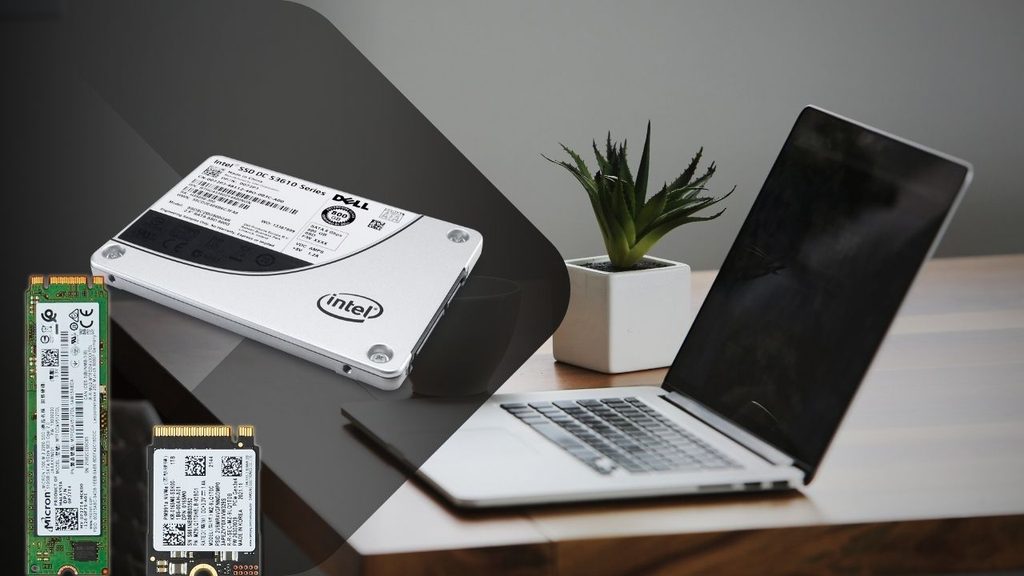
Before buying an SSD, confirm two things: whether your laptop has a 2.5-inch SATA bay, an M.2 slot, or both (this determines which SSD form factor you need), and whether it has a spare slot or you’ll be replacing your existing drive entirely. Most laptops from 2016 onward that shipped with an HDD have a 2.5-inch bay that’s a direct, tool-light swap — usually just a few screws on the base panel.

There’s two options always given to you while rebooting, keeping your existing Windows installation and files onto the new drive or clean installation. If you choose to keep, Cloning software like Macrium Reflect (free tier) or EaseUS Todo Backup will help transfer your programs and settings from old HDD onto the new SSD so you don’t need to reinstall and set things up.

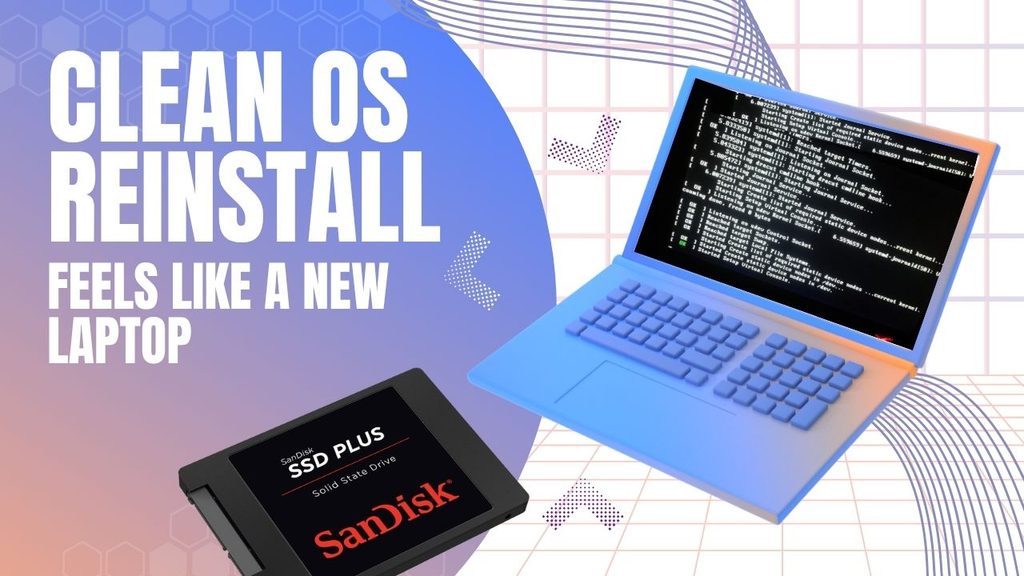
If the laptop is too old then fresh Windows installation onto the new SSD is a better option, it removes old or hidden leftover junk which consumed your memory.

See Details:- iPhone Duo Changes the Cost Effectively With These Methods

Add RAM: The Second-Cheapest Speed Fix

If your diagnostic check flagged high memory usage, this is your next move, and it’s usually inexpensive. Most laptops from the last decade that have 4GB or 8GB of RAM have room to go to 8GB or 16GB, either by adding a stick into a free slot or replacing existing sticks with higher-capacity ones.

It’s not a costly upgrade, an 8GB DDR4 SODIMM stick price is somewhere around
₹1,500-₹2,200 depending on the current market.

Before Buying, Check Which Type Of Ram is Compatible

Your laptop’s supported RAM type (DDR3 vs DDR4 vs DDR5 — check your model’s spec sheet, since installing the wrong type simply won’t work) and its maximum supported capacity, because some budget laptops cap out at 8GB even if there’s a second slot.

The install itself is usually the easiest upgrade on this list — a single panel on the bottom of most laptops, a couple of screws, and the RAM stick clicks into a slot at an angle before you press it flat. 

No cloning, no software, no reinstalling anything. If your laptop’s diagnostic showed disk usage as the real bottleneck rather than memory, though, don’t bother with this one first — RAM won’t fix a slow HDD, and you’d be spending money on the wrong problem.

Clean Out the Software Bloat You’ve Been Carrying for Years

Hardware isn’t the whole story. A laptop that’s had the same Windows installation for three or four years accumulates a genuinely surprising amount of drag: startup programs that launch silently every boot, background services from software you uninstalled ages ago, and browser extensions you forgot you added.

Open Task Manager’s Startup tab and disable anything you don’t need running the moment you log in — most people find five to ten programs quietly launching that have no business doing so (Spotify, printer software, half a dozen “helper” apps from programs installed years ago). This alone can shave real time off boot-up without touching a single piece of hardware.

Beyond that, uninstall software you genuinely don’t use anymore, clear out temp files (Windows’ built-in Disk Cleanup or Storage Sense handles this automatically), and check your browser extensions — each one adds a small but real memory and CPU tax that compounds when you’re already running an older machine.

If your laptop has never had a clean OS reinstall after SSD swap, this is the moment to consider it. A fresh Windows install onto new hardware, with only the software you actually use, often produces the single most dramatic “this feels like a new laptop” moment of the entire process — more than any single component swap.

Read More:- How AI Could Change India’s Digital Public Infrastructure

Don’t Skip the Physical Cleaning

This one costs close to nothing and gets ignored constantly. Laptops that have run for years without ever being opened up accumulate dust inside the fan and heatsink assembly, which traps heat, which causes the CPU to throttle its own performance to avoid overheating — meaning your laptop is deliberately slowing itself down to protect itself.

To reduce fan noise and prevent thermal throttling, cleaning fan blades and heatsink fins can be helpful. Replace dried-out thermal paste so it brings down temperature between the CPU and heatsink. It can cost around ₹300, and helps the laptop’s processor maintain its performance for longer under heavy workloads. 

This is the cheapest and under-appreciated fix but helps cool the processor because dust buildup and dried thermal paste don’t trigger warning as hard drive does, they just slow your laptop and get a little hotter all the time.

Small External Upgrades That Change How the Laptop Works

Not every upgrade needs to happen inside the case. Coders and Gamers need big screen resolution, a budget external monitor changes the entire experience without spending a new laptop’s cost.


Additionally, better-quality external keyboard and mouse will maximize that experience by making typing and navigating more easy and responsive, even if the internals haven’t changed at all.

A basic cooling pad (₹800-₹1,500) can also help laptops that run hot during longer sessions, buying you more sustained performance during demanding tasks like video calls or heavier multitasking, without opening the machine at all.

Know When Upgrading Laptop Stops Making Sense

If the laptop’s bottleneck isn’t the RAM and disk but CPU then do not spend a single rupee on the laptop upgrade because it’s useless. The process is the one component you almost never can replace on a laptop.

Old laptop battery-life usually degraded to holding half its original charge. Changing that will help if your laptop is just 2-3 years old because a five-plus years old laptop doesn’t come with a user-replaceable battery so that’s where you should start saving for a new laptop. It’s worth actually comparing the two costs side by side rather than assuming the upgrade is always cheaper. 

Read More :- Why ChatGPT Ads Deserve a Place In Your 2027 Media Plan 

Conclusion

If you’re staring at a slow laptop right now, check Task Manager first. If disk usage is maxed out, an SSD swap is your highest-impact move and should come before anything else. If memory is the constraint, add RAM — it’s cheap and takes ten minutes. 

Do both of those, clean out years of startup bloat, blow the dust out of the fans, and you’ve addressed the four things that account for the vast majority of “this laptop feels old” complaints — usually for less than a tenth of what a new laptop would cost.

Overall, if your bottleneck turns out to be the processor itself, no combination of these fixes will get you there, and that’s the one scenario where saving up for new hardware is genuinely the right call instead of the expensive-sounding one.


Leave a Comment

Your email address will not be published. Required fields are marked *

Your Dollar Income Isn’t Fixed: How INR Volatility Changes Freelancers Earning 

INR Volatility

If you are a student or IT engineer and have a side freelancing business then exchange rate updates is the second in your search list. Once you understand Impact of Exchange Rates On Freelancers In India and how it moves forward then you can earn a little more. Let’s take a look at some important points to understand INR Volatility isn’t about what you’re actually thinking.

You raised the invoice in August. $1,000, net 30, client in Austin. By the time the payment actually lands in your account in September, the number in rupees isn’t what you calculated when you sent it. Maybe it’s more. Maybe it’s less. Either way, you didn’t do anything different — the client paid exactly what they owed — and your income still moved. 

That gap is what most freelancers mean when they say the rupee is “volatile,” and most of them are only half right about what that word actually costs or earns them. 

Current Changes In INR Volatility 

As of September 9, the dollar was trading around ₹95.13, after touching two-month highs near ₹94.4 the week before on the back of sustained Reserve Bank of India intervention. Zoom out to the 12-month view, the rupee has weakened roughly 8% against the dollar over the past year. For a freelancer billing in USD, that’s not a warning sign — it’s a raise you didn’t ask for.

Run the math on a flat $1,000 invoice. At a rate near ₹88 (roughly where the pair sat a year ago, working backward from the reported annual move — treat this as an approximation, not a verified historical quote), that invoice cleared around ₹88,000. 

At today’s rate, the same $1,000 clears closer to ₹95,000. Same client, same scope, same invoice — ₹7,000 more in your account, before any platform fees. If your Gigs, your budgeting, or your client pricing only accounts for the dollar amount, you’re missing the part of your income that moved on its own.

Why “Volatile” Doesn’t Mean “Falling” 

If you thought “the rupee is volatile” means “the rupee is always losing value, brace yourself.” But that’s not what volatility means, and it’s not what the data shows. The rupee gained about 0.9% in the week leading into September 9, with the RBI actively defending the band using its foreign exchange reserves. A currency that can move up or down 1% in a week, depending on which government or central bank decides to act, is unpredictable — not one-directional.

The near-term pressure right now is coming from oil. Brent crude jumped roughly 8% to around $97 a barrel after US-Iran tensions escalated, and India imports the overwhelming majority of the crude it uses, so a sustained spike pushes the rupee the other way — weaker, which again works in a dollar earner’s favor, but also raises input costs across the economy, indirectly squeezing the Indian clients some freelancers also serve. 

Layer on the US Federal Reserve’s meeting scheduled for September 15–16, where a rate move could swing global dollar demand overnight, and you’ve got a currency pair reacting to three or four separate levers in the same month. Betting on “the rupee only goes one way” is how freelancers get caught flat when it doesn’t.

Read More 👉 UP Anganwadi Bharti 2026 — District-Wise Vacancies & Recruitment Details

Impact of Exchange Rates On Freelancers In India

Here’s the part that costs freelancers real money and rarely makes it into the currency conversation: the spread between the rate you see on Google and the rate you actually receive. This gap is usually bigger than the market’s actual weekly movement. And it fills only when you understand Impact of Exchange Rates On Freelancers In India.

PayPal is the most expensive route by a wide margin — a cross-border transaction surcharge that can run up to 4.4%, stacked with a currency markup of roughly 3.5–4.5%, pushes total cost toward 6% on some routes. 

Payoneer, common for Upwork and Fiverr payouts, charges around 1% to move funds to your bank plus an FX markup that can reach 2% on withdrawal into a different currency — so a $2,000 month can quietly lose $50–60 to fees that never show up as a single visible number. 

Wise is the outlier: it settles at the mid-market rate — the actual number you’d see on Google — with a transparent fee that’s usually under 1% for most USD-to-INR transfers, which is why it’s become the default for freelancers paid directly by clients rather than through a marketplace.

None of that shows up when you’re only watching the headline USD/INR number. A freelancer who tracks the exchange rate obsessively but invoices through PayPal is optimizing the wrong variable.

Read More 👉 Foreign Education Loan Currency Explained: How INR Depreciation Can Increase Your Loan Cost 

How To Check Your USD Income is Moving Forward

Stop checking “what’s the rupee doing today” in isolation. Three things move it, and all three are trackable without a finance degree: RBI intervention behavior (visible in how tightly the rate is held to a band, like the ₹94.5–95.3 range this week), Fed rate decisions (scheduled, public, and usually priced in days ahead), and oil price swings (Brent crude, since India’s import bill is the direct transmission line into rupee weakness or strength).

Practically, that means two things for how you run your freelance income. First, match your payout method to your income source — Payoneer if most of your work comes through marketplaces, Wise if you invoice direct clients — because the fee gap between them is often larger than a month’s currency movement. 

Second, if you’re pricing recurring retainers in USD, revisit them quarterly rather than annually; an 8% currency shift plus a fee structure you haven’t audited in a year is easily a 10–12% swing in what a “fixed” retainer actually pays you in rupees.

Your dollar invoice was never the number that mattered. The rupee number that hits your account is — and that number has three separate forces acting on it before you even get to the part your payment platform quietly takes.

Read More 👉 Planning MBBS or Master’s Abroad? Country-Wise Costs, Loan Limits and Lenders

Conclusion 

For Indian freelancers, earning in dollars doesn’t mean earning a fixed amount. The USD/INR rate, RBI and Fed decisions, oil prices, and payment-platform fees can all change what finally reaches your bank account. A $1,000 invoice can be worth noticeably more or less in rupees without the client changing a thing.

The smart move isn’t to predict the impact of Exchange Rates On Freelancers In India. It’s to understand how currency movements affect your real income, compare payout fees, and review your USD pricing regularly. For IT students planning to freelance or work with overseas clients, learning this early can help turn Dollar Income into something you can actually budget around.

Leave a Comment

Your email address will not be published. Required fields are marked *

iPhone 18 Pro on EMI: A Complete Buying Guide

iPhone 18 Pro

Apple hasn’t confirmed a single detail about the iPhone 18 Pro yet, but that hasn’t stopped Indian buyers from searching iPhone 18 Pro EMI options months before launch — and for good reason. With expected pricing starting north of ₹1,34,000, paying the full amount upfront isn’t realistic for most people. 

The real question isn’t whether you should use EMI. It’s which EMI actually saves you money, and which one just makes an expensive phone feel cheaper than it is for a few months.

When Is the iPhone 18 Pro Launching in India?

Every recent report points to September 2026, alongside the iPhone 18 Pro Max and for the first time — Apple’s foldable iPhone. What’s changed this year is the rest of the lineup. Bloomberg’s Mark Gurman reported that Apple is splitting its release schedule for the 18 series: only the Pro, Pro Max, and the foldable arrive this September, while the standard iPhone 18 and a new iPhone 18e get pushed to spring 2027. If that holds, this is the first year in a while where the “regular” iPhone won’t launch alongside the Pro models.

Going by Apple’s usual pattern (the iPhone 17 event was held on September 9, 2025, with sales opening ten days later), a keynote in the first two weeks of September 2026 is the safest bet, with stock hitting stores roughly a week to ten days after that. Some trackers are floating September 8–9 specifically; others leave more room, up to September 10. Take the exact date as a placeholder until Apple sends out invites, which usually happens about three weeks ahead of the event.

Expected iPhone 18 Pro Price in India

Price leaks are all over the place right now, which is normal this far out. Here’s the range being reported across sources as of this writing:

VariantExpected India price
iPhone 18 Pro, 256GB₹1,34,900 – ₹1,44,900
iPhone 18 Pro, 512GB₹1,52,500 – ₹1,69,990
iPhone 18 Pro Max, 256GB (starting)₹1,49,900 – ₹1,60,000

A few sources argue Apple will hold pricing close to the iPhone 17 Pro’s ₹1,34,900 launch price, citing “aggressive supplier negotiations” to protect India pricing. Others expect a hike tied to the RAM bump (12GB is the rumored figure) and camera hardware upgrades — the iPhone 18 Pro is rumored to carry a triple 48MP setup with a periscope telephoto lens and a variable-aperture main camera, on a 2nm A20 Pro chip. Rumors are also split on whether Face ID moves under the display this generation or stays as-is; one supply chain report specifically says it won’t happen this year due to production delays.

Budget for the ₹1,34,900–1,44,900 band on the base 256GB Pro, and don’t be surprised if the number lands closer to the top of that range once Apple accounts for import duty and GST on the final config.

What’s the Actual Difference In No-Cost EMI vs Standard EMI? 

This is where most buyers get it wrong. “No-cost EMI” doesn’t mean the bank is doing you a favour — it means the retailer or Apple absorbs the interest that would normally apply, so you pay roughly the sticker price split into installments instead of sticker price plus interest. Depending on the bank, this shows up in one of two ways: the interest is stripped out at checkout, or you’re charged interest upfront and it comes back to you as cashback within about 90 days (this is how ICICI’s scheme works on longer tenures). Either way, you’ll still pay a processing fee, GST on that fee, and — if you close the loan early — a foreclosure charge, typically around 3% of the outstanding principal plus the next month’s interest.

Standard EMI is the version without the safety net: real interest, usually in the 12–16% per annum range on credit card conversions, on top of the base price.

The gap adds up fast. On a ₹1,34,900 iPhone 18 Pro, a 24-month standard EMI at 14% p.a. works out to roughly ₹6,477 a month — about ₹20,500 more than the phone’s actual price by the time you’re done paying. The same tenure under a genuine no-cost scheme costs ₹5,621 a month, with no premium at all. That ₹20,500 difference is the entire reason to check which scheme you’re actually being offered before you tap “confirm” at checkout.

Read More👉 Best Laptops for Coding and Programming: Top Picks for Every Budget

Where You’ll Be Able to Buy iPhone 18 Pro on EMI

You’ll have more than one route in, and it’s worth comparing before you commit to any single one. Apple’s own online store runs its no-cost EMI tie-ups directly with Bajaj Finance, HDB Financial Services, ICICI Bank, IDFC First Bank, and TVS Credit — the current scheme window on Apple’s authorised platforms runs through late September 2026, which should carry into the 18 Pro’s launch. Apple Authorised Resellers such as iStore, Unicorn, Croma, Reliance Digital, and Vijay Sales layer their own instant cashback offers on top for Axis Bank, ICICI Bank, and SBI Card users, usually on 6-month no-cost tenures with low-cost EMI kicking in beyond that.

Amazon and Flipkart are the other major channels, particularly around sale events — Amazon’s Great Freedom Sale and Flipkart’s Freedom Sale both ran in early August 2026, and both platforms typically repeat similar EMI-plus-bank-discount stacking for major flagship launches. Flipkart also supports the Bajaj Finserv Instant EMI Card for buyers without a traditional credit card. Debit card EMI is more limited — HDFC, Axis, and ICICI extend it to pre-approved debit cardholders, but the pool of eligible customers is smaller and interest rates run similar to credit card EMI.

Whichever channel you pick, check the fine print on tenure caps — 6-month no-cost EMI is nearly universal, but 12- and 24-month no-cost schemes are usually restricted to specific banks and specific card tiers.

How Much Will Your Monthly EMI Be?

Based on the expected price bands above, here’s what a genuine no-cost EMI would look like at common tenures:

Tenure256GB Pro (~₹1,34,900)512GB Pro (~₹1,52,500)Pro Max 256GB (~₹1,54,900)
3 months₹44,967₹50,833₹51,633
6 months₹22,483₹25,417₹25,817
9 months₹14,989₹16,944₹17,211
12 months₹11,242₹12,708₹12,908
24 months₹5,621₹6,354₹6,454

These are straight divisions of the expected MRP with no interest added — that’s what “no-cost” is supposed to mean. If a bank quotes you anything higher than these figures for the same price and tenure, ask specifically whether interest is being charged, because it likely is.

Exchange Offer + EMI Combo — Lowering Your Effective EMI

Trading in your current phone reduces the amount you actually finance, which lowers every EMI figure above. As an example: on a ₹1,44,900 iPhone 18 Pro, a mid-range trade-in like a working iPhone 13 128GB might fetch around ₹15,000 in exchange value plus a ₹6,000 exchange bonus — a combined ₹21,000 off, bringing the amount you’d actually put on EMI down to ₹1,23,900. Financed over 12 months no-cost, that’s roughly ₹10,325 a month instead of ₹12,075.

The catch is that the trade-in values swing enormously based on the model, storage, and physical condition of your old device, and different assessors don’t agree with each other. Apple’s own trade-in estimate, a reseller’s in-store quote, and a third-party service like Cashify can differ by several thousand rupees for the same phone. 

Get quotes from at least two sources before you finalise, and remember that exchange bonuses on top of the base trade-in value are usually time-limited promotions, not permanent policy — they’re the kind of thing that disappears the week after a big sale ends.

Step-by-Step Guide To Buying iPhone 18 Pro on EMI

  1. Shortlist your retailer first, not the phone colour. Compare what Apple’s own store, your nearest authorised reseller, Amazon, and Flipkart are each offering on EMI tenure and bank tie-ups — the same phone can carry different effective costs depending on where you buy it.
  2. Check your card’s pre-approved EMI limit. Most banks let you check this via SMS or net banking before you shop, so you’re not caught out at checkout with a card that can’t support the tenure you want.
  3. Get an exchange quote in advance if you’re trading in. Apple’s trade-in tool and your reseller’s in-store estimate both take a few minutes and give you a real number to plan around.
  4. Select the EMI option at checkout that matches your card and target tenure. No-cost options are usually listed separately from standard EMI — don’t assume the first EMI option shown is the no-cost one.
  5. Confirm the breakdown before you pay. Look for a line item showing interest and processing fee separately. If the total EMI amount adds up to more than the phone’s price divided by the number of months, you’re paying interest somewhere.
  6. Read the foreclosure terms. If there’s a chance you’ll want to pay off the balance early, know the foreclosure charge upfront rather than finding out later.
  7. Save your EMI schedule and transaction confirmation. You’ll need these if a cashback-style no-cost EMI scheme (like ICICI’s) hasn’t been credited on schedule.

Read More👉 iPhone 18 Pro Launching Next Month: 12 New Features Worth Knowing About

Conclusion 

The iPhone 18 Pro’s price and launch date will stay rumors until Apple actually sends out event invites, and it’s worth waiting for that confirmation before you lock in a purchase decision — leaked pricing has moved by thousands of rupees between reports even in the past few weeks. 

But the EMI math you plan around today will hold regardless of the exact final price: the difference between a genuine no-cost scheme and a standard one is real money, often ₹15,000–20,000 over a two-year tenure, and it has nothing to do with which bank has the nicest app. 

Compare the tenure and the bank before you compare the storage variant, get your exchange quote sorted early if you’re trading in, and read the checkout screen closely enough to know exactly what you’re signing up for, not just what the monthly number says.

Leave a Comment

Your email address will not be published. Required fields are marked *

Best Noise-Cancelling Headphones for Online Classes and Mock Tests 

Headphones

You’re 40 minutes into a 3-hour mock test, deep into the reasoning section, and someone two floors down starts drilling a wall. Or it’s your neighbor’s TV bleeding through during a live online class, right when the teacher explains the one concept you actually needed. With best Noise-Cancelling Headphones, it is possible to block the noise out the room, stays comfortable for hours, and doesn’t die halfway through a session. 

As that kind of interruption doesn’t just annoy you — it costs you marks and attention you can’t get back. The right pair of Noise-Cancelling Headphones for online classes and mock tests is meant for this. Not just any Headphones — most people don’t need studio-grade audio for a lecture or a test window. Here are best picks that actually do that, across different budgets.

Why ANC Matters More for Exams Than for Music

Active noise cancellation in short ANC, helps prevent outside noise with an inverse sound wave by using a microphone and it is so effective on low-frequency and steady sound like traffic, fans, washing machine, TV, and construction site but less effective random sharp noises like barking or door slamming.

For a 2-3 hour mock test, that steady cancellation is what keeps your focus from draining. For live classes, you also need a decent mic, since ANC alone won’t help your teacher hear you over a ceiling fan.

Best Noise-Cancelling Headphones for Online Classes and Mock Tests

1. boAt Airdopes 413 ANC — ₹1,999

  • 25dB Active Noise Cancellation
  • ENx dual-mic technology for calls
  • ~20 hours total battery (earbuds + case)
  • In-ear TWS design


This is about as cheap as real ANC gets in India, and it holds up for what it is — steady background noise gets noticeably duller, which is the whole point during a test. The case battery isn’t huge, so charge it the night before a long mock test rather than assuming it’ll carry you through a full day.

Best for: the tightest possible budget where any real ANC beats none.

2. Boult Audio Omega — ₹2,499

  • Active Noise Cancellation + separate ENC chip for calls
  • 4 mics per stem, touch controls
  • ~32 hours total battery (8hr earbuds + 24hr case)
  • Dedicated Game Mode for low latency

The separate ENC chip is the standout here — it’s built for call clarity, which matters if your online classes involve a lot of back-and-forth with the teacher rather than passive listening. If you are also looking for gaming purposes, not just for mock test sessions then low-latency mode is an additional benefit in Boult Audio Omega.

Best for: students who have live classes and online courses to attend rather than recorded lectures.

3. Noise Buds Solo — ₹2,999

  • Active Noise Cancellation with switchable Transparency mode
  • 10mm driver, touch controls for calls/music/voice assistant
  • ~36 hours total battery (7hr earbuds + case)
  • Interchangeable eartips for fit
Noise Buds Solo


The 36-hour total battery is the best in this budget tier, and the switchable Transparency mode is genuinely handy — flip it on for five minutes if someone’s calling you from another room, without pulling an earbud out mid-test. Interchangeable eartips also make a bigger difference than you might realize; a bad seal will ruin passive noise isolation even before ANC activates. 

Best for: the best all-round earbud pick under ₹3,000 if battery life is your priority.

Read More👉 Best Laptops for Coding and Programming: Top Picks for Every Budget

4. boAt Rockerz 450 ANC — ₹2,499–2,999

  • Hybrid ANC (up to 25dB reduction)
  • 20-hour battery life with ANC on
  • 40mm dynamic drivers, BEAST mode for low-latency audio
  • On-ear, foldable design
boAt Rockerz 450 ANC


This is the one to get if you just need to shut out a noisy house without spending a month’s pocket money. The ANC won’t touch a jackhammer, but it flattens fan noise, traffic hum, and a TV in the next room reasonably well. The ear cushions get a little warm after 2+ hours, and call clarity is average — fine for a mock test, less ideal if you’re live-unmuting often in class.

Best for: students on a tight budget who mainly need ANC for silent, focused test-taking.

5. Soundcore Q20i — ₹4,298

  • Hybrid ANC with Indoor/Outdoor/Transport modes
  • 40-hour battery life with ANC on
  • Soft protein-leather earcups
  • Wired mode available (3.5mm) when the battery does die
Soundcore Q20i


The battery life here is the real selling point — 40 hours means you could go through an entire mock-test series for a week without touching the charger. The Indoor mode specifically tunes the ANC for steady household noise rather than street sound, which is exactly the scenario most Indian students are dealing with. The bass is a bit boosted for critical listening, but for lectures and tests that’s irrelevant.

Best for: anyone who forgets to charge things — this Noise-Cancelling Headphones forgives you.

6. JBL Tune 770NC — ₹8,999–10,999

  • Adaptive ANC that responds very quickly to the surrounding noise automatically
  • 50-hour battery life (ANC off), around 44 hours with ANC on
  • Multipoint Bluetooth (connect to phone and laptop simultaneously)
  • 40mm drivers with JBL Signature Sound
JBL Tune 770NC

The multipoint pairing is genuinely useful if you attend classes on a laptop but take calls or check notifications on your phone — no fumbling with Bluetooth settings mid-lecture. Adaptive ANC means it automatically dials up cancellation when your maid starts sweeping and dials back down when it’s quiet, instead of a fixed on/off toggle. Bass is JBL’s usual signature — punchy, a little forward — which some people love and others find a bit much for spoken-word content.

Best for: students juggling both a laptop for classes and a phone for everything else.

7. Soundcore Space Q45 — ₹9,999 (often available around ₹8,500–9,000 on sale)

  • Adaptive ANC rated up to 98% noise reduction
  • 50-hour battery life with ANC on
  • LDAC support for Hi-Res audio over Bluetooth
  • Memory foam earcups, app-based custom EQ

This is the closest thing to flagship-level ANC without paying flagship prices. The 98% noise reduction figure holds up well against consistent background noise — the kind you get from a busy street or a joint family household during the day. Good memory foam cushions really do make a difference during a 3-hour test because your ears are not sore at the end. The app is actually useful, allowing you to choose a “study” EQ preset that cuts mid-bass boom, making spoken word clearer while you’re studying or attending lectures.

Best for: the best all-round pick if you want near-premium ANC without the premium price tag.

Read More👉 Best Student Loans for College Students

8. Sony WH-1000XM5 — ₹29,990

  • Industry-leading ANC with 8-microphone array and dual processors
  • 30-hour battery life with ANC on
  • Speak-to-Chat: automatically pauses audio when you start talking
  • Precise Voice Pickup Technology for clearer calls
Sony WH-1000XM5

If your budget stretches this far, the XM5 is close to overkill for a student use case — but that’s not a bad thing. A duo which makes you feel like you are sitting in an exam hall rather than your house. When you’re nervous your voice gets lower that people sitting behind the system couldn’t understand but Sony WH-1000XM5 gives an automatic Speak-to-Chat feature that pauses automatically if you say something out loud and passes your lower voice very smoothly. But this is too expensive for students but college students who strictly need can buy it on EMI

Best for: students who treat this as a long-term investment across school, coaching, and eventually work-from-home use.

Sony WH-1000XM5 vs Soundcore Space Q45

Sony WH-1000XM5Soundcore Space Q45
Price₹29,990₹9,999
ANC strengthBest-in-class, handles sudden noise tooExcellent against steady noise, weaker on sudden sharp sounds
Battery (ANC on)30 hours50 hours
Mic quality for classesBest on this listGood, not exceptional
Value for a student budgetLow — premium pricingHigh — near-flagship ANC at a third of the price

If money weren’t a factor, the XM5 wins outright. For a student budget, though, the Space Q45 gets you 80-90% of the noise-cancelling experience for roughly a third of the price, plus a longer battery — which matters more than most people expect once exam season gets long.

Which Noise-Cancelling Headphones Should You Buy?

If you’re prepping for a single exam cycle and want the smallest possible spend, go with the boAt Rockerz 450 ANC or the Soundcore Q20i — either will hold up fine for mock tests where mic quality doesn’t matter. If you’re attending daily online classes on top of tests and need reliable multipoint connectivity, the JBL Tune 770NC earns its price. 

And if you’re looking for one pair that will cover you throughout years of coaching, college, and then working remotely, the Soundcore Space Q45 is the best value for money on this list, with the Sony WH-1000XM5 as the upgrade option if budget genuinely isn’t an issue. 

All of Noise-Cancelling Headphones are available on Amazon.in and Flipkart, boAt and Sony also sell directly from their own India stores if you want manufacturer warranty support without a third party seller in the mix. Prices above reflect typical listings as of August 2026 and do fluctuate with sale events — worth a quick price-check before you check out.

boAt Rockerz 450 ANC vs Noise Buds Solo

boAt Rockerz 450 ANC (Over-ear)Noise Buds Solo (Earbuds)
Price₹2,499–2,999₹2,999
Noise blockingANC + passive seal from ear cupsANC only, weaker passive isolation
Comfort for 2-3 hr sessionsBetter for most — no in-ear fatigueSome users get ear fatigue past 90 min
Battery20 hours~36 hours total (earbuds + case)
PortabilityFoldable but bulkierFits in a pocket

If you’re choosing between a headphone and earbuds at roughly the same price, format matters more than spec sheets here. Over-ear wins on raw silence for a long test window; earbuds win on battery life and portability if you’re carrying them between home, coaching class, and a library.

Read More 👉 How to Apply for a Student Loan to Get a Higher Education & Make Career

Conclusion

Best Noise-Cancelling Headphones for online class and mock tests are not always the expensive ones. For most students, the Soundcore Space Q45 provides the best combination of ANC, comfort, battery life, and price, while the boAt Rockerz 450 ANC and Soundcore Q20i are better choices for those on a tighter budget. 

If money is not an issue, the Sony WH-1000XM5 offers the best overall experience. In the end, decide based on the length of your studies, the noise level of your environment and whether you need better microphones or portability in addition to noise cancellation. 

Leave a Comment

Your email address will not be published. Required fields are marked *

Best Lightweight Sunglasses for Student Life 

Sunglasses

A pair of sunglasses in a college backpack is a choice of your comfort. When the college campus is large and you need to walk in direct sunheat or you go out randomly somewhere with your friends and your eyes start to burn in the heat. That’s where you start hunting for Best Lightweight Sunglasses for students, the best is the one which gives you comfort, weightless, and perfect for your face.

What Actually Matters for Campus-Ready Sunglasses

Frame weight comes down to material, not brand name. TR-90 and polycarbonate frames flex instead of snapping when they get crushed in a bag, and they sit lighter on the nose during a three-hour library stretch than metal or thick acetate does. UV protection — specifically UV400 — isn’t optional no matter how cheap the pair is; it’s the one spec that protects your eyes rather than your outfit. 

Polarization is worth paying a little more for if you’re on a bike or scooter daily, since it cuts glare off wet roads and car windshields far better than plain tinted lenses. And because these things get lost, borrowed by roommates, or sat on at least once a year, price-to-replacement-cost matters more here than it would for a pair you’d baby at home.

The 5 Best Lightweight Sunglasses for Students 

1. Fastrack Polarized Wayfarers and Aviators

Price: ₹950–₹5,000 | Frame: TR-90 polycarbonate | Lens: UV400, polarized options | Best for: tightest-budget daily wear


Fastrack’s entry-level polarized range starts under ₹1,000 and still comes with a 1-year warranty on lenses and frames, which is unusual at that price point. The TR-90 build is genuinely flexible — it survives the kind of backpack abuse a rigid acetate frame won’t. The trade-off is build quality at the very bottom of that price range: some buyers report the cheapest models feeling plasticky compared to what ₹2,000+ gets you in the same lineup. Good for someone who wants a backup pair as much as a main one.

2. Vincent Chase by Lenskart

Price: From ₹999, polarized from ₹1,299 | Frame: TR90 | Lens: 100% UV protected, polarized | Best for: best value-for-money on a first “real” pair


Vincent Chase is Lenskart’s in-house line, and it’s built around the same TR90 material for the same reason — daily wear without weight. The advantage over Fastrack is availability: Lenskart runs frequent Buy 1 Get 1 offers on this line, which effectively gets you a backup pair for the price of one. The catch is that heavy discounting means style availability shifts often, so a specific frame you like online today may not be there in three months if you need a replacement in the exact same shape.

3. OPIUM Eyewear

Price: ₹1,500–₹5,000 | Frame: lightweight polycarbonate | Lens: UV400, polarized, AVS coating | Best for: students who scratch or drop glasses often


OPIUM’s AVS lens coating adds hydrophobic, oleophobic, and anti-static properties on top of standard UV/polarized protection — practically, that means fewer smudges from fingerprints and better scratch resistance when the lenses rub against keys or coins loose in a bag. It sits a notch above Fastrack and Vincent Chase in price, which is the real trade-off: you’re paying for lens durability, not a jump in style tier.

4. IDEE

Price: ₹899–₹1,499 | Frame: lightweight, sporty builds | Lens: UV protected | Best for: gym, sports, or an active daily commute


IDEE leans into bold, sporty designs — wraparounds and neon accents rather than classic wayfarer shapes — and stays cheap while doing it. If your daily routine includes a run, a cycle to campus, or intramural sports, the closer-wrap fit holds better than a flat wayfarer frame. The limitation is versatility: the sportier shapes don’t double as well for a formal event or an internship interview the way a classic frame does.

5. Ray-Ban (Aviator / Wayfarer)

Price: roughly ₹7,000–₹15,000 depending on style and retailer | Frame: acetate/metal | Lens: UV400, optional polarized | Best for: one pair meant to last through all four years

Ray-Ban is the outlier on this list by price, and it’s here for a specific reason: it’s the one pair that isn’t disposable. The Original Wayfarer and Aviator have been in continuous production since 1952 and 1937 respectively, which means replacement parts, nose pads, and repairs are easy to find at any optician years later — something none of the budget brands above can promise. It only makes sense if you can absorb the upfront cost and genuinely won’t be swapping styles every semester.

The Real Face-Off of Fastrack & Vincent Chase 

These two get compared constantly because they’re the two brands most students actually cross-shop, so here’s the direct read:

FastrackVincent Chase
Entry price₹950₹999
Polarized entry priceIncluded in mid-rangeFrom ₹1,299
Warranty1 year (lens + frame)Standard return window, no stated 1-yr warranty
Where to buyFastrack’s own site, Titan Eye+, Flipkart, Tata CLiQLenskart, Amazon.in
Recurring offersOccasional salesFrequent Buy 1 Get 1

If warranty coverage matters more to you than getting two pairs, Fastrack wins. If you’d rather have a spare pair sitting in a drawer for when the first one inevitably gets sat on, Vincent Chase’s BOGO structure is hard to beat on pure economics.

Which One Should You Actually Buy?

If your budget is genuinely under ₹1,200 and you just need something functional for the sun on your walk to class, get the Fastrack or Vincent Chase entry model — there’s no meaningful difference in daily performance between them at that price. If you’re riding a two-wheeler daily, prioritize a polarized lens over anything else on this list; glare off a windshield or wet road is a real safety issue, not just comfort. 

If you’re the person who’s cracked three pairs of earphones and lost two water bottles this year, don’t buy OPIUM or Ray-Ban — buy the cheapest polarized Fastrack you can find and expect to replace it. And if you’ve got one splurge in your accessory budget for the year and want something that’ll still be wearable at your graduation photos, the Ray-Ban is the only pair on this list built to actually last that long.

One habit that extends your sunglasses lifespan –  a hard case, not the soft pouch that comes in the box. Most lens scratches on student sunglasses don’t happen while wearing them, they happen loose in a bag next to keys and a laptop charger.

Read More👉 iPhone 18 Pro on EMI: A Complete Buying Guide

Conclusion

The Best Lightweight Sunglasses for Everyday Student Life aren’t always expensive. Whatever you opt for, be sure to focus on UV400 protection, a lightweight frame, a comfortable fit, and polarization for when glare is an issue. Toss a hard case In Addition your backpack, and even a modest pair can make it through life on the daily grind of college. Pocket your case for your backpack and even a thrifty pair can easily keep up with daily college life. 

Leave a Comment

Your email address will not be published. Required fields are marked *

Why ChatGPT Ads Deserve a Place In Your 2027 Media Plan 

ChatGPT Ads

ChatGPT is becoming another advertising platform for brands and businesses. In 2026, OpenAI opened self-serve access to its Ads Manager in India. But ChatGPT Ads doesn’t work like Google Search, PPC managers should understand before shifting a Google Ads/Paid Search budget to ChatGPT Ads. 

Before asking — why ChatGPT Ads deserve a place in your 2027 media plan? Decide whether you want visibility or conversion from the ads. The answer is not that simple because considering the fact that every business has different approaches and methods to connect with their customers.

But advertisers don’t receive a conversation history or chats, ChatGPT only discloses target, context hints, and intent. Context Hints also don’t work like traditional exact-match keywords. So let’s look into how it’s gonna work and why it’s better than Google search in most cases.

The Channel Is No Longer Experimental

OpenAI began testing ads for logged-in adult users on the Free and ChatGPT Go tiers in the US on February 9, 2026. Three months later, on May 5, it opened a self-serve Ads Manager to any US business, with no minimum spend requirement. By July, the platform had added a formal “Advertise in ChatGPT” hub with case studies from Best Buy, Lowe’s, and VistaPrint. 

By August, OpenAI said the ad business had crossed a $1 billion annualized revenue run rate in under 200 days, and international expansion was already underway — the UK, Mexico, Brazil, Japan, and South Korea by mid-August, with India, Europe, and parts of the Middle East and North Africa following in September.

ChatGPT is becoming a channel with a self-serve buying platform, agency integrations from Dentsu, Omnicom, Publicis, and WPP, and ad-tech partners like Adobe, Criteo, Kargo, and StackAdapt already plugged in. 

What ChatGPT Ads Look Like Inside a Conversation

When a user asks a question, and OpenAI’s system judges a sponsored result relevant, a small card appears below the AI’s answer — never inside it. The card carries a business name, a site icon, a headline, a short description, one square image, and a link out. It’s labelled “Sponsored” and visually separated from the response.

OpenAI has been consistent that the ad doesn’t touch what ChatGPT actually tells the user. Responses and ChatGPT ads from two separate systems.


Targeting doesn’t work the way Google Search advertisers are used to. There’s no exact-match keyword bidding. Instead, advertisers submit “context hints” — short descriptions of the topics, situations, or product categories where their ad might be relevant.

Then OpenAI matches those against the general subject of the conversation, not the user’s chat history or personal data. Advertisers never receive individual conversations, memories, or personally identifiable details. 

What they get back is aggregate performance data: impressions, clicks, spend, cost-per-click.

ChatGPT Ads Charges For a Campaign

ChatGPT ads launched in February at a fixed $60 CPM with a $200,000 minimum commitment — enterprise-only pricing designed to test with brands that could absorb the risk. By April, the minimum had dropped to $50,000 and a CPC pilot was alive. By May 5, both the minimum spend and the fixed pricing were gone entirely, replaced by a relevance-weighted, second-price auction with a $25 minimum daily budget.

As of mid-to-late 2026, CPM campaigns (bought under a Reach objective) run roughly $25 to $60, with real clearing prices often landing in the $25–$45 range as inventory has scaled. CPC campaigns (bought under a Clicks objective) start around $3 to $5 for most ecommerce and consumer categories, climbing to $8–$18 for competitive verticals like software and finance. 

For context, that CPC range sits close to Google Search’s reported Q1 2026 average of $2.96 across industries, but ChatGPT’s conversion rates have been reported in a wider and generally lower band — roughly 0.2% to 5.8%, compared to Google’s cross-industry figure near 8.18%. 

This is priced as premium, high-intent inventory, not as a cheap alternative to your existing channels. You’re not buying volume at a discount. You’re buying attention at a moment when someone is actively working through a decision.

Read More 👉 How AI Could Change India’s Digital Public Infrastructure

Why ChatGPT Ads Deserve a Place In Your 2027 Media Plan

Every performance channel has a window where being early is genuinely worth something, before the auction gets crowded and costs catch up to the value. Google Search had it in the early 2000s. Facebook had it around 2012. TikTok had it a few years ago. ChatGPT Ads is having that moment right now, and a handful of forces are converging to make 2027 the year it stops being optional for competitive categories.

First, the volume is already enormous. ChatGPT is processing billions of prompts a day, and a meaningful share of those are research and decision-making conversations — the exact moment advertisers spend fortunes trying to reach through search and comparison sites. Early advertisers are already seeing it translate into real traffic; Target, for instance, reported 40% month-over-month traffic growth from ChatGPT to its site during the early rollout.


Second, the competitive set is still thin. Ads are only reaching roughly half of eligible responses in the US as of mid-2026, and most advertisers in any given category simply haven’t shown up yet. That’s exactly the kind of gap that closes as more media buyers catch on — and once it closes, the “relevance discount” early movers are currently enjoying narrows. If you’re waiting for the safety of a crowded, well-benchmarked auction before you test, you’re also waiting until the cheap inventory is gone.

Third, the platform’s own roadmap points toward this becoming a full-fledged performance channel rather than a novelty placement. Conversion tracking (a Conversions API and pixel launched May 5), automated bidding, and conversion-based optimization have all landed within a matter of months. That’s the same maturity curve Google Ads and Meta Ads went through, just compressed into a fraction of the time.

Fourth, international expansion changes the calculus for any brand running global campaigns. What started as a US-only test in February had reached the UK, Mexico, Brazil, Japan, and South Korea by August, with India, parts of Europe, and the Middle East and North Africa opening up in September. A 2027 media plan built only around US inventory would already be behind where the platform is heading.

Do You Really Need to Run Campaign on OpenAI

None of this means ChatGPT Ads should replace anything in your current mix. It’s a complement, and a fairly specific one. 

ChatGPT ads strongest for categories where people genuinely research before buying — consumer electronics, home improvement, travel, financial products, higher education, software — because those are exactly the kinds of extended, multi-turn conversations the ad matching is built around. 

It’s a poor fit for anything in the excluded categories (health, politics, mental health), and it’s not yet the place to chase raw reach or awareness at the lowest possible cost, given the CPM sits above social platforms like Meta and closer to LinkedIn’s premium tier.

It’s also not a channel to fund with your test budget’s leftovers. Given the measurement is still aggregated rather than granular, and given automated bidding tools only perform well once there’s a real conversion history to learn from, this works best as a deliberate, funded pilot — enough spend to get past the “five conversions” threshold the platform’s own bidding tools need to function well, run for long enough to see a real trend rather than a single lucky week.

Question Worth Asking Before Shifting Your Marketing Budget

Before you set a number next to “ChatGPT Ads” in the 2027 budget, ask yourself – 

Does your brand already show up when someone asks ChatGPT an open-ended question in your category — with no ad involved? 

Because the sponsored card sits underneath the organic answer, and premium subscribers never see ads at all, meaning the only version of your brand a large and growing share of ChatGPT users will ever encounter is whatever the model says about you unprompted. 

If that organic answer already favors you, every paid dollar on top of it works harder. If it doesn’t, the ad budget is arguably the second problem to solve, not the first.


Your Business Needs a Brand Awareness Or Conversions? 

Brand awareness means getting in front of someone while they’re still researching, before they’ve decided what they want. 

Conversions means catching someone who already knows what they want and getting them to buy or fill out a form. 

Decide which one you’re paying for first, because the budget, the creative, and the way you judge success all flow from that one decision. 

How Ads Target a ChatGPT User?

When someone searches on Google “Best AI Agents for E-Commerce” will get the exact result. ChatGPT works in a different way. Due to the user’s chat privacy, Advertisers don’t get the exact keyword of the search, they are working on a context hint.

ChatGPT itself may understand what a user wants with far more nuance than a Google search does, but as the advertiser, you don’t get that same visibility. You’re targeting in the dark relative to what you’re used to on Search Engine. 

That gap should shape how much you’re willing to spend before you’ve proven the targeting actually reaches the right people.

Shifting From One Running Campaign Budget to Another Platform Is a Risk Marketer Shouldn’t Consider

Shifting a budget from a running campaign on Google Ads to ChapGPT is riskier if you get leads from the first platform already. So why consider ChatGPT ads? Platforms where you didn’t accomplish from the ads, replace that budget into ChatGPT ads. Pull smaller amounts from a few underperforming campaigns or channels instead, so a disappointing ChatGPT Ads result doesn’t cost you revenue you were already counting on.

Conclusion

ChatGPT Ads went from a $200,000-minimum enterprise pilot to an open, self-serve, globally expanding ad platform with automated bidding and conversion tracking in under seven months. That kind of speed doesn’t happen unless there’s real advertiser demand behind it, and real demand tends to mean real results. 

Google is often about: “I searched for something → show me relevant results/ads.”

ChatGPT can involve: “I’m researching something → I’m having a conversation → I’m comparing options → I’m trying to make a decision.”

Because ChatGPT Ads are still relatively new, marketers don’t have the same amount of historical data they have with Google Ads.

The auction is still relatively uncrowded, the CPCs are competitive with established search and social benchmarks, and the platform is adding exactly the tools — conversion optimization, expanded geography, agency integrations that turn a novelty placement into a durable channel.

Leave a Comment

Your email address will not be published. Required fields are marked *

Scroll to Top