Collateral vs No Collateral Loan Amount Where Collateral Starts Making Financial Sense

Collateral vs No Collateral Loan

Ask most people whether a secured loan beats an unsecured one, and they’ll say yes without blinking — lower interest rate, obviously better. That’s the assumption. It’s also where the math quietly falls apart, because a lower rate on paper doesn’t always mean a lower cost in your pocket. Don’t get confused about Collateral vs No Collateral Loan, understand where it matters.

Whether collateral actually saves you money depends on how much you’re borrowing, and more specifically, on what kind of asset you’re pledging to get that lower rate.

This isn’t a “secured is always cheaper” point. It’s about the exact moment moves depending on the collateral where the interest-rate discount stops being eaten alive by fees, valuation costs, and paperwork.

What Changes When You Add Collateral to a Loan

A collateral loan amount decision comes down to three things shifting at once, not just the rate.

The interest rate drops, because the lender’s risk drops. If you default, they recover the loan by selling or auctioning the pledged asset. As of late 2026, unsecured personal loans in India typically run 11–18% per year for a reasonably qualified borrower, and unsecured business loans usually start closer to 16%. Gold loans from banks price between roughly 8.5% and 12%, and loans against property (LAP) generally fall between 8.5% and 14%, though NBFC gold loans for weaker profiles can climb well past 20%.

Fixed costs show up that don’t exist on an unsecured loan. Asset valuation, legal verification, mortgage registration, sometimes insurance on the pledged asset. These are flat charges — they don’t scale down for a small loan the way percentage-based interest does.

Your money moves slower, and your asset stops being liquid. A personal loan can land in your account same-day. A property-backed loan needs valuation, title checks, and registration, which can take one to three weeks. During that time, and for the life of the loan, that asset is off the table if you need to sell it, gift it, or use it as collateral again elsewhere.

That third point is the one people underweight, and it matters more as the loan amount grows, not less which is part of why there’s no single “collateral is worth it above this number” answer.

The Real Threshold Depends on Which Asset You’re Pledging

The breakeven point isn’t one number in Collateral vs No Collateral Loan. It’s a different number for every type of collateral, because the fixed costs attached to each one are wildly different.

Gold or fixed-deposit collateral has almost no fixed-cost floor. A gold loan can be sanctioned in under an hour, valuation is done on the spot, and processing fees run 0.25–1% of the loan amount — often just a few hundred rupees on a small ticket. Because there’s barely any fixed cost to clear, a gold loan can make financial sense on amounts as small as ₹50,000–₹1 lakh. The rate gap versus an unsecured loan (often 4–8 percentage points) starts saving you money almost immediately.

Property as collateral (LAP) is the opposite case. Valuation fees, legal verification, and mortgage registration or stamp duty typically add up to somewhere between ₹15,000 and ₹30,000, depending on the state and lender — and that’s before you factor in the two-to-three-week processing time. On a small loan, that fixed cost can wipe out most or all of the interest savings. LAP generally only starts making financial sense somewhere in the ₹5–8 lakh range, and it becomes clearly worthwhile above ₹10 lakh, where the fixed costs shrink to a rounding error against the total interest saved.

Vehicle or equipment-backed business loans sit in between — moderate valuation costs, faster processing than property, and a breakeven point that usually lands somewhere in the ₹2–4 lakh range.

A Quick Numbers Comparison 

Here’s a simplified comparison over a 3-year tenure, using a representative unsecured rate of 15–16% against a representative secured rate of 10% (gold loan) or 10% (LAP), before fixed costs:

Loan AmountInterest Paid Unsecured (~16%)Interest Paid Secured (~10%)Raw Interest SavedTypical LAP Fixed CostsNet Saving After Fixed Costs
₹1,00,000~₹25,000~₹16,000~₹9,000N/A (use gold loan, not LAP)Gold loan: still net positive
₹2,00,000~₹53,000~₹32,000~₹21,000~₹20,000Roughly breakeven
₹5,00,000~₹1,33,000~₹81,000~₹52,000~₹20,000~₹32,000 saved
₹15,00,000~₹3,98,000~₹2,42,000~₹1,56,000~₹25,000~₹1,31,000 saved

Note: these are illustrative figures based on representative rate bands, reducing-balance EMI math, and typical fee ranges reported by Indian lenders as of August 2026. 

The pattern holds regardless of the exact numbers: 

On a ₹1 lakh loan, a gold loan wins easily because there’s almost no fixed cost standing between you and the rate discount. On a ₹2 lakh loan taken as a property-backed loan specifically, the fixed costs and the interest savings roughly cancel out — which is exactly why lenders rarely push LAP that small in the first place. By ₹5 lakh and above, the fixed cost stops mattering and the rate gap does all the work.

When Collateral Still Doesn’t Make Sense, Even Above the Threshold

Crossing the breakeven number doesn’t automatically make collateral the right call. A few situations flip the decision back toward unsecured, even at a large loan amount and you started searching for  Collateral vs No Collateral Loan.

  • You need the money in days, not weeks. An unsecured personal loan can disburse within 24–48 hours. A property loan’s valuation and registration process can eat two to three weeks — a real cost if the need is urgent (medical, a time-bound business opportunity, an admission deadline).
  • The asset has a use you’d lose access to. Gold jewelry you might need to sell or gift, or a property you’re planning to sell within the loan tenure, becomes harder to move once it’s pledged. Foreclosure and part-release processes add time and fees of their own.
  • Your income is genuinely unstable. Secured loans still get called in on default — the lender auctions the asset. If repayment is uncertain, adding “losing the collateral” on top of “damaged credit score” is a worse outcome than an unsecured default alone, all else equal.
  • The rate gap has shrunk. RBI rate cuts through 2025 and 2026 have compressed the spread between top-tier unsecured personal loans (some starting near 10%) and secured options in certain cases. Always compare Collateral vs No Collateral Loan live quotes — a hypothetical rate gap on a post isn’t the rate you’ll actually be offered.

Which One Should You Pick Between Collateral vs No Collateral Loan?

Match the collateral type to the loan size, not the other way round:

  • Borrowing under ₹2 lakh and you own gold or have a fixed deposit sitting idle? Pledge it — the fixed-cost floor is low enough that it almost always wins over an unsecured loan.
  • Borrowing ₹2–5 lakh? Run the actual numbers from at least two lenders before deciding. This is the genuine grey zone where fees can cancel out the rate advantage.
  • Borrowing ₹5 lakh or more and you have a property or a high-value asset to pledge? Collateral almost always wins on cost, provided you can tolerate the slower disbursal and the asset being locked up for the tenure.
  • Need the money within a week, regardless of amount? Unsecured is usually the only realistic option, and the speed premium is worth paying for.

The rate on the sanction letter is only half the decision. The other half is whether your loan amount is big enough to make the fixed costs of pledging that asset disappear into the background — and that number changes depending on what you’re pledging, not just how much you’re borrowing.

Read More 👉 Your Credit Score Ignores 90% of Your Financial Life — What Your First Credit Card Changes 

Conclusion

Collateral doesn’t automatically make a loan cheaper if you understand at what point it financially makes sense then you won’t get confused ever. The loan amount, the asset you pledge, and the rate difference all have to work in your favour. 

Which kind of loan you are seeking is also a matter, Gold or FD-backed loans can make sense even at smaller amounts because their upfront costs are low, while other higher loans such as property-backed loans usually need a much larger ticket before the interest savings outweigh valuation, legal, and registration costs.

Collateral vs No Collateral Loan is not a big confusion, there is no universal ₹5 lakh or ₹10 lakh cutoff where collateral suddenly becomes worth it. So you must understand where your interest savings finally outweigh the real cost and inconvenience of pledging the asset. 

Leave a Comment

Your email address will not be published. Required fields are marked *

iPhone 18 Pro Launching Next Month: 12 New Features Worth Knowing About

iPhone 18 Pro

If you’ve been putting off a new iPhone purchase this month, that instinct is about to pay off. The iPhone 18 Pro launching next month means in September 2026, and unlike last year’s fairly incremental refresh, this generation brings changes that actually alter how the phone behaves day to day — not just how it looks in a colour catalogue. 

The iPhone 18 Pro comes up with twelve new features that keep resurfacing across leaks from potential sources, and enough of them line up with each other that the list is worth taking seriously, even months before Apple confirms anything on stage.

When Is the iPhone 18 Pro Launching in India?

Apple has not confirmed an exact date of launch but people are guessing according to the leaks of iPhone 18 Pro that it will launch on September 8 and other sources have cited a September 9 date, with sales starting around September 18. Either way, expect the announcement in the first half of September and phones on shelves roughly a week or two later — India has landed in Apple’s first launch wave for the last several cycles, so there’s no reason to expect a delay this time.

The bigger structural change is that Apple is reportedly splitting its iPhone 18 lineup across two events for the first time. Only the iPhone 18 Pro, iPhone 18 Pro Max, and Apple’s first foldable iPhone are expected this fall. The standard iPhone 18, a budget iPhone 18e, and a second-generation iPhone Air are said to be held back until around March 2027. If that holds, it’s a genuine break from Apple’s usual one-event calendar, not just a rumor footnote.

Read More👉 Best Student Laptops for School and University in 2026 

The iPhone 18 Pro Launching Next Month With New Features: 12 Upgrades Leaks 

1. A Smaller Dynamic Island

Apple’s Face ID flood illuminator is rumored to move under the display at the same time, allowing Apple to reduce the size of the pill-shaped cutout at the top of the display for the first time since its introduction. 

2. LTPO+ Displays

Screen sizes stay put at 6.3 inches and 6.9 inches, matching the iPhone 17 Pro line. What’s new is LTPO+ panel technology, which is expected to squeeze out extra battery life without changing the physical footprint.

3. Variable Aperture Camera

The 48-megapixel main camera is rumored to gain a variable aperture — a first for iPhone — giving more control over depth of field. Given how small phone camera sensors are compared to a real DSLR, how much this actually improves photos in practice is still an open question.

4. A20 Pro Chip on 2nm

This would be Apple’s first chip fabricated on TSMC’s 2nm node, up from the 3nm A19 Pro. There’s likely to be a huge jump in both performance and power efficiency, even if Apple hasn’t yet released any figures. 

5. Third-Generation C2 Modem

Apple’s in-house modem line continues past the C1 and C1X with a new C2 chip, expected to keep pushing speed and efficiency ahead of its predecessors.

6. 5G Connectivity via Satellite

Paired with the C2 modem, the iPhone 18 Pro is rumored to support satellite-based web browsing when there’s no Wi-Fi or cellular signal — useful well beyond emergency SOS messaging.

7. New N2 Wireless Chip

The chip that currently handles Wi-Fi, Bluetooth, and features like AirDrop and Personal Hotspot is due for an upgrade to N2. What specifically improves hasn’t leaked yet.

8. A New Dark Cherry Colourway

Reports consistently point to Dark Cherry replacing Cosmic Orange and Deep Blue as the standout shade, alongside Light Blue, Dark Gray, and Silver.

9. A Simplified Camera Control Button

Apple is expected to strip out touch sensitivity and haptic feedback from the Camera Control button, leaving a purely pressure-sensitive click — a response to complaints that the current button is fussy to use.

10. A Cleaner Rear Finish

The Ceramic Shield area around the MagSafe ring is rumored to move to a single frosted finish, replacing the two-tone look on current Pro models.

11. A Bigger Battery on the Pro Max

Alleged Chinese regulatory filings suggest the iPhone 18 Pro Max’s battery capacity could grow by close to 10% over the iPhone 17 Pro Max — a meaningful jump if it holds up.

12. A Thicker Pro Max Body

That extra battery could come with a price: the iPhone 18 Pro Max seems to be a bit thicker than the standard iPhone 18 Pro and last year’s Pro Max, according to leaks. 

iPhone 18 Pro Price in India: What to Expect

Still, no one outside Apple knows the real figure, so consider anything below as a pre-launch estimate and not a quote. Indian retailers trackers like Smartprix, Cashify and LatestLY are now pointing towards a base price of ₹1,39,900 for the 256GB base model of the iPhone 18 Pro — which would be ₹5,000 more than the iPhone 17 Pro started from. 

Some tech enthusiasts notes are less optimistic, citing rising costs for the 2nm chip and faster memory, with a few reports floating figures as high as ₹1,43,990 to ₹1,54,900 depending on storage tier and whether you’re looking at the standard Pro or Pro Max. The spread between these numbers is wide enough that none of them should be treated as settled until Apple confirms pricing at the keynote.

Should You Wait for the iPhone 18 Pro?

If you’re still on an iPhone 15 Pro or older, this generation is worth waiting for — the variable aperture camera and the A20 Pro’s efficiency gains are the kind of changes you’d actually notice in daily use, not just on a spec sheet. If you already own an iPhone 17 Pro, none of the 12 rumored changes look big enough on their own to justify an upgrade this cycle — the two most significant jumps, the larger battery and thicker body, apply mainly to the Pro Max. 

And if price is what’s holding you back either way, keep an eye on the iPhone 17 Pro once the new lineup launches — Apple typically keeps the outgoing Pro model on sale at a reduced price, and that discount is usually the better deal in late September than paying full price for year-one rumors that haven’t been battle-tested yet.

Read More 👉 Top Lightweight Student Laptops to Buy in 2026

Conclusion 

The iPhone 18 Pro launching next month seems like a worthwhile upgrade in a nutshell, featuring a new A20 Pro chip, variable-aperture camera, smaller Dynamic Island, better connectivity, and bigger Pro Max battery. But keep in mind that all of the 12 features are still leaks until Apple officially unveils the phone. 

If you have an older iPhone, then holding out for the September release is a good idea. If you’re already an iPhone 17 Pro owner, there’s probably no need to hurry unless the camera improvements or Pro Max battery life are plenty of temptation. 

Leave a Comment

Your email address will not be published. Required fields are marked *

Switching Jobs? Don’t Ignore Your EPF, NPS, and Mutual Fund Investments 

Jobs

Your resignation letter is signed, the new offer is accepted, and you’re ready for switching Jobs but what happens to the EPF account and should the new company’s NPS enrollment change anything about how you’re already investing through mutual funds? Don’t Ignore your EPF, NPS and Mutual Fund which most people already are doing.

The EPF vs NPS vs mutual funds decision isn’t really one choice — it’s three separate accounts with three different rules, and a job switch is exactly the moment most people either transfer things correctly or lose track of money they’ve already earned.

What Is EPF, NPS, and Mutual Funds

EPF — 8.25% for FY 2025-26, third year running at that rate, govt-backed, EEE (contribution, interest, withdrawal all tax-free if you cross 5 years’ continuous service). Mandatory for salaried staff at covered establishments; you don’t really “choose” this one, you’re already in it.

NPS — Market-linked, mix of equity/debt/govt bonds you can allocate; extra ₹50,000 deduction under 80CCD(1B) on top of the 80C limit. At exit, minimum 40% of the corpus must go into an annuity — you don’t get the whole pot in cash, and annuity payout rates in India have historically been mediocre (5–6% range).

Mutual funds — No lock-in except ELSS (3 years); LTCG/STCG taxed, no EEE treatment. Best long-run equity return potential of the three, but zero forced discipline — nothing stops you from redeeming during a panic.

Don’t Ignore Your EPF, NPS, and Mutual Funds After Switching Job

Your EPF doesn’t “carry over” automatically. A lot of people assume EPF just follows them to the new job. It doesn’t — not unless you actually transfer it.

When you leave a company, your EPF account under that employer becomes inactive. Your new employer opens a fresh account. If you don’t link the two using your UAN (Universal Account Number), you end up with multiple EPF accounts scattered across your career. Each one earns interest for a while, but an account that stays inactive for 36 months stops earning interest altogether.

How To Set Up Your EPF Account After Job Switch

  • Use the “One Employee One EPF Account” (OEEOA) transfer request on the EPFO portal, or let your new employer initiate it.
  • Don’t withdraw your EPF just because it feels like “extra cash” during the job switch. Withdrawing before 5 years of continuous service makes it taxable, and you lose out on decades of compounding.
  • Check your UAN is correctly linked to Aadhaar and your new employer’s establishment ID — half of all transfer delays come from mismatched KYC details.

The instinct to cash out is understandable when you’re between Jobs and expenses are piling up. But EPF is one of the few instruments giving you a stable, tax-free return over the long run. Treat withdrawal as a last resort, not a bonus.

Read More 👉 Your Credit Score Ignores 90% of Your Financial Life — What Your First Credit Card Changes 

Check Your NPS Before Leaving the Company

Your NPS account isn’t tied to your employer at all. It’s tied to you, through your PRAN (Permanent Retirement Account Number). So technically, nothing needs to be “transferred.”

But there’s a catch. If your NPS contribution was happening through your employer under the corporate NPS model, that contribution stops the day you resign. Your new employer may or may not offer an NPS benefit. If they don’t, your account doesn’t close but it goes silent unless you start contributing on your own through the eNPS platform or a POP (Point of Presence).

What to check:

  • Confirm your new employer’s NPS deduction is active and linked to your existing PRAN — don’t let them create a second one by mistake.
  • If your new company doesn’t offer NPS, decide if you want to keep contributing voluntarily. Many people simply let it sit, which defeats the purpose of consistent, long-term retirement investing.
  • Update your bank and nominee details after the switch — this is the most commonly skipped step.

NPS rewards discipline more than any other retirement product because of how compounding and low fund management costs stack up over 20-30 years. A gap of even a couple of years in contributions has a real, measurable impact on your final corpus.

Mutual funds: the SIPs nobody remembers to check

Job switches usually come with a change in salary account, and that’s where mutual fund SIPs quietly break. If your SIP auto-debit was linked to your old salary account and you close that account (or stop maintaining the minimum balance), your SIP simply fails. Most people don’t notice for months — until they check their portfolio and realize three or four SIP cycles never went through.

What to do immediately after switching:

Re-link your SIP mandates to your new primary bank account, or keep enough balance in the old one until the transition is smooth.

Review your asset allocation. A new job often means a new salary, new expenses, maybe new financial goals (relocation, higher rent, a shorter or longer commute cost). Your SIP amounts should reflect your current life, not your old one.

If you got a signing bonus or relocation allowance, resist the urge to let it sit in a savings account. Even a lump sum top-up into an existing fund puts that money to work instead of losing value to inflation.

What Happens If You Neglect These Procedures

None of this is complicated. It’s just easy to postpone because nothing about it feels urgent in the middle of a job change. But delayed EPF transfers lose interest. Paused NPS contributions lose compounding years you can’t get back. Broken SIPs mean missed market cycles.

A Jobs switch is one of the few moments where you’re forced to look at your entire financial setup at once — new salary, new perks, new expenses. Use that moment. Spend one weekend afternoon logging into EPFO, checking your PRAN, and confirming your SIPs are active. It’s boring, unglamorous work. It’s also the difference between a retirement corpus that actually reflects your career and one that has quiet, unexplained gaps in it.

Your new job deserves your excitement. Your old investments deserve five minutes of your attention before you move on.

Read More 👉 Collateral vs No Collateral Loan Amount Where Collateral Starts Making Financial Sense

Conclusion

Switching Jobs is exciting but don’t ignore your EPF, NPS, and mutual funds investment as it is a chance to reset your financial checklist. Your EPF needs to be transferred, your NPS needs to stay linked to your PRAN, and your mutual fund SIPs need to keep running without interruption.

You don’t have to choose between EPF vs NPS vs mutual funds, understanding the role each plays in your long-term financial plan is important. EPF provides retirement stability, NPS adds a dedicated retirement investment option, while mutual funds offer greater flexibility and growth potential.

Leave a Comment

Your email address will not be published. Required fields are marked *

How to Start a Mineral Water Business: Complete Guide

Mineral Water Business

Students who want to start a business while studying that will grow with time when they get passed out but don’t know how to start a mineral water business, stay consistent and understand everything step-by-step. Why the Mineral Water Business ? Because it’s easy and needs less investment so students can easily work it out.

In every area there’s someone on a bicycle, two or three 20-litre cans strapped to the back seat, making rounds before the 9 a.m. lecture. And you’re wondering about the cost per can, number of houses in the block, weekly demand and deciding to start a mineral water business. It sounds like the side income you’ve been looking for.

It’s not a bad instinct. Even if you don’t have six months of free time, and lakhs of rupees sitting idle. You can still set up your small business amid juggling a timetable, a hostel curfew, and exam weeks. Here’s what actually applies if you’re starting this while you’re still enrolled.

Mineral Water Business Is Different From Packaged Drinking Water

The label gets used loosely, and that’s where a lot of first-time entrepreneurs trip up. Under Indian standards, “natural mineral water” (IS 13428) and “packaged drinking water” (IS 14543) are two different categories. The natural mineral water is sourced from a protected mineral spring, while packaged drinking water is the RO-and-UV purified water in cans and bottles that almost every local plant actually sells. 

If you’ve ever seen a delivery guy with unbranded 20-litre cans, that’s packaged drinking water, not mineral water in the technical sense — even though everyone calls it “mineral water” on the street.

It matters because both categories legally require BIS certification if you’re selling them in a sealed, labelled container under a brand name. FSSAI registration is a separate, additional requirement that applies to anyone in the food and water supply chain — manufacturer, distributor, or reseller. 

Skipping either one isn’t a grey area; local FDA teams do seal unlicensed plants, and it happens more often than people expect. If you don’t have much money then you can apply for FSSAI certification to start with.

The Reality of Setting Up A Brand of Water

If the plan is to manufacture and bottle your own brand, here’s the honest range, based on current supplier and consultancy listings — treat these as ballpark figures and verify locally, since they shift by state, capacity, and vendor:

  • BIS/ISI certification facilitation through a consultant typically runs somewhere in the ₹35,000–₹70,000 range.
  • Entry-level packaged drinking water machinery (RO plant, filling, capping) starts around ₹2.4 lakh for lower-capacity units and climbs past ₹13 lakh for higher-capacity setups.
  • A full project — machinery, water-testing lab, premises — can land around ₹25 lakh once you include everything, which is roughly the scale seen in real project reports built for government-backed loans like PMEGP, financed mostly through a bank loan plus KVIC margin-money subsidy.

None of that is pocket money, and the setup timeline — BIS testing cycles, layout approval, machinery installation — usually runs months, not weeks. It’s a business for after you graduate, or for a family that already owns a plant.

Read More 👉 Best Noise-Cancelling Headphones for Online Classes and Mock Tests 

How to Start a Mineral Water Business While Studying

The workaround isn’t to skip compliance — it’s to skip manufacturing. Instead of building a plant, tie up with a local packaged drinking water plant that already holds FSSAI and BIS certification, and become their reseller or delivery partner in a specific area you can actually cover between classes.

You’ll still need your own FSSAI Basic Registration — it’s mandatory for anyone distributing or reselling food and water products, not just manufacturers, but it’s a low-cost, online process aimed at businesses with turnover under ₹12 lakh a year. No lab, no machinery, no factory inspection required at this tier.

However, you can’t put your own brand name on someone else’s water without their manufacturer backing you under their BIS license. Either sell openly under the supplier’s existing brand as their authorized reseller, or have a documented dealership arrangement. Your own labelled brand is the manufacturing route above — a later-stage move, not a starting point.

How to Manage Your Business While Attending Classes

A few things make the difference between this staying manageable and it eating your semester:

  • Keep the radius tight. Your own hostel block, one PG cluster, or a few shops near campus — something you can cover in under 15 minutes so it fits around lecture slots.
  • Vet suppliers in person. Visit two or three candidate plants, ask to physically see their FSSAI certificate and BIS license number rather than taking their word for it.
  • Apply for FSSAI Basic Registration early — it’s inexpensive and doesn’t take long, but it’s not something to leave until customers are already asking for it.
  • Run subscriptions, not daily orders. A weekly or monthly can subscription over WhatsApp is far easier to manage during exam weeks than fielding one-off orders every day.
  • Budget for the deposit cycle. Most local can systems run on a refundable can deposit — commonly in the ₹50–100 range per can, though this varies by supplier. That money is tied up as working capital until the empty can comes back, not profit you can spend.
  • GST registration only becomes mandatory once turnover crosses ₹40 lakh a year for goods in most states (lower in a few special-category states). Most student-run operations won’t hit that in year one.

Where Student Water Businesses Usually Fail

Three patterns show up repeatedly, and they’re worth naming before you start rather than after:

Treating it as passive income when it’s really a logistics job — someone has to physically move 20-kilogram cans at a fixed time, every week, including exam season. Letting the deposit-cash mismatch creep up — if thirty cans are out with customers and only ten deposits have come back, the working capital gap is real and it stalls reorders. 

And trying to compete on price against an established local operator who already owns the plant and the delivery network — a student reseller almost never wins that fight, and shouldn’t try. The actual pitch is convenience: reliable timing around class hours, UPI payment, water dropped right at the door. 

Read More 👉 Business Ideas for Students With Zero Investment — Easy Startup Guide

Where To Begin Your Mineral Water Business?

  • Skip the machinery quote for now. Call two local packaged drinking water plants and ask if they take resellers. 
  • Apply for your FSSAI Basic Registration online. 
  • Then run a 20-can pilot in your own hostel or nearby block before spending a rupee on anything beyond that. 
  • If the pilot survives one full exam cycle without a missed delivery, you’ll know whether this is a real business or just a good week.

Conclusion

Understanding how to Start a Mineral Water Business as a student is different from starting as a manufacturer. So don’t follow large-level business instruction points, begin with less investment and short area to cover. 

While attending your classes, you can set up your side business for passive income and it gets succeeded then you can turn it into a large-scale business. Apply FSSAI registration and track down your reliable provider who already has a water plant industry. Expand the network in the hostel and nearby block to easily deliver the mineral water cans.

Stay consistent and don’t get bored in just one week, keep up with the idea and you’ll get a success. 

Leave a Comment

Your email address will not be published. Required fields are marked *

How to Apply for an Education Loan Online

Education Loan

Your admission letter has a deadline attached to it, and so does the deposit your college wants. That’s usually the exact moment families realise they need an education loan and have no idea where to start — which bank, which portal, how long it takes, or whether the college fee will actually reach the institute on time. Applying for an Education Loan online in India isn’t hard once you know the sequence, but doing it in the wrong order costs weeks you don’t have.

Here’s the sequence that actually works, plus the numbers most guides skip.

Start On The Vidya Lakshmi Portal, Not a Random Bank Branch

The government’s PM-Vidyalakshmi portal (pmvidyalaxmi.co.in) exists precisely to stop students from filling out ten different forms at ten different bank branches. It currently lists 86 education loan schemes from 38 banks, and lets you fill one Common Education Loan Application Form (CELAF) and send it to up to three lenders at once. Each bank evaluates it independently and responds through your dashboard — you compare offers side by side instead of chasing branch managers.

You can still apply directly through a bank’s own app (SBI YONO, HDFC’s portal, or an NBFC like Credila or Avanse), and for study-abroad loans that’s often faster. But if you’re not sure which lender fits your profile, the portal is the better starting point because it also flags which subsidy schemes you qualify for — more on that below.

The Standard Step-By-Step Process on the Portal

Register on The Portal

with your mobile number, email, and Aadhaar. You’ll set up a student login and can save your progress partway.

Fill The CELAF  

Complete the Common Education Loan Application Form — personal and academic bio-data, course and institution details, total cost of education, and collateral info if applicable. One form covers every bank you apply to. 

Search and Shortlist Schemes. 

The portal shows which banks match your course, institute ranking, and loan amount, along with their listed interest rates.

Apply to up to 3 banks

Submit the same CELAF to up to three participating banks simultaneously. Each bank evaluates independently and responds through the portal.

Upload documents 

KYC, admission letter, fee structure/cost estimate, income proof, academic records, and collateral documents (if the loan amount requires security) go up here. Track status in real time — sanctioned, under review, or query raised.

Respond to Bank Queries 

Follow-up document requests, or interview calls show up directly on the dashboard if they ask for additional paperwork. Approval typically runs 15–30 working days depending on profile and paperwork. 

Sanction and Disbursement 

Loans are usually released in tranches per academic year — the first installment around admission time, the rest against fee receipts and progress certificates. Most banks send the amount as a demand draft or transfer straight to the institute, not to you.

Public sector banks typically take 15–25 days to sanction; NBFCs like Credila can do it in 7–14 days, which matters if your visa or admission deadline is tight.

Important Documents You Must Have For Education Loan

  • Admission letter with fee structure, 
  • 10th/12th mark sheets and entrance scorecard (JEE, NEET, CAT, GRE, whatever applies), 
  • Aadhaar and PAN, 
  • Co-applicant’s income proof (last two years’ ITR and Form 16, or salary slips), 
  • Last six months’ bank statements, 
  • Passport-size photos, 
  • Collateral documents if your loan amount needs security. 

Missing or blurry documents are the single biggest reason applications sit in “query raised” status for weeks.

Read More 👉 Business Ideas for Students With Zero Investment — Easy Startup Guide

How Much You Have To Repay in Education Loan Online

Headline rates change with every RBI repo revision, so treat these as indicative starting points as of mid-2026, not fixed numbers — confirm the current rate directly with the lender before you sign anything.

LenderIndicative rate (p.a.)Notes
SBI Scholar Loan (IIT/IIM/ISB/select institutes)6.90% – 7.65%Lowest rates available, but restricted to a specific institute list
SBI Global Ed-Vantage (study abroad)From ~9.15%Flat ₹10,000 processing fee, needs 15% margin money above ₹4 lakh
PNB8.55% – 11.95%Up to ₹20 lakh without collateral for eligible courses
Canara Bank9.25% – 11.95%Strong presence in South India
HDFC Bank9.50% – 13.50%Faster processing than most PSU banks
Axis Bank9.50% – 13.50%Similar positioning to HDFC
ICICI Bank10.50% – 13.50%Higher end of private-bank rates
HDFC Credila (NBFC)~9.75% secured / ~10.25%+ unsecured100% financing possible, sanction in days, but processing fee is 1–1.25% + GST
Avanse / Propelld (NBFC)~10% – 13.5%Collateral-free options up to ₹60–75 lakh, merit-based pricing

The gap between a PSU bank’s lowest rate and an NBFC’s unsecured rate can run 3–4 percentage points. On a ₹15 lakh loan over 10 years, that difference alone adds up to several lakh rupees in extra interest — it’s worth the extra week of paperwork to get a PSU sanction if your timeline allows it.

The Subsidy Most Students Never Check For

Two separate government schemes can cut your effective rate, and they’re easy to confuse:

PM-Vidyalakshmi interest subvention (launched November 2024) gives a 3% interest subvention on loans up to ₹10 lakh, during the study period and moratorium, if your family income is up to ₹8 lakh a year. It only applies if you’re admitted to a Quality Higher Education Institution — over 860 of them qualify, including all IITs, NITs, and IIMs, plus state institutions ranked 101–200 in the NIRF list. There’s also a 75% government credit guarantee on loans up to ₹7.5 lakh, which is why some banks will sanction you without asking for collateral or a guarantor.

Central Sector Interest Subsidy (CSIS) is the older scheme — it covers the full interest during moratorium, but only for families earning up to ₹4.5 lakh a year and only at a separate, narrower list of premier institutions. You can’t claim both on the same loan, so check which one your institute and income bracket actually qualify for before assuming you get nothing.

Apply for whichever subvention you’re eligible for through the same portal — it isn’t automatic.

What Happens Once You Start Your Repayment

Once repayment starts, the interest you pay (not the principal) is fully deductible under Section 80E of the Income Tax Act — no upper limit on the amount. The deduction runs for 8 years from when you start repaying, or until the interest is fully paid off, whichever comes first. 

It applies to loans taken for your own, your spouse’s, or your children’s higher education, but only from a bank or a notified financial institution — a loan from a relative doesn’t qualify.

Read More 👉 How to Start a Mineral Water Business: Complete Guide

How You Can Save Real Money in Education Loan

  • Girl students get an automatic 0.5% rate concession at most public sector banks — ask for it explicitly if it isn’t applied.
  • Pay simple interest during the moratorium if you can manage it, even partially. Left unpaid, it often compounds once repayment begins, and on a ₹10 lakh loan that gap can run into a couple of lakh rupees by the time you graduate.
  • Compare processing fees, not just the headline rate. SBI charges a flat ₹10,000; NBFCs typically charge 1–1.75% of the loan plus GST, which is a meaningful amount on a ₹50 lakh loan.
  • Check margin money requirements. PSU banks generally need you to fund 15% of the cost yourself for loans above ₹4 lakh (domestic) or above a certain threshold for study abroad; several NBFCs offer 100% financing instead.
  • Ask about prepayment penalties before signing with an NBFC — some charge 1–3% if you close the loan early, which matters if your income grows faster than expected.

What If Your Study Loan Application Gets Stuck?

Most delays trace back to one of four things: 

Documents uploaded in the wrong format or half-legible, applying to a bank whose collateral rules don’t match the loan amount requested, assuming you qualify for a subsidy without checking the institute list first, and accepting the first offer instead of comparing at least two or three sanctioned terms side by side.

Register on the Vidya Lakshmi portal, shortlist one PSU bank and one NBFC so you have both a low-rate option and a fast-sanction backup, check which subsidy scheme your institute and income actually qualify for, and get your documents scanned before you start the form — not after a bank asks for them.

Conclusion

Understanding How to Apply for an Education Loan Online lets you avoid mistakes, get your documents ready at time, and not get your application stuck. If you want to pursue your education but can’t afford it, the study loan will help you achieve your dreams. Remember to check the bank’s interest and calculate the cost you have to pay later.

Leave a Comment

Your email address will not be published. Required fields are marked *

Upgrade Laptop Like New Model In Low Budget

Laptop

Upgrade Laptop in low budget is more beneficial than buying a new one. It doesn’t mean that new laptops aren’t worth buying but upgrading from i3 to i7 can be quick and affordable for students. Working on a laptop which takes minutes to open and making noises while turning on kills the vibes for coding, gaming, or video editing.

However, it is worth knowing before making a decision to buy a brand new laptop this festive season, the machine slowing you down probably isn’t dying — it’s just outdated in one or two specific ways, and fixing those is often a fraction of the cost of a new one.

Laptop upgrades on a budget aren’t about replacing everything. Find the vulnerability of the system caused by one or two old elements and change it. Most 3–5 year old laptops are held back by Hard Drive and RAM most of the time. Fixing both can allow users to experience faster and smooth performance.

But how you can upgrade laptop like a brand new is something to understand first before buying anything you find on flipkart or amazon.

Diagnose Your Laptop Internally

This step is crucial because without knowing the cause of your system, how can you fix it? If you skip the diagnosis, and buy $60 RAM but end up waiting for your computer to respond faster and do the work, you wasted your money. 

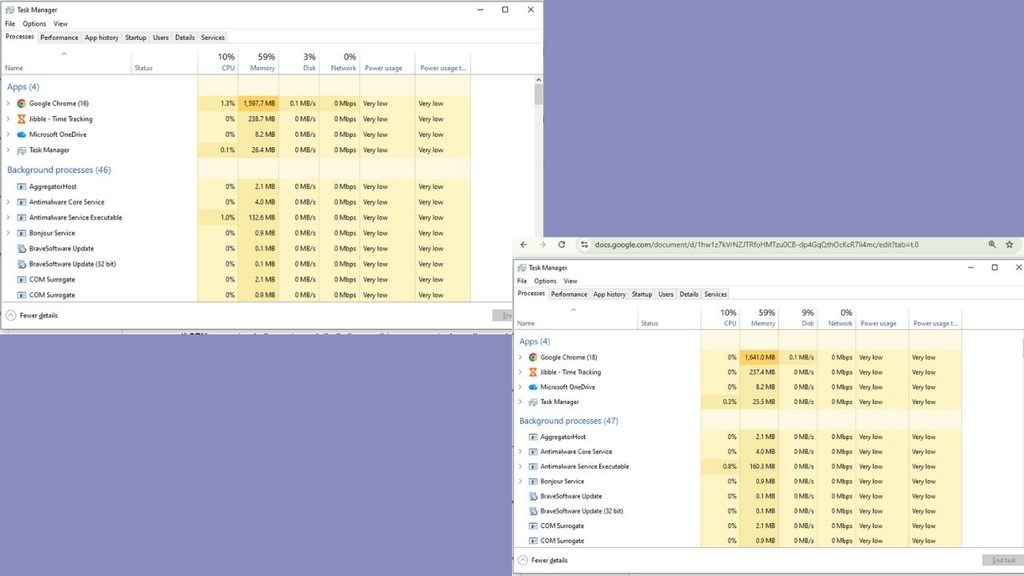
So Open Task Manager on Windows — shortcut keys are Ctrl+Shift+Esc or in MAC — go to Activity Monitor and watch it for a minute while working usually.

Check These Three Things in Your System:

The task manager shows you how much usage has been used to run your apps, if it’s near 100% then your storage drive is the bottleneck — almost certainly a traditional hard disk drive (HDD). Most of the older laptops suffer from this issue that’s why they’re too slow and fixing it (with SSD) is the cheapest and highest impact upgrade for your laptop.


Memory usage above 85% continuously means more RAM is needed. Heavier apps like Zoom, Team and Word running altogether with 15 browser tabs should be run smoothly at 8 GB. But if building applications and gaming is your main course then you need more than 8 GB. Since this amount is default on a lot of budget and mid-range laptops sold in the last five years.

If CPU usage is the thing hitting its limit, that’s one part you generally can’t upgrade on a laptop. CPU bottleneck won’t be solved by swapping components because it is soldered to the motherboard usually so knowing it before you start spending your money on an upgrade that won’t help is important.

Most people diagnosing a “slow laptop” for the first time are surprised to learn its disk, not processor. That distinction is the whole game.

SSD Swap: The Single Best Upgrade You Can Make

By replacing a mechanical hard drive with a Solid State Drive is the single most efficient upgrade that makes a laptop feel like new hardware. It improves the speed and multi-tasking process, boot times can drop from 90+ seconds to under 15 and regular tasks like switching between apps or opening them won’t lag.

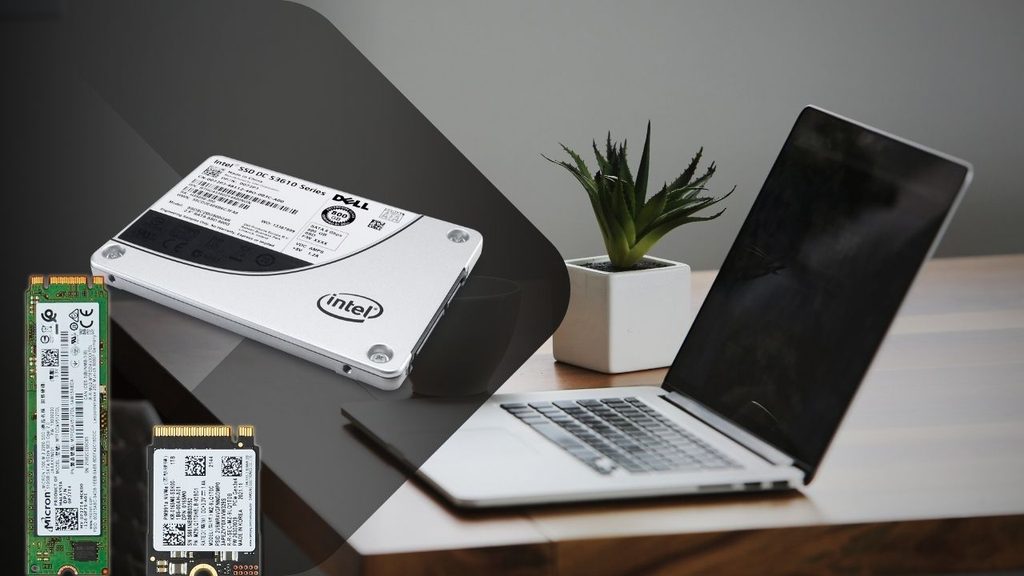
A basic 480GB–500GB SATA SSD, such as the Crucial MX500, Kingston A400, or WD Blue, usually costs around ₹2,500–₹3,500 in India, depending on ongoing pricing and sales. The price is far less than buying a whole new laptop, this upgrade can make your older laptop fresh.

Before buying an SSD, confirm two things: whether your laptop has a 2.5-inch SATA bay, an M.2 slot, or both (this determines which SSD form factor you need), and whether it has a spare slot or you’ll be replacing your existing drive entirely. Most laptops from 2016 onward that shipped with an HDD have a 2.5-inch bay that’s a direct, tool-light swap — usually just a few screws on the base panel.

There’s two options always given to you while rebooting, keeping your existing Windows installation and files onto the new drive or clean installation. If you choose to keep, Cloning software like Macrium Reflect (free tier) or EaseUS Todo Backup will help transfer your programs and settings from old HDD onto the new SSD so you don’t need to reinstall and set things up.

If the laptop is too old then fresh Windows installation onto the new SSD is a better option, it removes old or hidden leftover junk which consumed your memory.

See Details:- iPhone Duo Changes the Cost Effectively With These Methods

Add RAM: The Second-Cheapest Speed Fix

If your diagnostic check flagged high memory usage, this is your next move, and it’s usually inexpensive. Most laptops from the last decade that have 4GB or 8GB of RAM have room to go to 8GB or 16GB, either by adding a stick into a free slot or replacing existing sticks with higher-capacity ones.


It’s not a costly upgrade, an 8GB DDR4 SODIMM stick price is somewhere around
₹1,500-₹2,200 depending on the current market.

Before Buying, Check Which Type Of Ram is Compatible

Your laptop’s supported RAM type (DDR3 vs DDR4 vs DDR5 — check your model’s spec sheet, since installing the wrong type simply won’t work) and its maximum supported capacity, because some budget laptops cap out at 8GB even if there’s a second slot.

The install itself is usually the easiest upgrade on this list — a single panel on the bottom of most laptops, a couple of screws, and the RAM stick clicks into a slot at an angle before you press it flat. 

No cloning, no software, no reinstalling anything. If your laptop’s diagnostic showed disk usage as the real bottleneck rather than memory, though, don’t bother with this one first — RAM won’t fix a slow HDD, and you’d be spending money on the wrong problem.

Clean Out the Software Bloat You’ve Been Carrying for Years

Hardware isn’t the whole story. A laptop that’s had the same Windows installation for three or four years accumulates a genuinely surprising amount of drag: startup programs that launch silently every boot, background services from software you uninstalled ages ago, and browser extensions you forgot you added.

Open Task Manager’s Startup tab and disable anything you don’t need running the moment you log in — most people find five to ten programs quietly launching that have no business doing so (Spotify, printer software, half a dozen “helper” apps from programs installed years ago). This alone can shave real time off boot-up without touching a single piece of hardware.


Beyond that, uninstall software you genuinely don’t use anymore, clear out temp files (Windows’ built-in Disk Cleanup or Storage Sense handles this automatically), and check your browser extensions — each one adds a small but real memory and CPU tax that compounds when you’re already running an older machine.

If your laptop has never had a clean OS reinstall after SSD swap, this is the moment to consider it. A fresh Windows install onto new hardware, with only the software you actually use, often produces the single most dramatic “this feels like a new laptop” moment of the entire process — more than any single component swap.

Read More:- How AI Could Change India’s Digital Public Infrastructure

Don’t Skip the Physical Cleaning

This one costs close to nothing and gets ignored constantly. Laptops that have run for years without ever being opened up accumulate dust inside the fan and heatsink assembly, which traps heat, which causes the CPU to throttle its own performance to avoid overheating — meaning your laptop is deliberately slowing itself down to protect itself.

To reduce fan noise and prevent thermal throttling, cleaning fan blades and heatsink fins can be helpful. Replace dried-out thermal paste so it brings down temperature between the CPU and heatsink. It can cost around ₹300, and helps the laptop’s processor maintain its performance for longer under heavy workloads. 

This is the cheapest and under-appreciated fix but helps cool the processor because dust buildup and dried thermal paste don’t trigger warning as hard drive does, they just slow your laptop and get a little hotter all the time.

Small External Upgrades That Change How the Laptop Works

Not every upgrade needs to happen inside the case. Coders and Gamers need big screen resolution, a budget external monitor changes the entire experience without spending a new laptop’s cost.


Additionally, better-quality external keyboard and mouse will maximize that experience by making typing and navigating more easy and responsive, even if the internals haven’t changed at all.

A basic cooling pad (₹800-₹1,500) can also help laptops that run hot during longer sessions, buying you more sustained performance during demanding tasks like video calls or heavier multitasking, without opening the machine at all.

Know When Upgrading Laptop Stops Making Sense

If the laptop’s bottleneck isn’t the RAM and disk but CPU then do not spend a single rupee on the laptop upgrade because it’s useless. The process is the one component you almost never can replace on a laptop.

Old laptop battery-life usually degraded to holding half its original charge. Changing that will help if your laptop is just 2-3 years old because a five-plus years old laptop doesn’t come with a user-replaceable battery so that’s where you should start saving for a new laptop. It’s worth actually comparing the two costs side by side rather than assuming the upgrade is always cheaper. 

Read More :- Why ChatGPT Ads Deserve a Place In Your 2027 Media Plan 

Conclusion

If you’re staring at a slow laptop right now, check Task Manager first. If disk usage is maxed out, an SSD swap is your highest-impact move and should come before anything else. If memory is the constraint, add RAM — it’s cheap and takes ten minutes. 

Do both of those, clean out years of startup bloat, blow the dust out of the fans, and you’ve addressed the four things that account for the vast majority of “this laptop feels old” complaints — usually for less than a tenth of what a new laptop would cost.

Overall, if your bottleneck turns out to be the processor itself, no combination of these fixes will get you there, and that’s the one scenario where saving up for new hardware is genuinely the right call instead of the expensive-sounding one.

Leave a Comment

Your email address will not be published. Required fields are marked *

Scroll to Top