UP SuperTET Vacancy Notification 2026: Check Out Details, Dates, & Eligibility

SuperTET

If you’ve been searching continuously on Google for “UP SuperTET 2026 Notification Out, you are not alone because many future teachers are googling it but don’t panic. You are not late, because the official notification has not been released yet. The vacancy numbers are a guess if you see anywhere.  

When Will The UP SuperTET Notification Get Released?

UPBEB is going to publish the SuperTET 2026 notification soon and it carries the exam date, required documents, eligibility, and exam pattern information for the candidates. The best way of starting the process is to read that notification carefully once it is released before going to fill the form for UP SuperTET 2026. 

It’ll land after the UPTET result is out, so most of the candidates get eligible for the SuperTET so there should be a larger number of vacancies. But that’s an educated guess about timing, not a commitment from the The Uttar Pradesh Basic Education Board. 

Where You Can Find The SuperTET Updates? 

Skip the YouTube shorts and forward-heavy WhatsApp groups. The two sources worth bookmarking are:

Vacancy For UP SuperTET Exam 2026

From the past cycle and current teacher-shortage data, it is precisely reasonable that UP SuperTET 2026 Vacancy lies around 69,000, 85,000. But these numbers aren’t shared by the officials so treat them as a closer guess. 

The 2019 SuperTET drive filled around 69,000 posts so it became the usual provisional around number. Until UPBEB publishes district-wise and category-wise vacancy breakdowns in the actual notification.

SuperTET Salary and Eligibility 

Vacancy and dates can change year by year but 80% of the stuff is the same each year. SuperTET eligibility, salary, exam pattern are not going to change, even if it does, only slight change can happen. 

ParameterDetails
PostAssistant Teacher – Primary (Classes 1–5) and Upper Primary (Classes 6–8)
Pay Scale₹35,400 – ₹1,12,400 (Level 6, 7th Pay Commission)
EligibilityValid CTET or UPTET:- Paper I for Primary (Classes 1–5)- Paper II for Upper Primary (Classes 6–8)Plus relevant qualifying degree and/or B.Ed as per recruitment rules
Exam PatternObjective-type test, 150 marks, covering:- Language proficiency- Pedagogy (teaching methodology)- General Knowledge- Subject-specific content knowledge

Qualifying Numbers are easily let you pass by acquiring 40% (60/150) if you are General category candidate and 33% (49.5/150) for the candidates who belong to SC/ST/OBC-NCL/PwD but they are not a scoring score to win this battle among thousands candidates. 

Actual merit cutoff: if you actually want to get selected then score from 90 to 130+ out of 150 to hold out your position. These are the actual merit numbers, it also depends up on your category and how many seats are open. 

That gap between “qualifying score” and “actual selection score” trips people up every cycle. SuperTET isn’t a pass/fail eligibility test — it’s a straight competitive recruitment exam. Scoring the minimum gets you nowhere near a job.

UPSSSC PET Exam Date 2026 Out

How To Prepare Yourself For The Exam

  1. Don’t wait to start preparing. The syllabus and pattern are already finalized by UP authorities, which is usually a sign the recruitment machinery is moving even if the notification isn’t out yet.
  2. Keep your CTET/UPTET certificate and documents ready. Once the form opens, the window is typically short — 20 to 30 days and document scrambling under deadline pressure is a self-inflicted wound.
  3. Ignore vacancy-number debates on social media. They change nothing about your prep and mostly exist to farm engagement.
  4. Set a check-in habit, not a refresh habit. Checking the official website once a day is enough. Constant refreshing just adds stress without adding information.

Conclusion 

Start focusing on the syllabus, pattern, expected post structure before UP SuperTET 2026 Notification Out because it’s released, you won’t get enough time to prepare after that. There’s no confirmed vacancy count but there’s a guessing number, the competition will be higher. 

Prepare like the exam is close, because structurally it looks like it is, but don’t let unverified numbers shape your expectations or your plans.

Always cross-check every information on the official website of UP Super TET 2026 Notification Out before acting on any detail published by educational sites.

Leave a Comment

Your email address will not be published. Required fields are marked *

iPhone 18 Pro on EMI: A Complete Buying Guide

iPhone 18 Pro

Apple hasn’t confirmed a single detail about the iPhone 18 Pro yet, but that hasn’t stopped Indian buyers from searching iPhone 18 Pro EMI options months before launch — and for good reason. With expected pricing starting north of ₹1,34,000, paying the full amount upfront isn’t realistic for most people. 

The real question isn’t whether you should use EMI. It’s which EMI actually saves you money, and which one just makes an expensive phone feel cheaper than it is for a few months.

When Is the iPhone 18 Pro Launching in India?

Every recent report points to September 2026, alongside the iPhone 18 Pro Max and for the first time — Apple’s foldable iPhone. What’s changed this year is the rest of the lineup. Bloomberg’s Mark Gurman reported that Apple is splitting its release schedule for the 18 series: only the Pro, Pro Max, and the foldable arrive this September, while the standard iPhone 18 and a new iPhone 18e get pushed to spring 2027. If that holds, this is the first year in a while where the “regular” iPhone won’t launch alongside the Pro models.

Going by Apple’s usual pattern (the iPhone 17 event was held on September 9, 2025, with sales opening ten days later), a keynote in the first two weeks of September 2026 is the safest bet, with stock hitting stores roughly a week to ten days after that. Some trackers are floating September 8–9 specifically; others leave more room, up to September 10. Take the exact date as a placeholder until Apple sends out invites, which usually happens about three weeks ahead of the event.

Expected iPhone 18 Pro Price in India

Price leaks are all over the place right now, which is normal this far out. Here’s the range being reported across sources as of this writing:

VariantExpected India price
iPhone 18 Pro, 256GB₹1,34,900 – ₹1,44,900
iPhone 18 Pro, 512GB₹1,52,500 – ₹1,69,990
iPhone 18 Pro Max, 256GB (starting)₹1,49,900 – ₹1,60,000

A few sources argue Apple will hold pricing close to the iPhone 17 Pro’s ₹1,34,900 launch price, citing “aggressive supplier negotiations” to protect India pricing. Others expect a hike tied to the RAM bump (12GB is the rumored figure) and camera hardware upgrades — the iPhone 18 Pro is rumored to carry a triple 48MP setup with a periscope telephoto lens and a variable-aperture main camera, on a 2nm A20 Pro chip. Rumors are also split on whether Face ID moves under the display this generation or stays as-is; one supply chain report specifically says it won’t happen this year due to production delays.

Budget for the ₹1,34,900–1,44,900 band on the base 256GB Pro, and don’t be surprised if the number lands closer to the top of that range once Apple accounts for import duty and GST on the final config.

What’s the Actual Difference In No-Cost EMI vs Standard EMI? 

This is where most buyers get it wrong. “No-cost EMI” doesn’t mean the bank is doing you a favour — it means the retailer or Apple absorbs the interest that would normally apply, so you pay roughly the sticker price split into installments instead of sticker price plus interest. Depending on the bank, this shows up in one of two ways: the interest is stripped out at checkout, or you’re charged interest upfront and it comes back to you as cashback within about 90 days (this is how ICICI’s scheme works on longer tenures). Either way, you’ll still pay a processing fee, GST on that fee, and — if you close the loan early — a foreclosure charge, typically around 3% of the outstanding principal plus the next month’s interest.

Standard EMI is the version without the safety net: real interest, usually in the 12–16% per annum range on credit card conversions, on top of the base price.

The gap adds up fast. On a ₹1,34,900 iPhone 18 Pro, a 24-month standard EMI at 14% p.a. works out to roughly ₹6,477 a month — about ₹20,500 more than the phone’s actual price by the time you’re done paying. The same tenure under a genuine no-cost scheme costs ₹5,621 a month, with no premium at all. That ₹20,500 difference is the entire reason to check which scheme you’re actually being offered before you tap “confirm” at checkout.

Read More👉 Best Laptops for Coding and Programming: Top Picks for Every Budget

Where You’ll Be Able to Buy iPhone 18 Pro on EMI

You’ll have more than one route in, and it’s worth comparing before you commit to any single one. Apple’s own online store runs its no-cost EMI tie-ups directly with Bajaj Finance, HDB Financial Services, ICICI Bank, IDFC First Bank, and TVS Credit — the current scheme window on Apple’s authorised platforms runs through late September 2026, which should carry into the 18 Pro’s launch. Apple Authorised Resellers such as iStore, Unicorn, Croma, Reliance Digital, and Vijay Sales layer their own instant cashback offers on top for Axis Bank, ICICI Bank, and SBI Card users, usually on 6-month no-cost tenures with low-cost EMI kicking in beyond that.

Amazon and Flipkart are the other major channels, particularly around sale events — Amazon’s Great Freedom Sale and Flipkart’s Freedom Sale both ran in early August 2026, and both platforms typically repeat similar EMI-plus-bank-discount stacking for major flagship launches. Flipkart also supports the Bajaj Finserv Instant EMI Card for buyers without a traditional credit card. Debit card EMI is more limited — HDFC, Axis, and ICICI extend it to pre-approved debit cardholders, but the pool of eligible customers is smaller and interest rates run similar to credit card EMI.

Whichever channel you pick, check the fine print on tenure caps — 6-month no-cost EMI is nearly universal, but 12- and 24-month no-cost schemes are usually restricted to specific banks and specific card tiers.

How Much Will Your Monthly EMI Be?

Based on the expected price bands above, here’s what a genuine no-cost EMI would look like at common tenures:

Tenure256GB Pro (~₹1,34,900)512GB Pro (~₹1,52,500)Pro Max 256GB (~₹1,54,900)
3 months₹44,967₹50,833₹51,633
6 months₹22,483₹25,417₹25,817
9 months₹14,989₹16,944₹17,211
12 months₹11,242₹12,708₹12,908
24 months₹5,621₹6,354₹6,454

These are straight divisions of the expected MRP with no interest added — that’s what “no-cost” is supposed to mean. If a bank quotes you anything higher than these figures for the same price and tenure, ask specifically whether interest is being charged, because it likely is.

Exchange Offer + EMI Combo — Lowering Your Effective EMI

Trading in your current phone reduces the amount you actually finance, which lowers every EMI figure above. As an example: on a ₹1,44,900 iPhone 18 Pro, a mid-range trade-in like a working iPhone 13 128GB might fetch around ₹15,000 in exchange value plus a ₹6,000 exchange bonus — a combined ₹21,000 off, bringing the amount you’d actually put on EMI down to ₹1,23,900. Financed over 12 months no-cost, that’s roughly ₹10,325 a month instead of ₹12,075.

The catch is that the trade-in values swing enormously based on the model, storage, and physical condition of your old device, and different assessors don’t agree with each other. Apple’s own trade-in estimate, a reseller’s in-store quote, and a third-party service like Cashify can differ by several thousand rupees for the same phone. 

Get quotes from at least two sources before you finalise, and remember that exchange bonuses on top of the base trade-in value are usually time-limited promotions, not permanent policy — they’re the kind of thing that disappears the week after a big sale ends.

Step-by-Step Guide To Buying iPhone 18 Pro on EMI

  1. Shortlist your retailer first, not the phone colour. Compare what Apple’s own store, your nearest authorised reseller, Amazon, and Flipkart are each offering on EMI tenure and bank tie-ups — the same phone can carry different effective costs depending on where you buy it.
  2. Check your card’s pre-approved EMI limit. Most banks let you check this via SMS or net banking before you shop, so you’re not caught out at checkout with a card that can’t support the tenure you want.
  3. Get an exchange quote in advance if you’re trading in. Apple’s trade-in tool and your reseller’s in-store estimate both take a few minutes and give you a real number to plan around.
  4. Select the EMI option at checkout that matches your card and target tenure. No-cost options are usually listed separately from standard EMI — don’t assume the first EMI option shown is the no-cost one.
  5. Confirm the breakdown before you pay. Look for a line item showing interest and processing fee separately. If the total EMI amount adds up to more than the phone’s price divided by the number of months, you’re paying interest somewhere.
  6. Read the foreclosure terms. If there’s a chance you’ll want to pay off the balance early, know the foreclosure charge upfront rather than finding out later.
  7. Save your EMI schedule and transaction confirmation. You’ll need these if a cashback-style no-cost EMI scheme (like ICICI’s) hasn’t been credited on schedule.

Read More👉 iPhone 18 Pro Launching Next Month: 12 New Features Worth Knowing About

Conclusion 

The iPhone 18 Pro’s price and launch date will stay rumors until Apple actually sends out event invites, and it’s worth waiting for that confirmation before you lock in a purchase decision — leaked pricing has moved by thousands of rupees between reports even in the past few weeks. 

But the EMI math you plan around today will hold regardless of the exact final price: the difference between a genuine no-cost scheme and a standard one is real money, often ₹15,000–20,000 over a two-year tenure, and it has nothing to do with which bank has the nicest app. 

Compare the tenure and the bank before you compare the storage variant, get your exchange quote sorted early if you’re trading in, and read the checkout screen closely enough to know exactly what you’re signing up for, not just what the monthly number says.

Leave a Comment

Your email address will not be published. Required fields are marked *

NBEMS NEET PG Answer Key 2026: How To Download & Calculate Your Score

NEET PG Answer Key

NBEMS NEET PG Answer Key will be released soon on the official website, since August 30, over 2.65 lakh candidates are constantly searching and waiting for that. The exam held across 1,111 centres in 338 cities, and exam centres in Sitapura, Jaipur disrupted by a power failure and sat a re-examination on September 5 instead. This situation is also important to consider because NBEMS is processing two exam batches into one result and one answer key cycle, so that can be the reason why the board hasn’t rushed the provisional key out yet.

NEET PG Answer Key 2026 Important Dates

EventDate
Issue of Admit Cards27/August/2026
Examination Date30/August/2026
Declaration of ResultBy 30/September/2026
Cut-off Date for Completion of Internship Towards Eligibility for NEET-PG 202630/September/ 2026

When Will NBEMS NEET PG Answer Key Release?

As of previous year NBEMS NEET PG exam cycle the provisional key was released after the time gap of three to four weeks from the day of exam. The NEET PG 2025 was held on August 3, and the answer key was released on August 29, 2025.

So you can expect a similar gap this year too, due to power cut situations in some districts leading to re-examination of NEET PG, that is probably the reason for the delay in the result. A mid-to-late September release for the NBEMS NEET PG answer 2026 key is a reasonable expectation so check out the official notice section on natboard.edu.in directly.

Why This Year’s Key Looks Different

This year’s release isn’t just another routine update — it follows a Supreme Court directive from 2025 that instructed NBEMS to build more transparency into the NEET PG process. 

The National Board of Examination of Medical Sciences updated the format — they will release candidate’s individual response sheets alongside the provisional answer key. It will allow candidates to check their own marked responses side by side with the correct answers, so you don’t have to remember what you tick on the test day.

The exam pattern was also revised for NEET PG 2026, now the paper carries 180 questions worth 720 marks, not the 200-question format which was used in previous years. The marking pattern is the same as before — 4 marks for each correct answer and -1 for every wrong answer. 

But it’s worth recalculating your expectations of scores rather than guessing because the paper is shorter this year, so how much a single wrong guess costs you relative to your total score calculation is important.

How to Download NEET PG Answer Key Once It’s Live

  1. Head to the official website and look for the NEET PG 2026 notice link on the homepage — NBEMS typically doesn’t send individual emails for this, so you have to go find it. 
  2. You’ll need to log in using your registered application number and password, the same credentials you used for your admit card. 
  3. Once you’re in, the answer key and your personal response sheet should both be downloadable as PDFs. 
  4. Before you close the tab, cross-check the Question ID numbers on the key against your response sheet line by line — mismatches here are exactly what the objection window exists for.

Read More 👉 Apple iPhone Duo Changes the Cost Effectively With These Methods

How to Calculate Your Probable Score

Once the NEET PG Answer Key is released and download it to check your answers, calculation is not that hard. Use a simple formula to get your NEET PG score, multiply your total number of correct answers by four and minus by the total number of incorrect answers. Unattempted questions don’t count either way.

So if you attempted 165 of the 180 questions and your correct answers are 130 and 35 are incorrect according to the answer key. Put the numbers as: 

(Correct Answer × 4) − (Incorrect Answer × 1)
(130 × 4) − (35 × 1) = 485

Which means your probable score would be 485 out of 720. 

Do this calculation as soon as the key drops, before you start second-guessing individual answers — it gives you a real number to work with instead of an anxious estimate.

If You Disagree With an Answer

Once the provisional NEET PG Answer Key is out, NBEMS is expected to open a short window for candidates to raise objections against specific answers — based on past cycles, this window has typically stayed open for just two to three days, so it isn’t something to sit on. 

Objections generally need to be backed by references to standard textbooks, not just a strong feeling that the key is wrong, and there’s usually a small fee attached per question challenged. Check the official notification to know the process and fee amount. NBEMS will check your objections carefully and issue a final answer key before declaring results.

The moment the NEET PG Answer Key and response sheet go live, download and save, don’t leave it to login after and match the answers because the site servers may crash down later.  

What Happens After NEET PG Answer Key Is Released?

NBEMS has scheduled the NEET PG 2026 result for September 30, though the board has released results earlier than its stated deadline in previous years, so don’t be surprised if it moves up. 

Once results are out, MCC counselling for MD, MS, and PG diploma seats follows on a fairly tight timeline, which means the NEET PG Answer Key isn’t really the finish line — it’s the number that tells you which counselling conversations are actually worth planning for. 

Use the score you calculate today to start looking at realistic cutoffs for your target specialty, rather than waiting for the official result to start that homework.

Read More 👉 Bihar STET 2026 Online Form Out: Check Exam Syllabus and Pattern To Get Teacher Job

Conclusion

Once the NEET PG Answer Key is out by the authority, start your counselling preparation for the next phase of your career. If you want to check the final score, you have to wait for final results which will be released once the objections against specific answers will close.

Candidates can download & save the PDF once it is released on the official website of NBEMS, but don’t refresh the site every hour because it’ll come out in mid-to-late September. Check the steps to download and calculate your score.

Leave a Comment

Your email address will not be published. Required fields are marked *

Foreign Education Loan Currency Explained: How INR Depreciation Can Increase Your Loan Cost 

Education Loan

A student who took an SBI Education Loan in early 2024, when the rupee was trading around ₹83 to the dollar, is repaying that same loan today at a rate closer to ₹94–95. If you understand Foreign Education Loan Currency, it will be easy for you to save yourself from extra loss. Nobody changed the interest rate on the loan or the tuition fee either. 

What changed is the number of rupees it takes to buy one dollar and that single variable can add lakhs to the real cost of an Education Loan that was sanctioned in Indian rupees. 

Most Indian education loans for study abroad are disbursed and repaid in INR, but the expense they’re funding — tuition, hostel fees, living costs is billed in a foreign currency. The loan itself doesn’t have currency risk. The gap between what you borrowed and what the university actually charges does.

How the Education Loan Currency Gap Works

When a bank sanctions a loan of ₹40 lakh for a one-year master’s programme in the UK, that sanction amount is usually based on the exchange rate at the time of approval. But the loan is disbursed in tranches — often per semester and each tranche gets converted from INR to the foreign currency at whatever the rate is on that transfer date. 

If the rupee has weakened between sanction and disbursement, your ₹40 lakh will convert into fewer pounds or dollars than it did when the loan was approved. Families either dip into savings to cover the shortfall or go back to the bank for a top-up, which restarts part of the paperwork and interest calculation.

For instance, a $50,000 annual tuition bill works out to around ₹42.8 lakh at an exchange rate of ₹85.64 to the dollar. If the rupee falls to ₹91.5 per dollar, that same tuition bill rises to about ₹45.75 lakh — nearly ₹3 lakh more, with tuition itself unchanged. That’s the currency gap, and it compounds every year the course runs and every year the loan is repaid after the student starts working, especially if the borrower’s income doesn’t move at the same pace as the exchange rate.

Read More 👉 Planning MBBS or Master’s Abroad? Country-Wise Costs, Loan Limits and Lenders

Why Currency Risk Matters More In 2026

As of September 2026, USD/INR has been trading mostly in the 94–96 range, after hitting a record low of nearly ₹96.6 in May. In the starting of 2026, the rupee is nearly ₹90 to the dollar but depreciation occurred in the first quarter due to crude oil prices, the Fed–RBI rate gap and dollar outflows — roughly a 4–5% decline in three months. It affects everything, even students’ education who planned expenses at ₹83/USD, which creates a ₹10–12 per dollar gap. That means education loans also pushed from ₹50 lakh to ₹56+ lakh without any increase in tuition fees.

Some institutions expect rupee to recover modestly toward the ₹90–91 range while others firms like Goldman Sachs and Bank of America suggest USD/INR could remain in the ₹96–99 band over the next couple of years. These numbers are always moving so students should keep that in mind while taking an Education Loan.

Students must check the live USD/INR rate before finalising any loan math, rather than anchoring to a snapshot number 

What Is a TCS Rule For Education Loan Abroad

Under the Finance Act 2026, remittances for education funded through a loan from a notified bank or financial institution are exempt from Tax Collected at Source (TCS) entirely — no TCS even above the ₹10 lakh threshold, as long as the loan qualifies under Section 80E. That’s a meaningful change from the older 5% TCS regime, and it only applies when the money is routed as loan disbursement, not as a self-funded remittance from savings. 

Self-funded transfers above ₹10 lakh now attract 2% TCS (down from 5%), reclaimable as a credit when filing your ITR. Bank sources still describe a 2% rate for loan-funded remittances too, so this is worth confirming directly with your bank’s forex desk before you rely on it — TCS rules on LRS have changed twice in two budget cycles, and banks are usually the fastest to have the current interpretation.

What an Actual Loan Costs Today

SBI’s Global Ed-Vantage scheme, one of the more commonly used routes for study-abroad financing, currently covers loan amounts from ₹7.5 lakh up to ₹3 crore across 28 countries, with interest rates starting around 8.65% for female applicants and 9.15% for male applicants, and collateral-free borrowing up to ₹50 lakh for students admitted to a list of recognised foreign universities. 

Repayment tenure runs up to 15 years, with a moratorium covering the course duration plus one year. These figures move with RBI’s repo rate and SBI’s internal benchmark, so treat them as a starting reference and verify against the bank’s published rate sheet before quoting them to a reader as final.

Practical Ways To Manage Currency Risk 

None of this means avoiding a Foreign Education Loan as it’s still the only realistic way to fund an overseas degree for most families. It means treating the exchange rate as a cost variable, not a fixed number. 

What actually determines what you pay back is that rate plus processing fees, the forex margin the bank quietly builds into every disbursement, and how your moratorium is structured — and those three add-ons can separate two “9% loans” by lakhs.

Take a ₹60 lakh abroad loan from a public sector bank at a floating 9.65%, a flat ₹10,000 processing fee, and a 2% forex margin on each tuition transfer — a fairly standard structure in 2026. Run that through a typical 10-year repayment and the interest alone comes to roughly ₹33.6 lakh; add the ₹1.2 lakh forex margin and the real payback lands near ₹94.8 lakh on a ₹60 lakh loan, before anyone factored in a repo rate hike.

Move the same ₹60 lakh to an unsecured NBFC loan at 11.5%, where interest capitalises through a full moratorium instead of being serviced as simple interest, and the principal you start repaying against can already have grown to ₹66–68 lakh by the time EMIs begin. Layers on the 1.25%-plus-GST processing fee NBFCs typically charge — around ₹88,000–90,000 on that loan size — and the same ₹60 lakh commitment can end up closer to ₹1.05 – 1.15 crore in total outgo.

There’s one real way to shrink this gap rather than just track it: SBI’s Scholar Loan, reserved for IIT/IIM/NIT admits, has been quoted around 6.9%–7.65% in 2026 — well below the standard Global Ed-Vantage rate, and worth checking eligibility for before assuming the general scheme is the only door open. 

Read More 👉 UP Anganwadi Bharti 2026 — District-Wise Vacancies & Recruitment Details

Conclusion 

Foreign Education Loan Currency is not a risk for getting a degree abroad. Once you get a job there, you might be able to repay on time but paying more than extra can crash you over. So understand how INR Depreciation Can Increase Your Loan Cost to save yourself from heavy risks.

The families who get burned aren’t the ones who took a foreign currency risk — every rupee-denominated loan funding a dollar or pound expense carries that risk by default. It’s the ones who assumed the sanctioned loan amount was the final cost, when the exchange rate on the day of each disbursement was always going to have the final word.

Leave a Comment

Your email address will not be published. Required fields are marked *

Switching Jobs? Don’t Ignore Your EPF, NPS, and Mutual Fund Investments 

Jobs

Your resignation letter is signed, the new offer is accepted, and you’re ready for switching Jobs but what happens to the EPF account and should the new company’s NPS enrollment change anything about how you’re already investing through mutual funds? Don’t Ignore your EPF, NPS and Mutual Fund which most people already are doing.

The EPF vs NPS vs mutual funds decision isn’t really one choice — it’s three separate accounts with three different rules, and a job switch is exactly the moment most people either transfer things correctly or lose track of money they’ve already earned.

What Is EPF, NPS, and Mutual Funds

EPF — 8.25% for FY 2025-26, third year running at that rate, govt-backed, EEE (contribution, interest, withdrawal all tax-free if you cross 5 years’ continuous service). Mandatory for salaried staff at covered establishments; you don’t really “choose” this one, you’re already in it.

NPS — Market-linked, mix of equity/debt/govt bonds you can allocate; extra ₹50,000 deduction under 80CCD(1B) on top of the 80C limit. At exit, minimum 40% of the corpus must go into an annuity — you don’t get the whole pot in cash, and annuity payout rates in India have historically been mediocre (5–6% range).

Mutual funds — No lock-in except ELSS (3 years); LTCG/STCG taxed, no EEE treatment. Best long-run equity return potential of the three, but zero forced discipline — nothing stops you from redeeming during a panic.

Don’t Ignore Your EPF, NPS, and Mutual Funds After Switching Job

Your EPF doesn’t “carry over” automatically. A lot of people assume EPF just follows them to the new job. It doesn’t — not unless you actually transfer it.

When you leave a company, your EPF account under that employer becomes inactive. Your new employer opens a fresh account. If you don’t link the two using your UAN (Universal Account Number), you end up with multiple EPF accounts scattered across your career. Each one earns interest for a while, but an account that stays inactive for 36 months stops earning interest altogether.

How To Set Up Your EPF Account After Job Switch

  • Use the “One Employee One EPF Account” (OEEOA) transfer request on the EPFO portal, or let your new employer initiate it.
  • Don’t withdraw your EPF just because it feels like “extra cash” during the job switch. Withdrawing before 5 years of continuous service makes it taxable, and you lose out on decades of compounding.
  • Check your UAN is correctly linked to Aadhaar and your new employer’s establishment ID — half of all transfer delays come from mismatched KYC details.

The instinct to cash out is understandable when you’re between Jobs and expenses are piling up. But EPF is one of the few instruments giving you a stable, tax-free return over the long run. Treat withdrawal as a last resort, not a bonus.

Read More 👉 Your Credit Score Ignores 90% of Your Financial Life — What Your First Credit Card Changes 

Check Your NPS Before Leaving the Company

Your NPS account isn’t tied to your employer at all. It’s tied to you, through your PRAN (Permanent Retirement Account Number). So technically, nothing needs to be “transferred.”

But there’s a catch. If your NPS contribution was happening through your employer under the corporate NPS model, that contribution stops the day you resign. Your new employer may or may not offer an NPS benefit. If they don’t, your account doesn’t close but it goes silent unless you start contributing on your own through the eNPS platform or a POP (Point of Presence).

What to check:

  • Confirm your new employer’s NPS deduction is active and linked to your existing PRAN — don’t let them create a second one by mistake.
  • If your new company doesn’t offer NPS, decide if you want to keep contributing voluntarily. Many people simply let it sit, which defeats the purpose of consistent, long-term retirement investing.
  • Update your bank and nominee details after the switch — this is the most commonly skipped step.

NPS rewards discipline more than any other retirement product because of how compounding and low fund management costs stack up over 20-30 years. A gap of even a couple of years in contributions has a real, measurable impact on your final corpus.

Mutual funds: the SIPs nobody remembers to check

Job switches usually come with a change in salary account, and that’s where mutual fund SIPs quietly break. If your SIP auto-debit was linked to your old salary account and you close that account (or stop maintaining the minimum balance), your SIP simply fails. Most people don’t notice for months — until they check their portfolio and realize three or four SIP cycles never went through.

What to do immediately after switching:

Re-link your SIP mandates to your new primary bank account, or keep enough balance in the old one until the transition is smooth.

Review your asset allocation. A new job often means a new salary, new expenses, maybe new financial goals (relocation, higher rent, a shorter or longer commute cost). Your SIP amounts should reflect your current life, not your old one.

If you got a signing bonus or relocation allowance, resist the urge to let it sit in a savings account. Even a lump sum top-up into an existing fund puts that money to work instead of losing value to inflation.

What Happens If You Neglect These Procedures

None of this is complicated. It’s just easy to postpone because nothing about it feels urgent in the middle of a job change. But delayed EPF transfers lose interest. Paused NPS contributions lose compounding years you can’t get back. Broken SIPs mean missed market cycles.

A Jobs switch is one of the few moments where you’re forced to look at your entire financial setup at once — new salary, new perks, new expenses. Use that moment. Spend one weekend afternoon logging into EPFO, checking your PRAN, and confirming your SIPs are active. It’s boring, unglamorous work. It’s also the difference between a retirement corpus that actually reflects your career and one that has quiet, unexplained gaps in it.

Your new job deserves your excitement. Your old investments deserve five minutes of your attention before you move on.

Read More 👉 Collateral vs No Collateral Loan Amount Where Collateral Starts Making Financial Sense

Conclusion

Switching Jobs is exciting but don’t ignore your EPF, NPS, and mutual funds investment as it is a chance to reset your financial checklist. Your EPF needs to be transferred, your NPS needs to stay linked to your PRAN, and your mutual fund SIPs need to keep running without interruption.

You don’t have to choose between EPF vs NPS vs mutual funds, understanding the role each plays in your long-term financial plan is important. EPF provides retirement stability, NPS adds a dedicated retirement investment option, while mutual funds offer greater flexibility and growth potential.

Leave a Comment

Your email address will not be published. Required fields are marked *

Upgrade Laptop Like New Model In Low Budget

Laptop

Upgrade Laptop in low budget is more beneficial than buying a new one. It doesn’t mean that new laptops aren’t worth buying but upgrading from i3 to i7 can be quick and affordable for students. Working on a laptop which takes minutes to open and making noises while turning on kills the vibes for coding, gaming, or video editing.

However, it is worth knowing before making a decision to buy a brand new laptop this festive season, the machine slowing you down probably isn’t dying — it’s just outdated in one or two specific ways, and fixing those is often a fraction of the cost of a new one.

Laptop upgrades on a budget aren’t about replacing everything. Find the vulnerability of the system caused by one or two old elements and change it. Most 3–5 year old laptops are held back by Hard Drive and RAM most of the time. Fixing both can allow users to experience faster and smooth performance.

But how you can upgrade laptop like a brand new is something to understand first before buying anything you find on flipkart or amazon.

Diagnose Your Laptop Internally

This step is crucial because without knowing the cause of your system, how can you fix it? If you skip the diagnosis, and buy $60 RAM but end up waiting for your computer to respond faster and do the work, you wasted your money. 

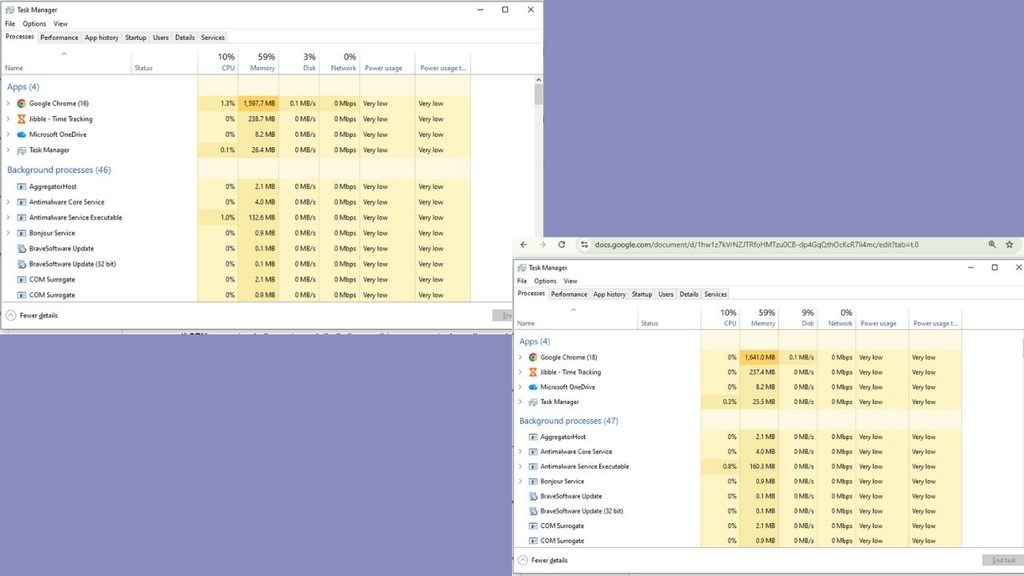
So Open Task Manager on Windows — shortcut keys are Ctrl+Shift+Esc or in MAC — go to Activity Monitor and watch it for a minute while working usually.

Check These Three Things in Your System:

The task manager shows you how much usage has been used to run your apps, if it’s near 100% then your storage drive is the bottleneck — almost certainly a traditional hard disk drive (HDD). Most of the older laptops suffer from this issue that’s why they’re too slow and fixing it (with SSD) is the cheapest and highest impact upgrade for your laptop.


Memory usage above 85% continuously means more RAM is needed. Heavier apps like Zoom, Team and Word running altogether with 15 browser tabs should be run smoothly at 8 GB. But if building applications and gaming is your main course then you need more than 8 GB. Since this amount is default on a lot of budget and mid-range laptops sold in the last five years.

If CPU usage is the thing hitting its limit, that’s one part you generally can’t upgrade on a laptop. CPU bottleneck won’t be solved by swapping components because it is soldered to the motherboard usually so knowing it before you start spending your money on an upgrade that won’t help is important.

Most people diagnosing a “slow laptop” for the first time are surprised to learn its disk, not processor. That distinction is the whole game.

SSD Swap: The Single Best Upgrade You Can Make

By replacing a mechanical hard drive with a Solid State Drive is the single most efficient upgrade that makes a laptop feel like new hardware. It improves the speed and multi-tasking process, boot times can drop from 90+ seconds to under 15 and regular tasks like switching between apps or opening them won’t lag.

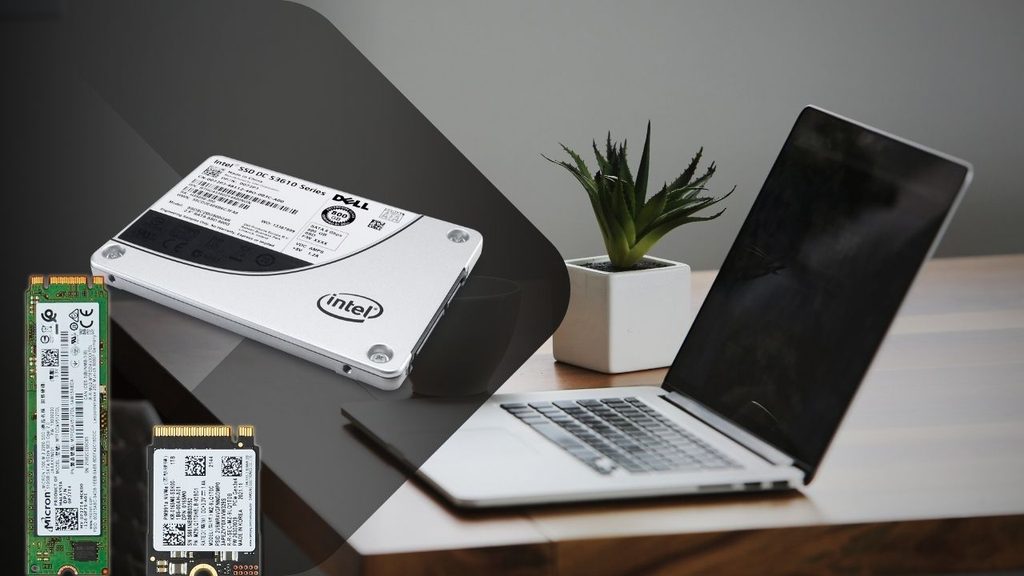
A basic 480GB–500GB SATA SSD, such as the Crucial MX500, Kingston A400, or WD Blue, usually costs around ₹2,500–₹3,500 in India, depending on ongoing pricing and sales. The price is far less than buying a whole new laptop, this upgrade can make your older laptop fresh.

Before buying an SSD, confirm two things: whether your laptop has a 2.5-inch SATA bay, an M.2 slot, or both (this determines which SSD form factor you need), and whether it has a spare slot or you’ll be replacing your existing drive entirely. Most laptops from 2016 onward that shipped with an HDD have a 2.5-inch bay that’s a direct, tool-light swap — usually just a few screws on the base panel.

There’s two options always given to you while rebooting, keeping your existing Windows installation and files onto the new drive or clean installation. If you choose to keep, Cloning software like Macrium Reflect (free tier) or EaseUS Todo Backup will help transfer your programs and settings from old HDD onto the new SSD so you don’t need to reinstall and set things up.

If the laptop is too old then fresh Windows installation onto the new SSD is a better option, it removes old or hidden leftover junk which consumed your memory.

See Details:- iPhone Duo Changes the Cost Effectively With These Methods

Add RAM: The Second-Cheapest Speed Fix

If your diagnostic check flagged high memory usage, this is your next move, and it’s usually inexpensive. Most laptops from the last decade that have 4GB or 8GB of RAM have room to go to 8GB or 16GB, either by adding a stick into a free slot or replacing existing sticks with higher-capacity ones.


It’s not a costly upgrade, an 8GB DDR4 SODIMM stick price is somewhere around
₹1,500-₹2,200 depending on the current market.

Before Buying, Check Which Type Of Ram is Compatible

Your laptop’s supported RAM type (DDR3 vs DDR4 vs DDR5 — check your model’s spec sheet, since installing the wrong type simply won’t work) and its maximum supported capacity, because some budget laptops cap out at 8GB even if there’s a second slot.

The install itself is usually the easiest upgrade on this list — a single panel on the bottom of most laptops, a couple of screws, and the RAM stick clicks into a slot at an angle before you press it flat. 

No cloning, no software, no reinstalling anything. If your laptop’s diagnostic showed disk usage as the real bottleneck rather than memory, though, don’t bother with this one first — RAM won’t fix a slow HDD, and you’d be spending money on the wrong problem.

Clean Out the Software Bloat You’ve Been Carrying for Years

Hardware isn’t the whole story. A laptop that’s had the same Windows installation for three or four years accumulates a genuinely surprising amount of drag: startup programs that launch silently every boot, background services from software you uninstalled ages ago, and browser extensions you forgot you added.

Open Task Manager’s Startup tab and disable anything you don’t need running the moment you log in — most people find five to ten programs quietly launching that have no business doing so (Spotify, printer software, half a dozen “helper” apps from programs installed years ago). This alone can shave real time off boot-up without touching a single piece of hardware.


Beyond that, uninstall software you genuinely don’t use anymore, clear out temp files (Windows’ built-in Disk Cleanup or Storage Sense handles this automatically), and check your browser extensions — each one adds a small but real memory and CPU tax that compounds when you’re already running an older machine.

If your laptop has never had a clean OS reinstall after SSD swap, this is the moment to consider it. A fresh Windows install onto new hardware, with only the software you actually use, often produces the single most dramatic “this feels like a new laptop” moment of the entire process — more than any single component swap.

Read More:- How AI Could Change India’s Digital Public Infrastructure

Don’t Skip the Physical Cleaning

This one costs close to nothing and gets ignored constantly. Laptops that have run for years without ever being opened up accumulate dust inside the fan and heatsink assembly, which traps heat, which causes the CPU to throttle its own performance to avoid overheating — meaning your laptop is deliberately slowing itself down to protect itself.

To reduce fan noise and prevent thermal throttling, cleaning fan blades and heatsink fins can be helpful. Replace dried-out thermal paste so it brings down temperature between the CPU and heatsink. It can cost around ₹300, and helps the laptop’s processor maintain its performance for longer under heavy workloads. 

This is the cheapest and under-appreciated fix but helps cool the processor because dust buildup and dried thermal paste don’t trigger warning as hard drive does, they just slow your laptop and get a little hotter all the time.

Small External Upgrades That Change How the Laptop Works

Not every upgrade needs to happen inside the case. Coders and Gamers need big screen resolution, a budget external monitor changes the entire experience without spending a new laptop’s cost.


Additionally, better-quality external keyboard and mouse will maximize that experience by making typing and navigating more easy and responsive, even if the internals haven’t changed at all.

A basic cooling pad (₹800-₹1,500) can also help laptops that run hot during longer sessions, buying you more sustained performance during demanding tasks like video calls or heavier multitasking, without opening the machine at all.

Know When Upgrading Laptop Stops Making Sense

If the laptop’s bottleneck isn’t the RAM and disk but CPU then do not spend a single rupee on the laptop upgrade because it’s useless. The process is the one component you almost never can replace on a laptop.

Old laptop battery-life usually degraded to holding half its original charge. Changing that will help if your laptop is just 2-3 years old because a five-plus years old laptop doesn’t come with a user-replaceable battery so that’s where you should start saving for a new laptop. It’s worth actually comparing the two costs side by side rather than assuming the upgrade is always cheaper. 

Read More :- Why ChatGPT Ads Deserve a Place In Your 2027 Media Plan 

Conclusion

If you’re staring at a slow laptop right now, check Task Manager first. If disk usage is maxed out, an SSD swap is your highest-impact move and should come before anything else. If memory is the constraint, add RAM — it’s cheap and takes ten minutes. 

Do both of those, clean out years of startup bloat, blow the dust out of the fans, and you’ve addressed the four things that account for the vast majority of “this laptop feels old” complaints — usually for less than a tenth of what a new laptop would cost.

Overall, if your bottleneck turns out to be the processor itself, no combination of these fixes will get you there, and that’s the one scenario where saving up for new hardware is genuinely the right call instead of the expensive-sounding one.


Leave a Comment

Your email address will not be published. Required fields are marked *

Scroll to Top