Gemini 4 Argon: How the New AI Model Can Help Students and Teachers

Gemini 4 Argon

Gemini 4 Argon is the new AI model which is specifically designed to handle complex, long-horizon professional workflows. Google announced it on September 30, 2026. It helps students and teachers in advanced reasoning & knowledge work but it is available first to trusted cyber defenders in Google’s Fairwind Program. You cannot switch it on in the Gemini app today.

A Class 12 student preparing for JEE Main sits with 400 pages of handwritten notes. A college lecturer has 90 answer scripts to grade and a lecture to build before Monday. Both are the kind of long, messy, multi-step work that every AI model since 2023 has promised to help with and mostly fumbled halfway through. Gemini 4 Argon is Google’s attempt to fix that, and it launched only days ago.

Everything below about students and teachers is therefore an informed projection from Google’s stated capabilities, not a report from classrooms. Google’s announcement did not include any education-specific features.

What Google Announced About Gemini 4 Argon

Gemini 4 Argon is the first model in the Gemini 4 generation. Google DeepMind’s flagship frontier AI model built for real-world coding, complex knowledge in industries such as software engineering, finance, and legal drafting. It arrives after Google dropped its planned Gemini 3.5 Pro. Google chose to focus on developing Gemini 4 instead.

Three specifics matter for anyone thinking about study and teaching use:

Longer output. Argon’s output limit rises to 1 million tokens, up from 64,000. A token is roughly three-quarters of an English word, so this is about the difference between getting a long essay back and getting an entire textbook chapter’s worth of material back in one go. Exact output ceiling is unconfirmed because Google didn’t publish the full documentation. Vals AI lists a 1M-token context window but caps output at 262K tokens.

Multimodal input. Gemini 4 Argon takes text, image, video and file inputs which suggests that notebook images, tough topics in a recorded lecture and previous year question papers can go in a single chat and give you conclusions.

Sustained multi-step work. Google’s Gemini product lead, Tulsee Doshi, called it an “incredibly well-rounded” model that excels at running long, multi-step tasks. That is the capability most relevant to teachers, and also the one least tested by outsiders so far.

Who Can Use Gemini 4 Argon?

Due to its advanced capabilities—especially in cybersecurity—Google is rolling out Argon cautiously. Access is restricted to select cyber defenders, public institutions, and government pre-release access programs. 

Google says wider rollout will start with paid API customers and Google AI Ultra subscribers, and it has not announced a public release date. Google AI Ultra is the company’s most expensive consumer plan, so even when access widens, free Gemini users and students on cheaper plans may be last in line. Nothing Google has published mentions the free app or the Google AI Pro tier.

Google hasn’t announced a launch date for India, no pricing details, and not any documentation about accessing hindi or regional-language performance. Anyone who tells you a date for India is guessing. As of the latest reports, Google has published no API model ID for Argon.

WHY FREE USERS CAN’T ACCESS THE Gemini 4 Argon?

Google says it can autonomously find, validate, and patch critical software vulnerabilities, which is exactly what attackers would also want, so Google is starting with vetted defenders. That is a reasonable explanation for the staged rollout, though it also means classroom access may arrive later than a pure education product would.

What The Benchmark Numbers Say About Gemini 4 Argon

Most of the figures below come from Google’s own announcement, so independent testing of Gemini 4 Argon is still catching up.

On Vals AI’s index, Argon ranks first with 68.90%, ahead of Claude Sonnet 5.5 at 67.04%. On AutomationBench, Zapier’s test of end-to-end business tasks, Google says Argon ranks first with 51.3%. Google reports 91.7% on LVBench for long-video understanding, the most useful figure, it helps students and teachers in complex topics. 

Independent analysis from Artificial Analysis is more measured. It found Argon matches OpenAI’s GPT-6 Astra on its Intelligence Index at about 60% of the cost per task, at discounted launch prices. The same analysis notes Argon uses far more output tokens per task than GPT-6 Astra, so the savings come from low token prices rather than efficiency. And on one agentic coding test, Argon scored 57% against Claude Sonnet 5.5’s 64%. Argon is competitive, not unbeatable.

How students could use Gemini 4 Argon

Treat the following as plausible uses given what the Gemini 4 Argon model is built to do, not as features Google has announced.

Turning a mountain of material into a study system 

Current AI models will lose the accuracy and logical understanding in long threads or when you provide them huge input sizes. Google designed this model to fill that gap, it accepts syllabus PDF, numbers of images, question paper then structured a revision plan for you. It also analyzes your weak spots and never forgets two hours before conversation. That is the practical meaning of “long-horizon” for a student.

Learning from video 

If the LVBench result holds up in real-world use, that means it is helpful for students to upload a recorded lecture and ask for explanations about depth elements inside the topics which you find hard to understand. Sometimes searching for a particular thing to understand is painful, but recorded lectures can be helpful in this way.

Writing feedback that isn’t generic 

A stronger writing model is most useful for students to write a statement of purpose for a postgraduate application and essay for an English exam. So there won’t be a lot of edits and errors in a context that wastes your time. Google specifically lists creative writing among Argon’s trained strengths.

Already existing Gemini models are weaker but working efficiently, after testing them by giving full-length JEE mock tests to Gemini which was posted on Physics Wallah and Careers360 with immediate feedback and a customized study plan, it proved that those features are available today so no need to wait.

How teachers could use Gemini 4 Argon

Again, these are projections. Google’s announcement is aimed at professionals and developers, not schools.

Marking and feedback at scale

The sustained multi-step ability matters most here. A teacher can upload marking schemes and answer sheets of students to generate draft scores with reasons for a teacher to review. That is a practical workflow of an AI model. Drafting matters because a model that gets 95% of high-stakes board or university papers right still isn’t a reliable grader. It’s a first pass that needs human review.

Lesson and assessment preparation

A teacher can use help to make a lesson plan for a week by uploading chapter’s outline, questions, and also generate differentiated worksheets for stronger and weaker students. It can also make a question paper according to the pattern.  Long output limits help because you can request a full unit in one pass rather than stitching together fragments.

Administrative work 

Argon’s strongest announced use is enterprise knowledge work across documents, which maps onto school and college paperwork: circulars, timetables, attendance reports, accreditation files. It is less glamorous than lesson planning, but it is where teachers lose the most hours.

Where Gemini 4 Argon falls short

Beyond the access limits, there are real reasons to stay cautious.

First, most of the performance claims are Google’s own, and independent testing is limited because the model isn’t broadly available. Google disputes the idea that testing is thin, and told CNBC that employees have been testing Gemini 4 versions for weeks. That is internal testing, which is not the same as the open scrutiny a public release brings.

Second, speed and cost. Vals AI lists a latency of 46 minutes for its full test suite, and the Magai review flags slow responses at high reasoning settings. A student cramming the night before an exam will notice slow.

Third, price. Google’s introductory rates of $2 per million input tokens and $10 per million output tokens will eventually double to $4 and $20. At current rates, that is far below what a school or coaching institute would spend on individual student plans, but it is a developer-facing price, not what a student will pay. Consumer pricing in India has not been announced.

Fourth, the general risk with any AI model in education: confident wrong answers. A model that can sustain long tasks can also sustain a long error. Anything graded, anything citing facts, and any solution to a numerical problem still needs checking against the textbook.

Useful Gadget 👉 Google Launches Fitbit Air in India: Features, Price and Availability

Gemini 4 Argon Also Fits in The Business World

Once access widens, Argon can be accessible for software teams working on real codebases, and analysts and lawyers drafting long filings or pulling evidence out of charts, filings, and video.

Software Engineers & Developers: Teams tackling massive codebases, complex repository-wide migrations, or intricate multi-step debugging will find Argon invaluable. Thanks to its strong performance on coding benchmarks like DeepSWE and its massive output window, it can handle extensive code generation and architectural overhauls in a single trajectory. 

Cybersecurity Professionals: Due to its heavy training in security operations, vetted cyber defenders and authorized security teams (such as those in the Fairwind Program) use Argon to proactively find, validate, and patch vulnerabilities across complex software systems. 

Enterprise Data & Research Analysts: Professionals who deal with document-heavy workflows—such as cross-referencing dense financial disclosures, legal frameworks, or extensive data charts can leverage its multi-step reasoning to synthesize massive amounts of text and data accurately.

AI & Model Evaluation Teams: Organizations and researchers benchmarking cutting-edge frontier models use Argon to test long-horizon reasoning, agentic task execution, and reliability under heavy cognitive loads against competing models like Claude Opus and GPT.

Conclusion

There is no Gemini 4 Argon to log into right now because this model isn’t launched yet. Gemini existing models are also working well for students, so there is no need to wait and buy. But for more complex work and tasks, such as worksheet generation or feedback comments on a single class’s assignments, Argon is needed.

Don’t upgrade a subscription for Gemini 4 Argon, don’t trust any site claiming early access, and check Google’s official blog for the announcement. If your institution is considering an AI tool, ask the vendor for documented accuracy numbers in your subject and language, not a model name.


Leave a Comment

Your email address will not be published. Required fields are marked *

Best Laptops for Coding and Programming: Top Picks for Every Budget

Best Laptops for Coding and Programming

If you are in the last semester of B.Tech or you got the first internship, and it requires VS Code, three Docker containers, Android Studio’s emulator, and eighteen Chrome tabs open at once on a laptop your parents bought you in 2021 with 4GB of RAM. That’s the moment most Indian coders realise their machine is the bottleneck, not their skills. And they started looking for the Best Laptops for Coding and Programming.

A gaming laptop’s RTX 4070 is dead weight if you’re building REST APIs all day, and a fanless ultrabook will choke the moment you spin up a local Postgres instance alongside two VMs. What actually matters for most development work — web, app, backend, data — is RAM headroom, a fast NVMe SSD, sustained CPU performance, and a keyboard you can survive eight hours on. A dedicated GPU only earns its price tag if you’re doing CUDA-based ML work, training models locally, or running the Android Studio emulator constantly.

Make sure that your laptop has 16GB RAM, not 8GB — Chrome alone with dev tools open can eat 4-6GB. Picking 24-32GB when you’re running Docker and VMs together. If there are SDKs, node_modules folders, and Android SDK files that take up to 50 GB itself then pick 512GB NVMe SSD. The best CPUs of current-gen are Intel Core Ultra 5, AMD Ryzen 5/7, or Apple M-series and these are the best options for IDEs and compilers. Coders don’t need a higher-end chip unless they’re compiling large codebases consistently. 

You must understand that laptop prices in India move fast, sometimes 8-10% within a few weeks around sale events. Every price below is what these models were listed at in the first half of August 2026 on Flipkart, Amazon, or the brand’s own India store — treat them as a strong reference point, not gospel, and check the live price before you check out.

Common Mistakes Indian Buyers Make When Choosing a Coding Laptop

The “i5 always beats i3” assumption costs people money every single sale season. Code compilation goes smoother in a 13th Gen Core i3 with 16GB RAM laptop than 11th Gen i5 with 8GB, because for coding, RAM headroom and SSD speed is more important than processor tag on it. Check the generation and RAM on it. 

The second mistake is buying a gaming laptop “just in case” you need the GPU later. Unless you already know you’re headed into machine learning, computer vision, or heavy Android emulator work, that RTX card is dead weight adding to the price, the heat, and the battery drain — money better spent on RAM or storage.

The third mistake which most ‘students and I’ made was to pick a laptop with a good processor and ignore the screen size and keyboard which is necessary for coding. They bothered a lot when you sit for 8 hours with it and fix errors. If you are shopping online then check practical reviews or sit with it on a story.

Read More 👉 Top Lightweight Student Laptops to Buy in 2026

The 11 Best Laptops for Coding in India 

1. Apple MacBook Air 13 (M4, 16GB/256GB)

This is the finest and most expensive laptop but offers excellent performance with Apple M4 chip, 16GB unified memory, 256GB SSD, that help running programs smoothly. It doesn’t get shut down when you are working in a campus because 18 hours of battery life makes it possible with no fan noise.

With price around ₹89,990-97,900, macOS delivers a Unix-based environment — a native terminal, Homebrew, and zero WSL workarounds. So there is no need for WSL during your production, you can just focus on your development tools. However, if you are installing Xcode, Docker Desktop, and multiple projects then a 256GB SSD is less than you need for your project. The files are big and you need more space so pick 512GB version if your budget allows.

Students enrolled in a Full-stack and iOS development programs that require macOS and not Windows can select this laptop for their best use.

2. ASUS Vivobook S16 OLED (Core Ultra 5 225H, 16GB/512GB) 

ASUS offers not just a laptop but a digital book with 16-inch OLED display for ₹85,990. With Intel Core Ultra 5 225H processor, 16GB LPDDR5X, 512GB SSD, of space it runs every software and program very smoothly. You can use this machine for multi-tasking and production on a genuinely large, colour-accurate screen that helps in working in a single laptop with split-pane coding without an extra monitor on one side. 

You must be aware that OLED panels are more prone to burn-in with static IDE toolbars left on screen for hours so be careful with that. Most people recommend to dim the brightness or use auto-hide dock settings. Otherwise it’s the best machine for developers who want big screens on work or on campus without lugging a 17-inch brick.

3. ASUS Zenbook 14 OLED (Core Ultra 7 255H, 32GB/1TB) 

Raise the budget and buy ASUS Zenbook 14 OLED at ₹1,31,990. If you need to run large codebases and softwares like Docker, two VMs, and a browser with 20 tabs simultaneously then you need a system that is built on Intel Core Ultra 7 255H, 32GB LPDDR5X, 1TB SSD. Not any other laptop is worth at this price point than ASUS with 14-inch 3K OLED, Thunderbolt 4. 

There is no drawback than its premium price for a 14-inch laptop. But this is the best piece for Data Scientists and Backend Engineers doing heavy multitasking who are not planning to buy another laptop for the next four years.

4. Lenovo IdeaPad Slim 5 (Ryzen AI 5 330, 16GB/512GB)

If your budget allows, you can check out the Lenovo IdeaPad Slim 5 laptop specs. An AMD Ryzen AI 5 330 processor which gives excellent performance, 16GB RAM, 512GB SSD in  ₹97,890. Best for coders with 14-inch display, and an integrated NPU for on-device AI tasks. 

Its value is increasing day-by-day because AMD’s price-to-performance here beats most Intel equivalents at this exact price point. But the issue is RAM is soldered on some variants so carefully check the exact model and the upgradation system before you buy it. Either way this is the best laptop for developers who want better performance.

5. Lenovo ThinkPad E14 Gen 5 (13th Gen Core i5-1335U, 16GB/512GB) 

If your budget is low and you want a laptop on which you can easily run large codebases then this ₹74,990 Lenovo ThinkPad E14 Gen 5 is best for you. It built on Intel Core i5-1335U and offering space of 16GB RAM, 512GB SSD which makes it perfect for backend and enterprise developers. 

When you sit for hours on coding and typing then you realize ThinkPad keyboards with spill-resistant are amazing and 14-inch WUXGA IPS display for working on multiple softwares. But it won’t be good in integrated graphics and also plain IPS panels feel dated next to the OLED competition at this price.

6. HP OmniBook 3 (AMD Ryzen AI 300 series) 

HP OmniBook 3 is available at just ₹69,999 with features that any coder needs for their production. AMD Ryzen AI 300 processor with a 50 TOPS NPU which remarkably out-performs every task and other laptop at this price point. The big display of 14-inch and 15.6-inch, both are available with FHD display, HP True Vision camera. 

But the power that the display consumes is high, it tops out at 250 nits so this is not good for working outdoors where you can’t get a power source. Overall laptop performance is good enough for students and early-career developers who have less budget.

7. Dell Inspiron 15 3520 (12th Gen Core i5-1235U, 16GB/512GB) 

Intel Core i5-1235U (12th Gen) laptop is fantastic for web developers or early backend developers who want the nearest service center and have less budget. It comes with 16GB DDR4, 512GB SSD which is good for handling compilation with a big screen of 15.6-inch but 120Hz brightness of display is not good enough to see for 8 hours or outside. That doesn’t matter for coders because they mostly do coding inside and in-office so modern AI-focused processor at this competitive price is a good choice.

8. Acer Aspire Lite AL15-41 (Ryzen 5 5625U, 16GB/512GB) 

AMD Ryzen 5 5625U is good but the U series might get stuck during multi-tasking so it is good only for college students who started learning coding. Space is given for running IDE smoothly and compilation with 16GB DDR4, 512GB SSD but do not run any task simultaneously. The 15.6-inch FHD display and metal body is convenient for students to carry it for college.

One thing about the Acer Aspire Lite is good that they give a proper 16GB configuration, not 8GB at just ₹56,990. It is rare to find this kind of laptop which supports Docker and multiple IDE instances open without raising any issue.

9. Acer Aspire 3 A324-53 (13th Gen Core i3, 16GB/512GB) 

Acer Aspire 3 offers 13th Gen i3 with 16GB RAM, provides sufficient performance for coding and beats older i5 laptops in day-to-day development work. The newer processor matters more than the i5 badge because coding needs a system who handles new libraries and data. The tech evolves every year that’s why upgrades or new versions support more tasks and software easily than older models.

Specifications are Intel Core i3 13th Gen, 16GB RAM, 512GB SSD are given at ₹46,900 which is affordable for most of the students and new developers who need VS Code, Python, and Java to run smoothly. 15.6-inch FHD IPS is good for coding so it won’t affect on eyes but there is no discrete graphics and a plain plastic chassis, it’s designed for work rather than premium looks. 

10. Lenovo LOQ 15ARP9 (Ryzen 7 7435H, 24GB RAM, RTX 4060 8GB)

The RTX 4060 is a great pick for developers who are working for CUDA-based machine learning, local AI models, andAndroid Studio emulator running full-speed with hardware acceleration. As ML engineers, Android developers who lean on the emulator daily need AMD Ryzen 7 7435H, 24GB RAM, 512GB SSD, NVIDIA RTX 4060 8GB, all of it.

Anyone doing local AI/GPU work can afford it in ₹1,03,290. But it’s actually built for gaming purposes and battery life is shorter so it is difficult to work without sitting near a power source. 

11. HP OmniBook 5 (Snapdragon X Elite, 16GB/1TB) 

You can get a Qualcomm Snapdragon X Elite X1-26-100 processor, 16GB RAM, 1TB SSD for ₹87,990 from HP. don;t get confused because it uses an ARM-based processor so you can expect issues of compatibility while running some development tools. Its always-on connectivity, and Copilot+ PC support is amazing with excellent battery life that can easily last through a full workday. You can buy it if you work mostly in browser-based IDEs, lightweight scripting, or cloud-hosted dev environments but check your specific toolchain before buying.

MacBook Air M4 vs ASUS Vivobook S16 OLED: The Real Choice Most Buyers Face

Most people narrow this list down to “Mac or Windows,” so here’s the direct comparison:

MacBook Air M4 (16GB/256GB)ASUS Vivobook S16 OLED (16GB/512GB)
Price₹89,990-97,900₹85,990
Storage256GB (upgrade recommended)512GB
Battery lifeUp to 18 hoursRoughly 8-10 hours real-world
OS/toolingmacOS, native Unix terminalWindows 11, WSL2 for Linux tooling
Best trade-offBattery and build quality, less storageMore storage and screen real estate, shorter battery

And if your stack includes iOS, native Unix tools, or you’re often travelling without a charger, the MacBook Air wins. If you’re on Windows-only enterprise tools, need the extra storage right away, or want a larger screen for the same price, the Vivobook S16 is the superior purchase. 

Which One Should You Actually Buy?

If you are a first year budget student then Acer Aspire 3 A324-53 is the decent option. Its 16GB RAM and price under ₹47,000 make it more appropriate for coding than a costlier i5 laptop with just 8GB RAM. If you want better all-round performance and more potential to grow, the Acer Aspire Lite AL15-41 or Lenovo IdeaPad Slim 5 are decent choices for Docker and running multiple IDEs without breaking the bank at under ₹80,000. 

If you’re doing CUDA, local ML training, or heavy Android emulator work, skip everything else and get the Lenovo LOQ with the RTX 4060 — no other laptop here will keep up. And if you want a machine that will still feel fast in three years and don’t mind paying for it, it comes down to the MacBook Air M4 for Unix-native workflows or the ASUS Zenbook 14 OLED if you’re staying on Windows and want 32GB as standard.

A quick note on operating system, since it comes up in every comments section: Linux dual-boot is still viable on nearly every Windows laptop on this list if you’d rather skip WSL2 entirely, though ThinkPads and the Acer/Dell budget picks tend to have the smoothest driver support for that route. 

macOS gives you native Unix without the dual-boot hassle, but locks you out of any Windows-only enterprise software your future employer might require — worth checking if you’re already targeting a specific industry like banking or government-adjacent IT, where Windows is still often mandated.

Check current pricing on Flipkart, Amazon.in, Croma, or the brand’s official India store before buying — several of these models moved 8% or more in the past month alone, in both directions. And if a listing shows a price noticeably below everything here, treat it as a flag to double-check the seller and warranty terms rather than an automatic win.

Read More 👉 Best Student Laptops for School and University in 2026

Conclusion 

When you are searching for the Best Laptops for Coding and Programming, you are expecting one simple answer but it isn’t. The best one is the one which fits in your budget, works efficiently, and is durable to handle all your workload. So make a list of 2-3 laptops which come into your budget and work needs then compare their pricing and look for a special discount offer before buying it.

If you are buying online then check practical reviews and videos from people who have actually used it before and work on it so you can get an idea whether it is good for you or not.

Leave a Comment

Your email address will not be published. Required fields are marked *

Best Lightweight Sunglasses for Student Life 

Sunglasses

A pair of sunglasses in a college backpack is a choice of your comfort. When the college campus is large and you need to walk in direct sunheat or you go out randomly somewhere with your friends and your eyes start to burn in the heat. That’s where you start hunting for Best Lightweight Sunglasses for students, the best is the one which gives you comfort, weightless, and perfect for your face.

What Actually Matters for Campus-Ready Sunglasses

Frame weight comes down to material, not brand name. TR-90 and polycarbonate frames flex instead of snapping when they get crushed in a bag, and they sit lighter on the nose during a three-hour library stretch than metal or thick acetate does. UV protection — specifically UV400 — isn’t optional no matter how cheap the pair is; it’s the one spec that protects your eyes rather than your outfit. 

Polarization is worth paying a little more for if you’re on a bike or scooter daily, since it cuts glare off wet roads and car windshields far better than plain tinted lenses. And because these things get lost, borrowed by roommates, or sat on at least once a year, price-to-replacement-cost matters more here than it would for a pair you’d baby at home.

The 5 Best Lightweight Sunglasses for Students 

1. Fastrack Polarized Wayfarers and Aviators

Price: ₹950–₹5,000 | Frame: TR-90 polycarbonate | Lens: UV400, polarized options | Best for: tightest-budget daily wear


Fastrack’s entry-level polarized range starts under ₹1,000 and still comes with a 1-year warranty on lenses and frames, which is unusual at that price point. The TR-90 build is genuinely flexible — it survives the kind of backpack abuse a rigid acetate frame won’t. The trade-off is build quality at the very bottom of that price range: some buyers report the cheapest models feeling plasticky compared to what ₹2,000+ gets you in the same lineup. Good for someone who wants a backup pair as much as a main one.

2. Vincent Chase by Lenskart

Price: From ₹999, polarized from ₹1,299 | Frame: TR90 | Lens: 100% UV protected, polarized | Best for: best value-for-money on a first “real” pair


Vincent Chase is Lenskart’s in-house line, and it’s built around the same TR90 material for the same reason — daily wear without weight. The advantage over Fastrack is availability: Lenskart runs frequent Buy 1 Get 1 offers on this line, which effectively gets you a backup pair for the price of one. The catch is that heavy discounting means style availability shifts often, so a specific frame you like online today may not be there in three months if you need a replacement in the exact same shape.

3. OPIUM Eyewear

Price: ₹1,500–₹5,000 | Frame: lightweight polycarbonate | Lens: UV400, polarized, AVS coating | Best for: students who scratch or drop glasses often


OPIUM’s AVS lens coating adds hydrophobic, oleophobic, and anti-static properties on top of standard UV/polarized protection — practically, that means fewer smudges from fingerprints and better scratch resistance when the lenses rub against keys or coins loose in a bag. It sits a notch above Fastrack and Vincent Chase in price, which is the real trade-off: you’re paying for lens durability, not a jump in style tier.

4. IDEE

Price: ₹899–₹1,499 | Frame: lightweight, sporty builds | Lens: UV protected | Best for: gym, sports, or an active daily commute


IDEE leans into bold, sporty designs — wraparounds and neon accents rather than classic wayfarer shapes — and stays cheap while doing it. If your daily routine includes a run, a cycle to campus, or intramural sports, the closer-wrap fit holds better than a flat wayfarer frame. The limitation is versatility: the sportier shapes don’t double as well for a formal event or an internship interview the way a classic frame does.

5. Ray-Ban (Aviator / Wayfarer)

Price: roughly ₹7,000–₹15,000 depending on style and retailer | Frame: acetate/metal | Lens: UV400, optional polarized | Best for: one pair meant to last through all four years

Ray-Ban is the outlier on this list by price, and it’s here for a specific reason: it’s the one pair that isn’t disposable. The Original Wayfarer and Aviator have been in continuous production since 1952 and 1937 respectively, which means replacement parts, nose pads, and repairs are easy to find at any optician years later — something none of the budget brands above can promise. It only makes sense if you can absorb the upfront cost and genuinely won’t be swapping styles every semester.

The Real Face-Off of Fastrack & Vincent Chase 

These two get compared constantly because they’re the two brands most students actually cross-shop, so here’s the direct read:

FastrackVincent Chase
Entry price₹950₹999
Polarized entry priceIncluded in mid-rangeFrom ₹1,299
Warranty1 year (lens + frame)Standard return window, no stated 1-yr warranty
Where to buyFastrack’s own site, Titan Eye+, Flipkart, Tata CLiQLenskart, Amazon.in
Recurring offersOccasional salesFrequent Buy 1 Get 1

If warranty coverage matters more to you than getting two pairs, Fastrack wins. If you’d rather have a spare pair sitting in a drawer for when the first one inevitably gets sat on, Vincent Chase’s BOGO structure is hard to beat on pure economics.

Which One Should You Actually Buy?

If your budget is genuinely under ₹1,200 and you just need something functional for the sun on your walk to class, get the Fastrack or Vincent Chase entry model — there’s no meaningful difference in daily performance between them at that price. If you’re riding a two-wheeler daily, prioritize a polarized lens over anything else on this list; glare off a windshield or wet road is a real safety issue, not just comfort. 

If you’re the person who’s cracked three pairs of earphones and lost two water bottles this year, don’t buy OPIUM or Ray-Ban — buy the cheapest polarized Fastrack you can find and expect to replace it. And if you’ve got one splurge in your accessory budget for the year and want something that’ll still be wearable at your graduation photos, the Ray-Ban is the only pair on this list built to actually last that long.

One habit that extends your sunglasses lifespan –  a hard case, not the soft pouch that comes in the box. Most lens scratches on student sunglasses don’t happen while wearing them, they happen loose in a bag next to keys and a laptop charger.

Read More👉 iPhone 18 Pro on EMI: A Complete Buying Guide

Conclusion

The Best Lightweight Sunglasses for Everyday Student Life aren’t always expensive. Whatever you opt for, be sure to focus on UV400 protection, a lightweight frame, a comfortable fit, and polarization for when glare is an issue. Toss a hard case In Addition your backpack, and even a modest pair can make it through life on the daily grind of college. Pocket your case for your backpack and even a thrifty pair can easily keep up with daily college life. 

Leave a Comment

Your email address will not be published. Required fields are marked *

How to Apply for a Student Loan to Get a Higher Education & Make Career

Student Loan

How to apply for a Student Loan doesn’t come randomly in anyone’s mind. Getting into a good college is only half the battle. The other half starts the moment you realize a B.Tech at a decent private university now costs ₹8–15 lakh, an MBA at a tier-2 B-school can run past ₹12 lakh, and a master’s abroad easily crosses ₹40 lakh once you add living costs. 

If you don’t have that sort of money lying around, a Student Loan is the only realistic option — and how to get one usually determines how much of that money actually gets deposited into your account, and how much you end up overpaying in interest over the next 10 years. 

This guide walks through the process as it actually works in India in 2026, not the version that shows up in a bank’s marketing brochure.

How to Apply for a Student Loan Through the Vidya Lakshmi Portal

Almost every organized education loan in India now runs through the Vidya Lakshmi portal, a government-backed single window that connects more than three dozen banks and well over 100 loan schemes to one common form. Instead of visiting five bank branches and filling five different applications, you fill one — the Common Education Loan Application Form (CELAF), prescribed by the Indian Banks’ Association and accepted by every participating lender.

The process, in order:

  • Register on the portal with your email ID and a mobile number, ideally the one linked to your Aadhaar, since OTP verification runs through it.
  • Fill the CELAF in sections — personal details, course and institution details, cost breakdown, and your co-applicant’s financial information.
  • Upload KYC documents, academic transcripts, and your admission letter in the required digital format.
  • Use the “Search and Apply” tab to filter loan schemes by amount, interest rate, and whether you’re studying in India or abroad.
  • Shortlist and apply to a maximum of three banks in one go — a sensible mix is usually one public-sector bank (lower rate, slower processing) and one private bank or NBFC (faster, more flexible).
  • Track status from your dashboard. If a bank marks your application “on hold,” it means they want more documents — check the remarks column rather than waiting for an email.

The portal is also linked to the National Scholarship Portal, so if you qualify for a central or state scholarship, you can apply for it in the same sitting.

Where the PM Vidyalaxmi Scheme Fits In

Layered on top of Vidya Lakshmi since 2024–25 is the PM Vidyalaxmi Scheme, a Central Sector Scheme aimed specifically at students who’ve secured admission — through merit-based or open competitive selection — into a Quality Higher Education Institution (QHEI). The official list currently runs past 800 institutions and keeps expanding as new NIRF-ranked colleges get added, so don’t assume your college qualifies; check the current QHEI list on the portal before you plan around this scheme.

What it actually gets you:

  • No collateral, no guarantor for eligible loans. Some official sources describe this as applying to the entire loan regardless of amount; others cap the collateral-free portion at ₹7.5 lakh, after which the bank may ask for security on the balance. This detail genuinely varies by bank in practice — confirm it directly with your chosen lender before you apply, don’t assume either version.
  • A 75% government credit guarantee on loans up to ₹7.5 lakh, which is what makes banks comfortable lending without collateral in the first place.
  • Interest subvention during the moratorium period (course duration plus one year) — full interest subsidy if annual family income is up to ₹4.5 lakh, and a 3% subsidy if family income falls between ₹4.5 lakh and ₹8 lakh, both capped at loans up to ₹10 lakh.
  • Above ₹8 lakh family income, you still get the collateral-free structure and credit guarantee — you just pay the bank’s normal interest rate with no subsidy.

To claim the subvention, you submit an “intent” declaration on the portal along with income proof from an authorized state government authority — it isn’t automatic just because you’re eligible.

Eligibility Criteria You Need to Meet For Student Loan Across Indian Banks

Setting PM Vidyalaxmi aside, general education loan eligibility across Indian banks looks fairly consistent:

  • You need to be an Indian national with confirmed admission to a recognized, full-time regular course — part-time and distance programs are excluded by most lenders, though a few NBFCs make exceptions.
  • A co-applicant, almost always a parent or guardian, is required by nearly every bank once the loan crosses a modest threshold (often ₹4 lakh), and their income and credit history factor directly into how much you’re sanctioned.
  • For merit-based schemes like SBI’s Scholar Loan or PM Vidyalaxmi’s QHEI route, your entrance exam rank or admission channel matters as much as your family’s finances — these schemes exist precisely to reward the admission, not the collateral.
  • There’s no universal age cap, but banks do informally weigh whether you’re likely to complete the course and start repaying within a reasonable working-age window.

Documents to Keep Ready Before You Apply

Missing paperwork is the single most common reason applications sit in limbo for weeks. Have these ready before you start the CELAF, not after:

  • Admission letter and the institution’s official fee/cost structure
  • Mark sheets for 10th, 12th, and any prior degree
  • Identity proof — Aadhaar and PAN at minimum
  • Co-applicant’s income proof: recent salary slips or ITR, and the last six months of bank statements
  • Collateral documents, if your loan amount or scheme requires security
  • Passport and visa copy, if you’re studying abroad

Keep names spelled identically across every document — a mismatch between your Aadhaar and your admission letter is a small thing that causes real delays.

How Much Will It Cost You Across Every Sector Banks

Interest rates on Indian education loans in 2026 span a wide range depending on lender type:

  • Public-sector banks (SBI, PNB, Bank of Baroda, Union Bank, Canara Bank) generally price standard education loans between roughly 8% and 10.75% p.a., floating, tied to each bank’s repo-linked or external benchmark rate. As of mid-2026, the RBI repo rate itself sits around 6.25% — the actual benchmark moves at each monetary policy review, so treat any quoted rate as a starting point to verify, not a fixed number.
  • SBI’s Scholar Loan, reserved for students admitted to premier institutes like IITs, IIMs, and NITs, runs noticeably lower — roughly 6.9% to 7.65% p.a. — compared to its regular Student Loan Scheme at around 9.4% to 9.9%.
  • Private banks and NBFCs (HDFC Credila, Avanse, and similar) typically charge 9.5% to 16% p.a. Rates are higher, but sanction and disbursal are usually faster, and many offer larger unsecured amounts.
  • Most public banks give a 0.5% interest concession to girl students — worth asking about explicitly, since it isn’t always advertised upfront.
  • Several lenders, including SBI and PNB, offer a 0.5–1% rate discount if you pay simple interest during the moratorium period instead of letting it accumulate. Skipping this is the single most expensive mistake students make: unpaid interest during your study years gets added to the principal, so your EMI ends up calculated on a bigger loan than you actually borrowed.

Claiming the Section 80E Tax Benefit Once You Start Repaying

Once repayment begins, Section 80E of the Income Tax Act lets you deduct the entire interest component of your EMI from taxable income — not the principal, just the interest, but with no upper cap, which is unusual among Indian tax deductions.

A few conditions determine whether you actually qualify:

  • The deduction is available for a maximum of eight consecutive years, starting from the year you begin paying interest, or until the interest is fully repaid, whichever comes first.
  • It only applies if you’ve opted for the old tax regime — under the new regime, this deduction isn’t available at all, so run the comparison before you file.
  • The loan must come from a recognized bank, financial institution, or an approved charitable institution. A loan from an employer, a relative, or an informal lender does not qualify, no matter how similar the repayment terms look.
  • You can claim it for a loan taken for yourself, your spouse, your children, or a legal ward — and it applies whether the course was pursued in India or abroad.
  • You’ll need an interest certificate from your lender each financial year, clearly splitting principal from interest, to actually file the claim.

How To Avoid Application Rejection

A few patterns show up again and again in rejected or delayed applications: 

  • Applying to just one bank instead of shortlisting two or three through Vidya Lakshmi and comparing offers side by side
  • Assuming your college is on the PM Vidyalaxmi QHEI list without checking the current portal listing
  • Letting moratorium interest pile up instead of paying it as simple interest each quarter
  • Submitting documents where your name, date of birth, or address doesn’t match exactly across your Aadhaar, admission letter, and bank KYC. 

Each of these is fixable in an afternoon but only if you catch it before submission, not after a bank has already put your file on hold.

Select the Reliable Option for Student Loan

If you’ve been admitted to a QHEI on the current PM Vidyalaxmi list and your family’s annual income is under ₹8 lakh, start there through the Vidya Lakshmi portal — the interest subvention alone can save you lakhs over the loan’s life, and it’s the closest thing to free money in this entire process. 

If your institution isn’t on that list, or your loan requirement crosses ₹10 lakh, shortlist two or three public-sector banks, compare their post-moratorium rates head-to-head, and ask each one directly what your EMI looks like once the subsidy or discount period ends. Not the headline interest rate but that one question is where most students get blindsided.

Conclusion 

The paperwork for Student Loan application is simpler once you have your documents in order, have compared lenders and know the government schemes that apply to you. Vidya Lakshmi portal provides students a one-stop shop to apply for education loans and also compare the loans, while PM Vidyalaxmi can help eligible students by lightening their financial load through interest support and collateral-free loans. 

Before you accept any offer, look beyond the stated interest rate. Check the terms of the moratorium (temporary period in which you don’t have to start paying the regular EMI), your eligibility for subsidy, the amount you need to repay, the amount of collateral required and the total interest you will pay. A bit of comparison before signing can make a big difference to your finances after you graduate.

Leave a Comment

Your email address will not be published. Required fields are marked *

UP SuperTET Vacancy Notification 2026: Check Out Details, Dates, & Eligibility

SuperTET

If you’ve been searching continuously on Google for “UP SuperTET 2026 Notification Out, you are not alone because many future teachers are googling it but don’t panic. You are not late, because the official notification has not been released yet. The vacancy numbers are a guess if you see anywhere.  

When Will The UP SuperTET Notification Get Released?

UPBEB is going to publish the SuperTET 2026 notification soon and it carries the exam date, required documents, eligibility, and exam pattern information for the candidates. The best way of starting the process is to read that notification carefully once it is released before going to fill the form for UP SuperTET 2026. 

It’ll land after the UPTET result is out, so most of the candidates get eligible for the SuperTET so there should be a larger number of vacancies. But that’s an educated guess about timing, not a commitment from the The Uttar Pradesh Basic Education Board. 

Where You Can Find The SuperTET Updates? 

Skip the YouTube shorts and forward-heavy WhatsApp groups. The two sources worth bookmarking are:

Vacancy For UP SuperTET Exam 2026

From the past cycle and current teacher-shortage data, it is precisely reasonable that UP SuperTET 2026 Vacancy lies around 69,000, 85,000. But these numbers aren’t shared by the officials so treat them as a closer guess. 

The 2019 SuperTET drive filled around 69,000 posts so it became the usual provisional around number. Until UPBEB publishes district-wise and category-wise vacancy breakdowns in the actual notification.

SuperTET Salary and Eligibility 

Vacancy and dates can change year by year but 80% of the stuff is the same each year. SuperTET eligibility, salary, exam pattern are not going to change, even if it does, only slight change can happen. 

ParameterDetails
PostAssistant Teacher – Primary (Classes 1–5) and Upper Primary (Classes 6–8)
Pay Scale₹35,400 – ₹1,12,400 (Level 6, 7th Pay Commission)
EligibilityValid CTET or UPTET:- Paper I for Primary (Classes 1–5)- Paper II for Upper Primary (Classes 6–8)Plus relevant qualifying degree and/or B.Ed as per recruitment rules
Exam PatternObjective-type test, 150 marks, covering:- Language proficiency- Pedagogy (teaching methodology)- General Knowledge- Subject-specific content knowledge

Qualifying Numbers are easily let you pass by acquiring 40% (60/150) if you are General category candidate and 33% (49.5/150) for the candidates who belong to SC/ST/OBC-NCL/PwD but they are not a scoring score to win this battle among thousands candidates. 

Actual merit cutoff: if you actually want to get selected then score from 90 to 130+ out of 150 to hold out your position. These are the actual merit numbers, it also depends up on your category and how many seats are open. 

That gap between “qualifying score” and “actual selection score” trips people up every cycle. SuperTET isn’t a pass/fail eligibility test — it’s a straight competitive recruitment exam. Scoring the minimum gets you nowhere near a job.

UPSSSC PET Exam Date 2026 Out

How To Prepare Yourself For The Exam

  1. Don’t wait to start preparing. The syllabus and pattern are already finalized by UP authorities, which is usually a sign the recruitment machinery is moving even if the notification isn’t out yet.
  2. Keep your CTET/UPTET certificate and documents ready. Once the form opens, the window is typically short — 20 to 30 days and document scrambling under deadline pressure is a self-inflicted wound.
  3. Ignore vacancy-number debates on social media. They change nothing about your prep and mostly exist to farm engagement.
  4. Set a check-in habit, not a refresh habit. Checking the official website once a day is enough. Constant refreshing just adds stress without adding information.

Conclusion 

Start focusing on the syllabus, pattern, expected post structure before UP SuperTET 2026 Notification Out because it’s released, you won’t get enough time to prepare after that. There’s no confirmed vacancy count but there’s a guessing number, the competition will be higher. 

Prepare like the exam is close, because structurally it looks like it is, but don’t let unverified numbers shape your expectations or your plans.

Always cross-check every information on the official website of UP Super TET 2026 Notification Out before acting on any detail published by educational sites.

Leave a Comment

Your email address will not be published. Required fields are marked *

How AI Could Change India’s Digital Public Infrastructure

Digital Public Infrastructure 

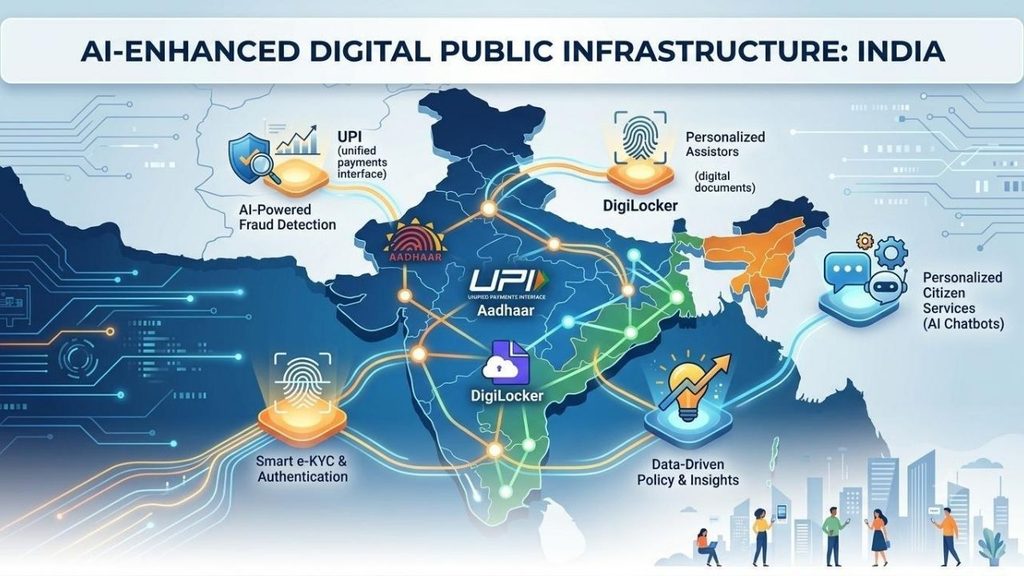
The shift from traditional systems to Digital India raises concerns about public privacy and security, as greater reliance on digital systems can create new opportunities for fraud and scams. Aadhaar is one pillar of what the government now calls India’s Digital Public Infrastructure and how AI could change that DPI for making it faster and more reliable is the biggest evolution.

Every month, close to 20 million people across India get turned away by a fingerprint scanner or a face-authentication camera that’s supposed to hand them a subsidised ration bag, a pension, or a bank withdrawal. That failure rate — a little over 6% of roughly 312 million Aadhaar-based authentications attempted monthly has stayed almost unchanged for a decade, according to UIDAI’s own parliamentary disclosures. 

It’s a strange fact to sit with, because DPI includes the stack of identity, payments, and data-sharing rails — Aadhaar, UPI, DigiLocker, Account Aggregator, ONDC — that more than a billion Indians touch, often without realising it. AI is now being wired into nearly every one of those rails. Some of it is already live and working. 

What Is India’s Digital Public Infrastructure 

Aadhaar is the identity layer — a biometric ID held by nearly every adult in the country. UPI is the payments layer, the real-time system that lets any bank app talk to any other. DigiLocker and Account Aggregator are the document and data-sharing layers, letting people share verified paperwork or consented financial records instead of photocopies. 


ONDC is the newest piece, an attempt to do for e-commerce what UPI did for payments: an open network any app can plug into, rather than one company owning the marketplace. 

Each of these was built as plumbing — deliberately boring, interoperable infrastructure. AI is the first layer being added on top that isn’t boring at all, and it’s arriving fastest in fraud detection, credit, language, and now shopping.

Fraud Detection at a Scale No Human Team Can Watch

UPI now clears more than 750 million transactions a day, a number NPCI expects to keep climbing toward a billion. At that volume, catching fraud after the money has moved is close to useless — NPCI’s fraud-detection platform processes roughly 2 terabytes of transaction data daily and needs to score risk within about 20 milliseconds, fast enough to block a payment before it settles. 

Its MuleHunter AI tool has already flagged more than 4.7 lakh mule accounts — the disposable, borrowed accounts fraud rings use to bounce stolen money through four to six hops before cashing out. 

NPCI is now piloting what it calls a “federated model” with three or four banks: instead of pooling everyone’s raw transaction data in one place, banks and NPCI compare AI-generated risk scores on a customer, getting the benefit of shared pattern-matching without centralising anyone’s actual financial history. 

NPCI’s leadership has said openly that the next leg of UPI’s growth depends on AI doing three jobs at once — catching fraud, extending credit based on payment history, and onboarding the next half-billion users through voice and regional-language interfaces instead of English-only screens.

Half of India Still Can’t Access Bank Credit

For decades, an MSME owner without three years of clean, bankable paperwork was mostly invisible to formal lenders — not un-creditworthy, just un-scoreable. 

The Account Aggregator framework, built on the RBI’s 2016 Master Direction and NITI Aayog’s Data Empowerment and Protection Architecture, changed the plumbing: with a customer’s explicit consent, a lender can now pull real bank statements, GST filings, and insurance records through a single encrypted pipe instead of chasing PDFs. 

As of the framework’s fourth anniversary in 2025, 112 financial institutions had gone live on both sides of that pipe, with hundreds more connected as data providers or users. AI models sit on top of that data flow, and lenders report the payoff is real: industry estimates put improvements in default-prediction accuracy at 15 to 25%, and processing times that used to run one to three weeks are increasingly settled same-day. 

This isn’t unregulated black-box lending, though — RBI’s digital lending rules require a lender to explain, in terms a risk officer or auditor can actually interrogate, why a model approved or rejected an application, which puts a real ceiling on how opaque these systems are allowed to get.

Read More 👉 Apple iPhone Duo Changes the Cost Effectively With These Methods

No More Language Barrier: Treating Language Like Infrastructure

India has more than one language and an AI layer that drops the barrier between languages is Bhashini. In India, MeitY’s National Language Translation Mission became fully AI-powered translation engines and it now sits underneath every government services app from January 2026. Portals like DigiLocker, UMANG, e-Shram running into 22 Indian languages. 


A Bhashini-powered voice assistant called Kumbh Sahaiyak used a Llama-based model to field pilgrim questions in 11 languages in real time — arguably the clearest proof yet that a DPI project can meet people in their own language at genuine crowd scale, not just in a pilot deck. If India’s Digital Public Infrastructure’s whole promise was ever about reaching people who can’t fill out an English form, Bhashini is the piece actually doing that, one API call at a time.

The Part AI Might Not Fix: Aadhaar’s Exclusion Problem

The government’s current bet is that AI-driven face authentication — rather than fingerprint or iris scanning, which struggle with a manual labourer’s worn fingerprints or an elderly person’s cataracts — will close that 6.5% failure gap. 

It’s already been tested at real scale with UIDAI ran a face-authentication proof of concept at NEET-UG 2025 exam centres with the NTA and NIC, and by 2026 similar AI-camera verification, backed by liveness checks and a fingerprint or manual fallback, was standard at UPSC exam halls. Officials describe the results as promising. 

Researchers who’ve actually gone door to door are less convinced: a survey across 32 villages in Jharkhand by economist Jean Drèze and co-authors found exclusion errors running as high as 20% in areas where biometric authentication was required for every ration purchase — and critics note that swapping fingerprints for face scans doesn’t remove the underlying design flaw, which is that a single biometric check, controlled by a ration dealer or bank teller rather than the beneficiary, decides whether someone eats that month. 

There’s a second, quieter concern sitting alongside is the more AI systems sit on top of Aadhaar-linked data — UPI payments, SIM registrations, app logins — the easier it becomes to assemble a detailed behavioural profile of someone, usually described publicly as fraud prevention rather than surveillance. Both things can be true at once. 

AI-based face authentication may genuinely cut into the 20-million-a-month failure count, and the same infrastructure may quietly expand what the state and private platforms can see about a person’s life. That tension, not a clean technical fix, is the actual story here.

Agents That Could Soon Shop and Transact for You

The newest layer is barely a layer yet. ONDC, India’s government-backed alternative to Amazon and Flipkart, runs on the open-source Beckn protocol, which had onboarded more than 900 network participants across grocery, food delivery, mobility, and financial services by 2026. 

FIDE, the nonprofit behind Beckn, has already demonstrated BecknGPT — an experimental agent that lets a ChatGPT-style assistant browse and complete an ONDC purchase on a shopper’s behalf and mainstream apps including Swiggy, BigBasket, and Flipkart have started exposing their catalogues directly to AI shopping assistants. 

It’s genuinely early, more demo than daily habit right now. But the direction matters: if UPI proved India could build a public payments rail that private apps compete on top of, ONDC plus AI agents is the government’s bet that the same model can work for commerce itself, without any single platform owning discovery.

Read More 👉 Bihar STET 2026 Online Form Out: Check Exam Syllabus and Pattern To Get Teacher Job

Why Other Countries Are Copying India’s Homework

Whatever India’s Digital Public Infrastructure domestic wrinkles, India has turned it into one of its more effective diplomatic exports. 

During its 2023 G20 presidency, India pushed Digital Public Infrastructure as a global development model, the framework receiving endorsement from 20 member nations. By 2026, the cooperation agreements between India and other 23—24 countries have been signed for helping them build their own version of Aadhaar, UPI, or DigiLocker by sharing open-source blueprints rather than selling a finished product. 


UPI itself is already live in eight-plus countries, from the UAE and Singapore to France and Mauritius, and Kenya is reportedly building a national digital-identity stack directly modelled on India’s approach. 

Analysts who track this call it the “Aadhaar Paradox”: India is exporting a model with real, unresolved problems at home — the exclusion numbers above, heavy market concentration in UPI apps, ongoing data-protection debates — alongside genuine, population-scale successes that few other countries have managed. 

Both halves of that sentence are true, and any AI layer India bolts onto its own DPI will likely travel abroad along with everything else.

What Determines Changing India’s Digital Public Infrastructure With AI Goes Well

A few concrete things to watch over the next year, rather than general optimism about AI transforming governance. 

First, whether NPCI’s 30% market-share cap for individual UPI apps — currently set to take effect December 31, 2026 — actually holds this time, since two apps still control more than 80% of transaction volume and AI-driven credit and voice features could widen that gap further or finally give smaller players something to compete on. 

Second, whether UIDAI’s AI-based face authentication measurably moves the 6.5% Aadhaar failure rate in its next couple of annual disclosures, or whether as analyzer expect — it just changes which biometric ends up failing people. 

None of these are settled yet. Both will tell you, faster than any government press release, whether AI made India’s Digital Public Infrastructure more inclusive, or just faster at doing the same thing to the same people.

Read More 👉 NBEMS NEET PG Answer Key 2026: How To Download & Calculate Your Score

Conclusion 

AI could make India’s Digital Public Infrastructure faster, more accessible, and better at handling problems that humans simply cannot manage at this scale. From spotting fraud across UPI transactions to helping lenders understand small businesses and breaking language barriers, the benefits are already becoming visible. 

But the bigger question isn’t whether AI can make India’s Digital Public Infrastructure more efficient. It’s whether it can make it more inclusive without creating new problems along the way. Aadhaar’s authentication failures, concerns around data profiling, and the risk of AI-powered systems becoming harder to challenge show why speed alone isn’t enough.

India has already built the digital rails. The next phase is about deciding how intelligently, transparently, and fairly AI runs on top of them. The success of that shift will depend not just on better models, but on whether the people using these systems actually have fewer barriers when they need them most.

Leave a Comment

Your email address will not be published. Required fields are marked *

Scroll to Top