UPSSSC Lower PCS Recruitment 2026: Notification, Vacancy, Eligibility & Apply Online

UPSSSC Lower PCS 2026

It is now or never for those aspiring for an administrative job in Uttar Pradesh. On 30 March 2026 the notification of UPSSSC Lower PCS 2026 Recruitment was released to recruit candidates on various positions. A large number of candidates regard this as an excellent chance to get their foot in the door of the executive branch of the state, as opposed to merely an employment opportunity. 

This recruitment drive offers 2,285 job vacancies for 11 different departments for aspiring candidates. Look out this blog for every date and details to apply.

UPSSSC Lower PCS 2026 at a Glance

FeatureDetails
Notification Date30/March/2026 
Registration Period29/May/2026 to 18/June/2026 
Total Vacancies2,285 Posts 
Mandatory RequirementValid UPSSSC PET 2025 Scorecard 
Selection ModeMains Written Exam (Objective) 
Official WebsiteClick Here

Understanding the Vacancy Breakdown

The 2026 notification is surprisingly wide, including departments from Urban Development to Agriculture. With this range if you come from a background in Commerce, Arts or Science there is a niche for you. 

Post NameVacancies
Assistant Treasury Accountant548
Auditor (Lekha Parikshak)419 
Amin / Auctioneer323 
Executive Officer (Nagar Nikay)238 
Clerk-cum-Typist / Cashier229 
Assistant Consolidation Officer (Chakbandi)168
Assistant Manager (Non-Technical)134
Mandi Supervisor Grade-246

The posts of Executive Officer and Assistant Treasury Accountant are generally the most popular on account of the potential for administration and advancement. 

Eligibility for UPSSSC Lower PCS Recruitment

The lower PCS threshold has a dual-eligibility gate. It’s not just about having a degree, you have to have the right “ticket” from last year. 

1. The PET 2025 Mandate

In case, you possess a valid score card with non-zero marks and you didn’t appear for Preliminary Eligibility Test (PET) in 2025 then you are not eligible to apply for the Lower PCS 2026. To prepare a Initial Main exam list, the Commission consider PET scores. 

2. Educational Qualifications

If you have a graduation degree from any field, you are eligible to apply for this recruitment. 

Post-Specific Qualifications:

  • Executive Officer: Graduation is sufficient to apply, but for the purpose of regularisation, you require to have ‘O’ Level Computer Diploma from NIELIT.
  • Auditor: This post usually prefer candidates who are commerce background (B. Com) or post graduate diploma in accountancy.
  • Clerk-cum-Typist: in Hindi, 25 w.p.m. of speed is required. 

3.Age Limit (As of July 1, 2026)

The starting range of age is 21 years and you are allowed till 40 years. The government expands the maximum age limit according to the candidate’s category.

The Selection Process UPSSSC Lower PCS 2026

There are not so many long detailed interviews for these jobs now. The process for choosing the 2026 hosting is now simpler and more merit based.

  • Shortlisting: Candidates will be shortlisted for consideration based on their normalized PET 2025 scores. 
  • Main Written Examination: It is the most important stage and most of the times it determines your final selection.
  • Document Verification (DV): The last stage in which all your papers and certificates are verified for genuineness. 

Exam Pattern (Mains)

FeatureDetails
Total Questions100 MCQs
Total Marks100
Duration2 Hours (120 Minutes)
Negative Marking0.25 (1/4th) per wrong answer

Core Syllabus of UPSSSC Lower PCS

There are three papers in the 2026 syllabus. The secret is to find the right balance between the static general knowledge part and the dynamic UP Special part.

Part 1: Subject related & General knowledge (65 Marks) 

It covers the History of India and the Indian National Movement, Polity, Constitution, World Geography, and the Indian Economy. Science, Technology and Environmental Ecology also receives a great deal of attention. 

Part 2: Computer & IT (15 Marks)

With all the focus on e-governance, you will be tested on hardware/software, IT gadgets, MS Office (Word/Excel) and Internet Protocols. 

Part 3: General Knowledge of Uttar Pradesh (20 Marks)

This is often where homegrown candidates excel. It deals with the history, culture, art, festivals, geography, and present administrative patterns of UP. 

Read More :- Jail Prahari Recruitment 2026 For A Steady Salary, And Clear Career 

Salary and Perks

In 7th CPC, UPSSSC Lower PCS salary range is lucrative that lies between Pay levels 4 to 6.

Pay Scale: ₹25,500 to ₹1,12,400.

Salary range depends on region and profile of the job (Class A, B, OR C) so it can be up to ₹32,000 to ₹45,000 a month in-hand salary.

Benefits: HRA, DA, medical facilities, and the prestige of being a “Gazetted” or senior “Non-Gazetted” government officer. 

Step-by-Step Instructions To Fill the Form

  1. Sign In: Visit here and search for UPSSSC Lower PCS Online Application Form 2026. Register yourself with mobile/email or login.
  2. Information: Your personal information (Name, DOB, Gender, Domicile, Education) are required to be filled by you carefully.
  3. Documents: Attach all necessary documents required to validate your information.
  4. Payment of Fees: A token application fee of Rs 25 has been imposed across all categories (General/OBC/SC/ST). Please be informed that in case you are shortlisted for the Mains, a separate exam fee has to be paid subsequently.
  5. Print: Keep a print out of the final submitted application form at the time of Document Verification. 

Conclusion

The UPSSSC Lower PCS 2026 is a great opportunity for those who want to serve the people of Uttar Pradesh with a stable and respected career. The window from May 29 to June 18 is going to be too fast for you to catch it so keep your files ready (especially your PET 2025 scorecard and caste/domicile certificates). 

Leave a Comment

Your email address will not be published. Required fields are marked *

Google Launches Fitbit Air in India: Features, Price and Availability

Fitbit Air

Picture a fitness tracker you forget you’re wearing. It has no screen to check mid-meeting and no buzz on your wrist at 2 a.m. That’s the idea behind the Fitbit Air. Google has now launched it in India at ₹13,999, with sales starting October 2. It’s the company’s smallest and lightest FitBit yet, and it arrives in a market where most people expect a wearable to have a display. 

The Fitbit Air isn’t a smartwatch. It’s a small sensor “pebble” that sits in a band and tracks your body in the background. Everything you want to read, like sleep scores, workout recaps and heart trends, lives in the Google Health app on your phone.

This isn’t a brand-new product. Google announced the Fitbit Air globally on May 7, 2026, with US shipping from May 26. India is getting it about four months later.

Fitbit Air Price in India And Launch Offers

The India price is ₹13,999 for all four colours. The box includes a three-month trial of Google Health Premium. That trial matters because it unlocks the Google Health Coach, the AI assistant Google built this tracker around.

For comparison, the US price is $99.99. Indian buyers will pay noticeably more than the US sticker price. On bank offers, buyers using eligible HDFC Bank and ICICI Bank cards get ₹1,000 cashback at launch, and it can be combined with six-month no-cost EMI. The exact terms may vary depending on the bank’s conditions.

Google Health Premium will cost is different in India after the trial ends. In the US, it runs $9.99 a month. Google hasn’t shared an Indian figure in the launch details, so check the Google Store listing before you buy.

More Helpful : Voice-to-Notes Tools for Students

What Fitbit Air Features Tracks And How Long It Lasts

Sensors

Google says the sensors cover 24/7 heart rate, heart rhythm monitoring with Afib alerts, SpO2, resting heart rate, heart rate variability, and sleep stages and duration. However, Google’s own footnote says the Afib feature is not available in all countries. So it is still unconfirmed whether it will be switched on in India at launch. If irregular-rhythm alerts are a deciding factor for you, verify this first.

Battery life is the other reliable feature 

Google claims up to a week per charge, and five minutes of fast charging gives you roughly a full day. Those numbers come from Google’s own pre-production testing, so real-world results may be lower.

Workout tracking is where the Google Health Coach comes in 

The Air detects common activities automatically, and you can also start a session from the app. With Premium, you can snap a photo of a cardio machine or a gym whiteboard routine and have it logged.

Hardware details from the global launch:

SpecFitbit Air
DisplayNone
WeightAbout 5 g for the pod alone, 12 g with a band
Water resistance50 metres 
BatteryUp to 7 days (Google’s claim)
Phone supportAndroid 11 or higher, iOS 16.4 or higher
Colours (India)Obsidian, Berry, Lavender, Fog

A reviewer at The5KRunner reported that the Air has no built-in GPS, so run distances will depend on your phone. 

Bands

The pebble pops out, so you can swap bands. The Performance Loop, made from recycled materials, comes in the box. The sweatproof Active Band and the dressier Elevated Modern Band are sold separately. India pricing for those extra bands wasn’t available at the current time.

Fitbit Air Availability In India

The Fitbit Air goes on sale October 2 through the Google Store, Flipkart, Croma, Reliance Digital and Vijay Sales. That offline spread is a smart move for a product people may want to try on first. A screenless tracker is odd enough that holding one makes it easier to understand.

👉 Explore More: Apple iPhone Duo Cost-Effective Methods

Fitbit Air vs Whoop: How Does it Compare?

The obvious rival is Whoop, which pioneered the screenless band. The 5.0 is bulkier, at about 27 g with its band, and rated for 10 metres of water resistance. The bigger difference is the business model. 

Whoop requires a membership starting at $199 a year, while the Fitbit Air’s core tracking works without a required subscription. WHOOP’s current India pricing and availability weren’t clear, so the comparison below uses US pricing only. 

Beyond that, the Fitbit Air competes with cheaper straps like the Amazfit Helio Strap and with Fitbit’s own older display trackers. Those give you a screen for similar money. If you want to glance at the time or your heart rate mid-run, a screenless band is a step backward.

Conclusion

You can buy a Fitbit Air if sleep and recovery data matter more to you than notifications, you already like the Google ecosystem. If you’ve been curious about Whoop but dislike paying a yearly fee. Then it makes you confused, what you need matters most. The Fitbit Air is more comfortable to use around 24/7. A 12 g band is easier to wear to bed than a smartwatch.

Skip it if you want on-wrist GPS, quick glances at stats, or music and payments. Also hold off if the Premium price after the three-month trial is unclear to you, since the Coach is the main reason to choose this over cheaper trackers.

Wait for the October 2 listings, check the final Premium pricing and bank-offer terms, and compare against any display tracker you’re considering at ₹13,999. Then decide which one you can need.

Army School AWES TGT PGT PRT OST Online Form 2025 Out – Apply Now!

Army School AWES TGT PGT PRT OST Online Form 2025 Out

Army School AWES TGT PGT PRT OST Online Form 2025 Out, if you are interested in teaching a specific subject in a government school. You must hurry to fill the online form to secure your future. AWES is an online screening test anyone can apply after the Post Graduation in a specific subject with a 50% score.

Army School AWES TGT PGT PRT OST Online Form Important Dates

Important Dates Fresh Candidate
Starting Date05/06/2025
Last Date16/08/2025 
Correction Date22 to 24 /August/ 2025
Admit Card Release08/September/2025
Exam Date20 to 21 /September/ 2025
Gen/OBC/EWSSC/ST/PHPayment Mode
385/-385/-Online 
Age Limit Fresh CandidateExperienced
On 1/04/2025Maximum 40 yearsMaximum 55 years
Post NameEligibilitySelection Process
PRT TeacherGraduation in B.Ed/D.Ed with 50% score-AWES exam is a online screening test -Vacancy notification appear-Interview by the school-Document verification-Medical examination
TGT TeacherGraduation in Specific Subject-B.Ed (above 50% score)
PGT TeacherPG in specific subject B.Ed (above 50%)

Some Useful Links

Registration
Important Date Notice
Online Form
Official Website

Best Government Jobs in Punjab

There are many good opportunities for those looking for government jobs in Punjab in 2025. Government jobs give you job security, good salary, and respect in society. If you are a youth of Punjab and want to start your career with a government job, then this blog will be very useful for you.

In this blog, we will tell you about the top 15 government jobs in Punjab which will be very popular in 2025. You will also get the department, eligibility, and official website link of every job from where you can get more information and apply.

In the table given below you will get information about the best government jobs in Punjab, after reading which you can choose the right job for yourself.

Top 15 Government Jobs in Punjab 2025

S.No.Job TitleDepartment/OrganizationEligibilityOfficial Website
1Punjab Civil Services (PCS)Punjab Public Service CommissionGraduationppsc.gov.in
2Sub Inspector (SI)Punjab PoliceGraduationpunjabpolice.gov.in
3Junior Engineer (JE)PWD / PSPCL / Water Resources DeptDiploma in Engineeringpunjab.gov.in
4ClerkPunjab Subordinate Services BoardGraduation + Typingsssb.punjab.gov.in
5PatwariRevenue DepartmentGraduationsssb.punjab.gov.in
6School Lecturer (PGT)Punjab Education DepartmentPost Graduation + B.Ededucationrecruitmentboard.com
7Assistant ProfessorPunjab Higher Education DepartmentPost Graduation + NETpunjab.gov.in
8Staff NurseHealth & Family Welfare DepartmentB.Sc. Nursing / GNMbfuhs.ac.in
9Veterinary OfficerAnimal Husbandry DepartmentDegree in Veterinary Scienceppsc.gov.in
10Excise & Taxation InspectorExcise & Taxation DepartmentGraduationsssb.punjab.gov.in
11Forest RangerPunjab Forest DepartmentGraduation in Science/Enggpunjab.gov.in
12Agriculture Development OfficerAgriculture DepartmentB.Sc. Agricultureppsc.gov.in
13Food Safety OfficerHealth DepartmentDegree in Food Tech/Pharmacyppsc.gov.in
14Assistant Superintendent JailPunjab Prisons DepartmentGraduationpunjabpolice.gov.in
15Block Primary Education OfficerDepartment of School EducationGraduation + B.Ededucationrecruitmentboard.com

DSSSB Recruitment 2025 – Latest Vacancy, Eligibility & Application Details

dsssb recruitment

Candidates can apply for the Trained Graduate Teacher post as DSSSB has opened a portal to accept online applications under the process of DSSSB Recruitment 2025 drive for TGT teacher. Don’t lose time because the last date to fill out the application is 07/Nov/2025. Once you fill the application, wait for the admit card and prepare for the examination that will help you get selected. Only shortlisted candidates are going to teach in public schools from class 6 to 8. The salary is good for this position, the starting earning is Rs 44,900 and it can go higher with experience. 

The Short View of DSSSB Recruitment 2025

OrganizationDelhi Subordinate Services Selection Board
Exam NameDSSSB TGT Teacher 
Post ResponsibilityTeacher for 6 to 8
SalaryRs. 44,900 + allowance
Vacancy5346
Last Date To apply07/November/2025
Official WebsiteClick Here

Mark the Calendar for DSSSB Recruitment 2025

Notification Date03/October/2025
Application Start09/October/2025
Application Ends On 07/November/2025
Fee payment last date07/November/2025
Exam DateUpdate Soon
Application Fee
Gen/OBC/EWSRs. 100
SC/ST/FemaleRs. 00

DSSSB TGT Teacher Recruitment Eligibility

Any candidate who has a graduate degree OR postgraduate degree in related subjects like Hindi, English, Science, etc with training degree like B.Ed or diploma D.El.Ed OR any equivalent degree from a recognized government board is required for this job. And CTET exam qualified.

Read More 👉 BCA vs BTech – Which Course Offers Better Career Opportunities in 2025?

DSSSB TGT Teacher Exam Pattern

Each section contains 20 questions, one mark per question and wrong answer will deduct 0.25 mark as negative marking. The time is given for 2 hours, candidates have to complete all the questions. There are General Intelligence & Reasoning Ability, General Awareness, Arithmetical, English Language & Comprehension, Hindi Language & Comprehension, and the concerned teaching subject section contains 100 questions for 100 marks. So the total marks of this examination is 200 marks.

Useful Links
Apply OnlineClick Here
Download NotificationClick Here
Official WebsiteClick Here

Voice-to-Notes Tools for Students: Study Faster Without Typing

Voice-to-Notes Tools

Voice-to-Notes Tools are really helpful from turning large study lectures into simple notes in just few minutes. Writing everything down is an old fashion technique that takes a lot of time for a few pages notes but everything is going easy with fast pacing technologies. Whether it’s hours of session or long research sheets, enabling speech to text is the smarter way to take notes. 

You’re forty minutes into a lecture, the professor has moved through three concepts, and your notes still say “photosynthesis — light reaction —” because your hand gave up before your brain did. Speaking runs at roughly 150-160 words a minute while typing tops out around 40 for most people. 

That gap is the entire case for Voice-to-Notes Tools , and for Indian students juggling coursework in English, Hindi, or a regional language, the tool you pick matters more than the concept itself — because most of the tools were built for American office meetings, not for Indian classrooms. 

Best Voice-to-Notes Tools For Indian Students 

There are plenty of tools that can turn your voice into text but then you find an error — spelling, whole different word (except, accept), not able to turn your regional language — that’s because it doesn’t understand. Some AI integrated voice tools that turn your every word into text without major errors is here:

Gboard Voice Typing — free, and it’s already on your phone

Before downloading anything, check what you have. Google’s Gboard keyboard has an in-built voice typing feature which you can use by clicking on the mic icon. If the icon is invisible then enable it from the setting so Voice-to-Notes can be easy and quick without downloading any new app.


It works in Hindi plus eight regional languages — Bangla, Gujarati, Kannada, Malayalam, Marathi, Tamil, Telugu, and Urdu — Indian students can use this keyboard in any app that takes input in the same language, not just Google’s own apps. 

For a student jotting quick revision notes in Hindi between classes, this is the lowest-friction option because there is no signup, no subscription, no separate app to remember to open.

Google Recorder — real-time transcription, best if you have a Pixel

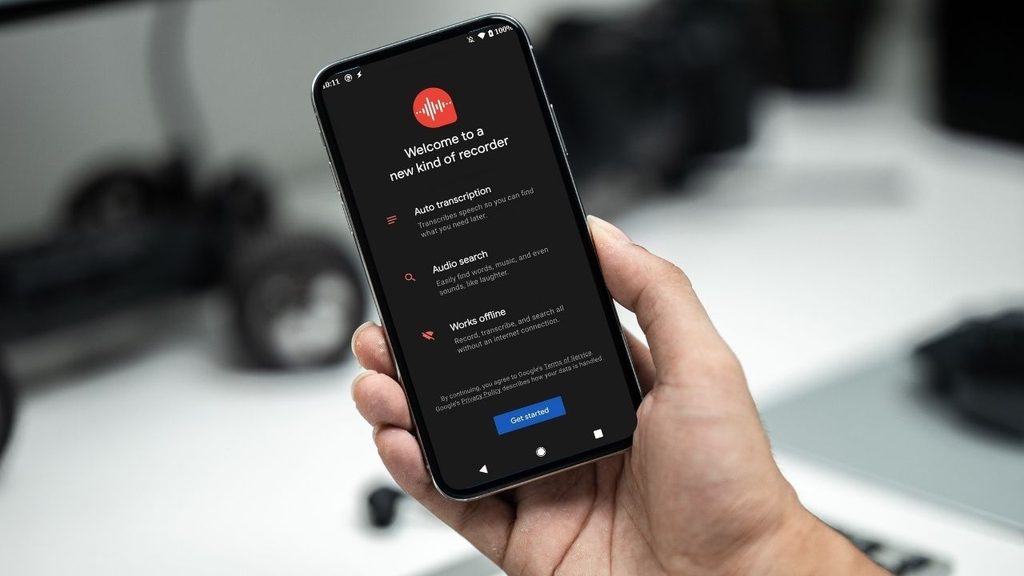
Google Recorder transcribes live as you speak and runs the processing on-device, which matters if your hostel Wi-Fi is unreliable. The catch: it’s tied to Pixel phones for its full real-time transcription experience, so if you’re on a different Android device or iPhone, this one’s off the table.

Otter.ai — good for English lectures, but it skips Hindi entirely

Otter is the name that comes up first in most “best Voice-to-Notes Tools” lists, and for English-medium lecture capture it’s genuinely capable — live transcription, speaker labels, searchable transcripts. 

The free tier gives you 300 minutes of transcription a month, capped at 30 minutes per recording, which covers maybe eight or nine standard lecture sessions before you hit the wall. The Pro plan runs $16.99/month billed monthly, or roughly $8.33/month if you pay annually (about $99.99/year). 

But for Indian students: Otter’s transcription supports English and a small set of other languages — Spanish, French, German, Japanese, Chinese depending on the source you check — but not Hindi or Indian regional languages. If your coursework happens in Hindi medium, Otter simply won’t understand you, no matter which plan you’re on.

Wispr Flow

Wispr Flow is the strongest option because it works inside almost any application. Students who want long-form writing and fast drafting can use this tool but unlimited dictation requires a subscription, which costs around $15 per month or $12 per month when billed annually. Since it supports more than 100 languages and gives accuracy for names and jargon along with AI editing, the cost is worth it.

VoiceToNotes.ai 

Its features include real-time transcription, grammar correction, AI summaries so it can become a useful tool for students which turn spoken thoughts into structured notes. Some professionals consider this tool as more affordable than many full-featured AI assistants but free usage is limited. The catch: accuracy still depends on microphone quality and background noise.

Mindgrasp

Mindgrasp is primarily an AI learning and content-understanding platform. Students can use it for lectures and study material — it helps in creating flashcards and quizzes automatically. Best for exam preparation and research but some features are tied to specific subscription tiers. 

Lisup 

Lisup focuses on accessibility and hands-free writing. It can be used across desktop applications so access will be easy and it is specifically designed for in-place speech-to-text features. It’s not built for broader use but enough for students to take notes easily. 

Soniox — the app actually built for Hindi dictation

Soniox is less well-known in student circles but solves exactly the gap Otter leaves open. It handles Hindi across regional varieties like Khariboli and Braj Bhasha, works system-wide across any app or text field on your phone rather than locking you into one note-taking interface, and covers 60-plus languages total with the ability to switch languages mid-sentence. 


It’s useful if you naturally code-switch between Hindi and English while explaining a concept to yourself. It’s free to start, with weekly free credits rather than a hard monthly cap, and the company states it doesn’t store your recordings or use them for model training, which is worth knowing if you’re dictating exam-prep notes you’d rather keep private.

Sarvam AI — worth watching, not quite a student app yet

Sarvam is India’s most-funded sovereign AI company, and its speech models (Saaras v3) handle 22 Indian languages with genuinely strong accuracy claims. But as of now, Sarvam’s product lineup is built mainly for enterprises — voice agents for banks and government call centers, APIs for developers — rather than a polished consumer app you’d install and use for lecture notes. 

A consumer-facing voice app was announced in February 2026, aimed at exactly this kind of mass-market, multilingual use case, but a public launch isn’t happening right now.

Read Also 👉 Why ChatGPT Ads Deserve a Place In Your 2027 Media Plan 

Why Do Students Need These Tools?

Most of the time students missed points while trying to understand the same topic simultaneously. Writing it down on paper or in a mobile is the same thing — it consumes a lot of time and misses points. So, these Voice-to-Notes Tools help students take notes without tiring their hands. 

There are some free and some paid tools, if you just need to take notes of what your processor is explaining then a free tool is enough for you. But if you are a Ph.D student or you need to do heavy research, organize every note, and make summaries from online content, you need a tool which can handle all of that, even if it costs you a little.

Which Speech-to-Text Tools are Best For Studies?

Google’s Gboard keyboard is the best free Voice-to-Notes Tools which I have used personally and crafting many documents in English, Hindi and Urdu. I recommended to students who wanted to take notes before exams and stop writing everything manually and waste their time. 


Gboard offers unlimited access to use on any other applications like docs, word, and on any device (mobile or laptop). Most of the students take their mobile to the college, so it runs smoothly. But sometimes it makes minor errors in spelling which you can edit later. 

Second is Wispr Flow but you have to pay after a limited use and many students can’t afford it but those who can afford can consider Wispr Flow as the best tool for making notes.

Read Also👉 Upgrade Laptop Like New Model In Low Budget

Conclusion for Voice-to-Notes Tools

The world is changing and for solving traditional problems by adapting new technology. One of the old problems is taking notes in a mid-session in your classrooms. Students have to understand the topic and write down their important concepts — two jobs at once.

If they forgot, they have to ask other students and it appears a problem if you don’t have a lot of friends. So the problem is solved now, you can spend your time to understand the topic without worrying about the notes as these Voice-to-Notes Tools do that job for you.

Scroll to Top